7 Use Cases for Aerospace Supplier Compliance Agents
Seven agent-driven workflows for aerospace supplier compliance: onboarding, certificate checks, PO validation, traceability, audits, and exceptions.

In this article
- Define Requirements and Source Records
- 1. Supplier Onboarding and Approval
- Workflow Triggers and Source Records
- Agent Checks and Evidence
- Human Approval and Escalation
- Workflow Metrics
- 2. Supplier Document and Certificate Checks
- Workflow Triggers and Source Records
- Agent Checks and Evidence
- Human Approval and Escalation
- Workflow Metrics
- 3. Requirement Flow-Down Review
- Workflow Triggers and Source Records
- Agent Checks and Source-Linked Results
- Human Approval and Escalation
- Workflow Metrics
- 4. Purchase Order Checks Before Release
- Workflow Triggers and Source Records
- Agent Checks and Source-Linked Results
- Human Approval and Escalation
- Workflow Metrics
- 5. Quality Record Routing and Traceability
- Workflow Triggers and Source Records
- Agent Checks and Source-Linked Results
- Human Approval and Escalation
- Workflow Metrics
- 6. Audit Preparation and Evidence Assembly
- Workflow Triggers and Source Records
- Agent Checks and Source-Linked Results
- Human Approval and Escalation
- Workflow Metrics
- 7. Exception Tracking and Escalation
- Workflow Triggers and Source Records
- Agent Checks and Source-Linked Results
- Human Approval and Escalation
- Workflow Metrics
- Integration, Access Controls, and Testing
- Build Cross-System Workflows With Ryshe
- Conclusion: Pilot One Workflow and Measure Results
- FAQs
- Which compliance workflow should we pilot first?
- How can we prevent agents from missing critical discrepancies?
- How do we calculate a compliance agent’s ROI?
- Frequently asked questions
- Which compliance workflow should we pilot first?
- How can we prevent agents from missing critical discrepancies?
- How do we calculate a compliance agent’s ROI?
Originally published October 25, 2026.
I’d start with one supplier compliance check - not automated approval. Connect it to approved requirements and source records, keep people in charge of decisions, and test it alongside manual review for four to six weeks.
Here are seven places I’d use an agent to cut searching and organize review work:
- Supplier onboarding: Check whether supplier records support the requested work and facility.
- Document and certificate checks: Match shipment documents to PO lines, parts, lots, and required approvals.
- Requirement flow-down: Check that supplier-facing clauses include the requirements that apply.
- Purchase order checks: Flag supplier, revision, quantity, and clause errors before release.
- Quality record routing: Link records to the right transaction, owner, and system.
- Audit preparation: Assemble source-linked records for human review.
- Exception tracking: Assign gaps, track deadlines, and require proof before closure.
My rule: agents check and route; authorized people approve. Across ERP, PLM, SharePoint, and quality systems, I’d require controlled access, revision-specific links, and testing before expanding. I’d measure review time, missed requirements, false positives, and traceability - not speed alone.
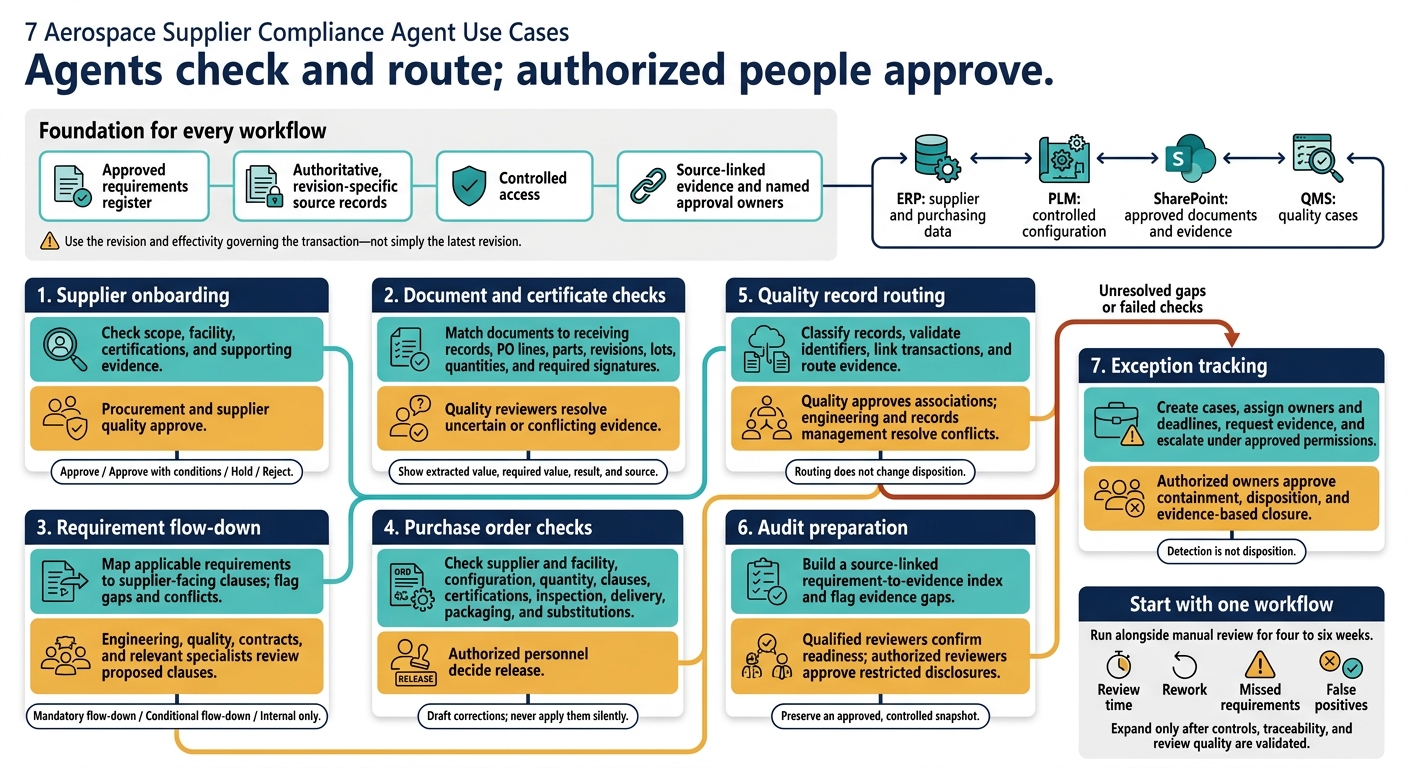
7 Aerospace Supplier Compliance Agent Use Cases
Define Requirements and Source Records
Build a requirements register before configuring checks. Include the applicable AS9100 revision, organizational procedures, customer-specific requirements, purchase-order clauses, engineering specifications, material and process standards, traceability obligations, and relevant U.S. and international regulations. This register gives the agent a rule base for every supplier check.
For each requirement, record its source, clause, revision, effective date, scope, owner, and approval status. Separate mandatory requirements from guidance, and send conflicts to the responsible human owner.
Include supplier controls for qualification, approval scope, personnel competence, special-process authorization, testing, inspection, acceptance, sub-tier flow-down, and record retention. Supplier approval must match the purchased commodity, process, and site - not just the supplier’s name. Set periodic reviews for conformity and on-time delivery.
Assign a system of record by record type before connecting systems:
- ERP: Supplier and purchasing data.
- PLM: Controlled part revisions, drawings, specifications, and configuration.
- SharePoint: Approved procedures, customer clauses, certificates, and audit evidence.
Document these assignments so the agent doesn’t treat nonauthoritative copies as control records. Route disagreements for review rather than letting the agent overwrite authoritative records.
For evidence, specify the document type, issuer, required signatures, acceptance criteria, retention period, and links to the supplier, PO, part revision, lot, heat, batch, or serial number. Match records to the revision and effectivity in force for the transaction - not the latest drawing. Traceability should connect the material or part to its acceptable source and supporting inspection, test, and release records.
Classify ITAR-, EAR-, CUI-, customer-proprietary, and other restricted data before retrieval. Apply approved access rules to source files, extracted text, indexes, prompts, and logs. Record what was shared, with whom, and when.
Authorized personnel set classifications and access permissions. The agent enforces those permissions and flags uncertainty; record access alone does not prove compliance. Each workflow uses this shared set of approved requirements, records, and access rules, starting with supplier onboarding and approval.
1. Supplier Onboarding and Approval
Workflow Triggers and Source Records
Start onboarding when procurement requests a new supplier, a new part or service needs an approved source, ERP supplier data changes, or a certificate expires. Use the requirements register and authoritative records defined above.
Pull supplier questionnaires, capability statements, audit reports, certificates, and customer approvals from SharePoint. Then reconcile those documents with ERP supplier data and PLM sourcing requirements.
Agent Checks and Evidence
Check whether documents support the work - not just whether they exist. Extract each certification’s scope, issuing body, facility, and expiration date. Verify aerospace certification status through IAQG’s OASIS database where available.[5][6]
Compare equipment, inspection methods, and special processes with the requested work scope. Check that customer approvals cover both the work and the facility. Each finding should cite its source page or record and flag missing, expired, or conflicting evidence.
Human Approval and Escalation
Send gaps to a missing-document queue, with an owner, due date, and risk level. Prepare an approval packet with one disposition: approve, approve with conditions, hold, or reject.
Include proposed ERP supplier-master changes for status, capabilities, certification dates, and restrictions. Show the old value, new value, and supporting evidence for each change.
Procurement and supplier quality retain approval authority. Route scope conflicts, expired credentials, and missing customer approvals to them before any authorized ERP update. Record the decision, approver, and review date. Conditional approval must not permit work outside the approved scope.
Workflow Metrics
Use median onboarding cycle time, measured from intake to final approval, as the primary measure. Track ERP update lag separately.
Also monitor 90th-percentile cycle time, first-pass completeness, missing-document resolution time, reviewer agreement, and false-positive and false-negative rates. Use this evidence set for the document and certificate checks that follow.
2. Supplier Document and Certificate Checks
Once a supplier is approved, each incoming document package must match the receiving record before acceptance.
Workflow Triggers and Source Records
Start checks when a shipment arrives, a supplier uploads records, inspection closes, or a PO line, part, or specification changes. Pull receiving records and PO requirements from ERP, controlled part and specification data from PLM, supplier certificates from SharePoint, and inspection or nonconformance records from the quality system.
Link every document to its receiving transaction and PO line so reviewers can retrace the evidence chain.[7][2][8] This ties each check to one transaction record rather than scattered files.
Agent Checks and Evidence
Review certificates of conformance, material and chemical certificates, calibration certificates, inspection reports, special-process approvals, and shipping records. Compare the supplier, PO, part revision, lot, heat, serial number, quantity, dates, and required signatures with the transaction’s authoritative records.
Then apply checks specific to each document: material test results, calibration equipment IDs and due dates, inspection acceptance criteria, and whether process approvals were valid on the process date.[8][9][10]
For every comparison, show the extracted value, required value, result, and source page or region. Use the part and specification records that apply to the order. Check quantities against both the receiving record and PO line, and confirm that signatures belong to an authorized supplier representative.
Human Approval and Escalation
Send unreadable scans, missing signatures, mismatched identifiers, and uncertain extractions to quality reviewers. Do not infer critical values. Attach the original files and conflicting records so reviewers can resolve issues without searching across systems.
Record the disposition, reviewer, timestamp, and receiving record link. Route suspected counterfeit or unapproved material to quarantine and escalation.[7][9]
Workflow Metrics
Measure review time, exception-resolution time, and the percentage of packages linked to receiving records. Use reviewer sampling and later audit findings to track missed discrepancies separately from false alarms.
Compare pilot results by supplier, document type, and part criticality. Count faster review as progress only if discrepancies do not escape detection.
3. Requirement Flow-Down Review
Workflow Triggers and Source Records
Start a review when a new PO, contract, drawing/spec revision, regulatory update, or supplier change enters the workflow. Pull PO and supplier data from ERP, drawings and specifications from PLM, and approved customer and quality clauses from SharePoint or the contract repository.
Record each source’s document ID, revision, effective date, and applicability to the program and PO line. Then use these records to translate each obligation into supplier-facing language.
Agent Checks and Source-Linked Results
Map each requirement to the exact clause it creates, citing the source revision that supports it. Build a requirement-to-clause matrix that covers customer, engineering, quality, regulatory, software, traceability, retention, change-notification, access-to-records, and sub-tier clauses. Label each requirement as mandatory flow-down, conditional flow-down, or internal only.
Draft language that preserves notice periods, approval rights, and exceptions. Each proposal should link to the source section and revision, explain why it applies, and identify the evidence required from the supplier. Flag unmapped requirements and conflicting terms rather than choosing one without review.
Human Approval and Escalation
Keep proposed clauses in recommendation mode. Route drawing, specification, and software-configuration conflicts to engineering. Send inspection, retention, and traceability questions to quality, and customer terms, access rights, and notice periods to contracts. Direct unclear regulatory or cyber obligations to the appropriate specialists.
Hold the PO line when high-risk issues remain unresolved. For any exclusion, record the approver, decision, timestamp, and justification.
Workflow Metrics
Track omissions caught before release, requirement-to-clause coverage, review turnaround, and unresolved conflicts by owner and age. Compare pilot results with the prior quarter, separating them by program, supplier, and requirement type. Also count post-release PO corrections and downstream nonconformances caused by missing language.
4. Purchase Order Checks Before Release
After flow-down review, use the PO gate to check the release-ready order against authoritative records.
Workflow Triggers and Source Records
Run checks whenever a buyer creates, edits, or resubmits a PO for release. Recheck changes to the supplier, site, item, date, or substitute item.
Pull the draft PO, approval status, released part revision, specifications, clauses, and controlled supplier instructions from ERP, PLM, and SharePoint. Include any amendments, waivers, and approved deviations that affect release. Reviewers need the full order context.
Agent Checks and Source-Linked Results
Check the supplier and facility separately. Corporate approval does not mean every site is approved. Match the PO to the order-specific configuration - not simply the latest revision - and distinguish standing certificates from shipment-specific documents.
Use these checks to catch errors before release rather than at receiving.
| Rule type | Agent validation | Risk if missed | Approval owner |
|---|---|---|---|
| Supplier and facility | Confirm site-and-commodity approval covers the work | Unapproved source | Supplier quality |
| Part configuration | Match the part and revision to the order-specific configuration and deviations | Wrong configuration | Engineering |
| Quantity and unit of measure | Match quantities to the requisition using approved conversions | Shortage or overpurchase | Buyer |
| Clauses | Confirm each line includes its mandatory clauses | Missing contractual controls | Contracts |
| Certifications | Confirm the PO specifies standing certificates and shipment documents | Unverifiable conformity | Supplier quality |
| Inspection and testing | Confirm the PO specifies inspection, sampling, and tests | Undetected defects | Quality engineering |
| Delivery | Check dates against lead-time and delivery requirements | Production delay | Buyer or planner |
| Packaging and labeling | Match preservation, marking, and labels to instructions | Damage or misidentification | Logistics quality |
| Substitutions | Confirm alternate parts, materials, and sources have authorization | Incompatible or counterfeit parts | Engineering |
For every failed check, show the PO line, expected value, actual value, severity, source record, revision or effective date, and owner. Draft the correction; do not apply it silently. Display the current field beside the proposed change.
Human Approval and Escalation
Block release for unapproved sites, wrong revisions, substitutions without authorization, unit-of-measure errors that change quantity, or missing mandatory certification or inspection requirements.
Route minor issues to the buyer using approved severity rules. If evidence is missing or conflicts, request clarification rather than assume a pass. An authorized human makes the release decision. Retain the evaluated PO, source versions, correction, and approval record.
Workflow Metrics
Track median and 90th-percentile review time, false positives per rule, and missed errors found after release or during receiving inspection. Compare results with the manual-review baseline by PO type.
Track safety- and customer-critical misses separately. Faster review is not success if more errors slip through.
The release gate then feeds the next workflow: routing quality records and traceability evidence.
5. Quality Record Routing and Traceability
Workflow Triggers and Source Records
After PO release and receiving, route quality evidence to the correct system of record. Trigger a review whenever quality packages, nonconformances, supplier corrective action requests (SCARs), first-article inspections (FAIs), deviations, waivers, or certificates are created or uploaded. Use records in ERP, PLM, QMS, and SharePoint to link each package to its PO, part revision, inspection result, certificate, and corrective-action record.
Agent Checks and Source-Linked Results
Classify each quality record by type before routing it. Extract the supplier ID, part number, revision, PO/line, lot or serial number, and work-center identifier to keep the record connected to its transaction. For AS9102 packages, check Forms 1–3 for part accountability, materials or special processes, and characteristic-level verification results.[11][12]
Match identifiers before running similarity checks. Flag duplicate uploads, missing links, and conflicting revisions. Keep valid revisions and connect them with supersession links.
Assign the destination, owner, access group, and retention class. Route transaction evidence to ERP, configuration evidence to PLM, quality cases to QMS, and controlled packages to SharePoint. Base retention on the applicable requirement - not the folder convention.
Once the record is classified and linked, the agent can route it without changing its disposition.
Human Approval and Escalation
Send certificate and FAI associations to receiving quality or supplier quality for approval. Send configuration conflicts to engineering and retention classifications to records management.
Escalate suspected altered certificates, unverified material traceability, and shipments missing required evidence. The agent must not disposition nonconformances, authorize deviations or waivers, close corrective actions, or delete records.
Workflow Metrics
Establish a four- to eight-week baseline. Measure traceability completeness as the share of records with all required, validated links, excluding fields that do not apply. Track the unlinked-record backlog and the time to approved association.
Compare results by supplier, record type, and facility, and sample accepted links for review. Send unresolved routing exceptions to the exception-tracking workflow.
6. Audit Preparation and Evidence Assembly
Workflow Triggers and Source Records
Once records are routed and linked, audit prep turns them into submission-ready evidence. Begin assembly when an audit is scheduled, a supplier needs reapproval, or a customer requests evidence. A nonconformance investigation, certification renewal, or regulatory inquiry that expands scope also triggers assembly.
First, define the supplier, part number, program, contract, facility, process, audit period, and applicable standard or clause. Then retrieve authoritative records from ERP, PLM, QMS, and SharePoint.
Agent Checks and Source-Linked Results
Build a requirement-to-evidence index using the authoritative links established earlier - not a search folder. Each item should include its source link, record ID, system, revision, owner, dates, access history, and retention status. Keep controlled procedures separate from completed records that show the work was done.
Check that evidence matches the requested supplier, part, purchase order, contract, facility, and audit period. Compare document revisions with the approved configuration baseline, not simply the newest revision. Don't infer evidence that isn't available. Mark each requirement Complete, Partial, Missing, Expired, Conflicting, Pending approval, or Restricted access.
Human Approval and Escalation
A qualified human reviewer must confirm relevance, scope, record authenticity, and configuration alignment, then decide whether the package is ready for submission.
Before disclosure, send privileged information, export-controlled information, confidential customer information, personally identifiable information, or controlled unclassified information to authorized legal or security reviewers. Route other questions to the right team:
- Quality engineering: Technical conflicts.
- Supplier quality: Incomplete supplier records.
- Contracts or program management: Ambiguous customer or contract clauses.
- Records management: Retention or disposition questions.
Block submission until critical gaps are closed. Then preserve the approved package as a controlled snapshot.
Workflow Metrics
Measure median and 90th-percentile retrieval time from the request to the source record. Track the time to prepare a review-ready package separately from the time to obtain final approval.
Compare a pilot covering one supplier, one purchase order, and one audit period with manual assembly. Track speed alongside first-review completeness, valid-link coverage, rework, and disclosures made without permission. Move unresolved gaps to exception tracking.
7. Exception Tracking and Escalation
Use this workflow when earlier checks fail or leave uncertainty.
Workflow Triggers and Source Records
Open a case when checks fail in ERP, PLM, SharePoint, supplier portals, or quality systems. Group related alerts under one case ID, but keep the original events.
Record the supplier, facility, part, lot, PO, requirement, revision, detection time, risk level, owner, and deadline. Include the triggering record and the evidence location.
Agent Checks and Source-Linked Results
Show the rule, expected value, observed value, and source link. Classify each result as not found, expired, conflicting, or failed.
Keep confidence separate from severity. Uncertainty calls for review - not a lower risk rating. The case then moves to human containment and closure.
| Exception category | Automated action | Required approver | System of record | Closure evidence |
|---|---|---|---|---|
| Missing document or certificate | Create a task, request the record, and place the affected line on document hold | Supplier quality engineer | Supplier quality system or ERP quality module | Valid document linked to the correct supplier, facility, part, and revision |
| Expired certification or approval | Flag active transactions and prevent automatic release | Quality manager or authorized compliance owner | Approved supplier list and document repository | Renewed certificate, approval record, and effective-date verification |
| Supplier or facility mismatch | Block release and compare master, PO, and source records | Supplier quality and procurement | ERP supplier master plus PLM or supplier portal | Corrected master data or approved facility authorization |
| Revision conflict | Hold the transaction and identify the governing revision | Engineering and quality | PLM and ERP change-control records | Approved revision, change notice, and affected-order assessment |
| Failed inspection or test | Open a nonconformance, contain material, and notify the owner | Quality authority or material review board (MRB) | Quality management system | Inspection result, disposition, and approved release or rework record |
| Missing flow-down | Flag the PO or supplier instruction before release | Procurement and quality | ERP purchasing record | Revised PO or supplier acknowledgment with applicable clauses |
| Unapproved substitution | Block use and route a deviation request | Engineering, quality, and customer approval when required | PLM change control and QMS deviation record | Approved deviation, equivalency analysis, and updated traceability |
| Overdue corrective action | Send reminders, link repeat cases, and escalate by aging | Supplier quality manager or quality leadership | SCAR/CAPA system | Root-cause analysis, implemented action, effectiveness review, and closure approval |
Human Approval and Escalation
Detection is not disposition. Agents may create cases, request records, and place holds within approved permissions. They must not waive requirements, accept nonconforming product, approve substitutions, close corrective actions, or change an approved supplier or facility.
Closure requires objective evidence and authorized approval - not just a status change.[13][3]
Immediately escalate safety-critical or potentially regulatory cases to quality leadership and the accountable engineering or regulatory authority. Notify operations, purchasing, quality, and the program owner, and require a recovery plan with a deadline.
Link repeat failures to earlier cases, increase their priority, and require supplier corrective action or management review. Escalate overdue corrective actions first to the owner, then to the quality manager, supplier leadership, or program leadership at defined intervals. Customer-specific notification clauses override generic timing rules.[14]
Workflow Metrics
Track median and 90th-percentile time to acknowledgment, containment, approval, and closure. Measure overdue cases, repeat exceptions by supplier and facility, and closures with complete evidence and approval.
Review active production risks weekly and supplier trends monthly. Set targets using your own baseline.
Integration, Access Controls, and Testing
After workflow design, integration rules determine whether the agent can act on the right record. Before deployment, define record ownership across ERP, PLM, SharePoint, and QMS to preserve the evidence trail. Maintain cross-references for supplier, part, revision, PO, lot, serial, and document IDs. For each decision, store the source ID, effective date, approval status, and version used.[15][16]
With ownership set, define who can retrieve, edit, approve, and audit each step. Use governed APIs with role-based, least-privilege access. Keep extraction, rule maintenance, transaction approval, and audit administration separate in both permissions and audit trails so the agent cannot change controlled compliance decisions without review.[17][18][19]
Require human review for disqualification, ambiguous certificates, blocked PO release, nonconformance disposition, and any airworthiness or contractual compliance decision. Set thresholds by field and risk using validation results - not one global score. Send output for review whenever it cannot map to a governing record or would change release status.[17][18][19]
Next, validate supplier master updates, PO holds, certificate routing, and audit evidence assembly. Use a version-controlled test set with representative records and known failures: expired certificates, mismatched part and lot numbers, duplicate supplier records, missed flow-down clauses, and incorrect routing. Keep a separate holdout set. Report field-level precision and recall by document type and risk, along with overrides, rework, and cycle times compared with manual review. Blended scores can hide missed violations.[4]
Test the full workflow, including failure paths. Verify that reviewer corrections preserve original outputs and reasons while carrying those corrections into downstream systems. Confirm that outages, permission denials, duplicate messages, partial writes, and retries cannot create duplicate records or unintended approvals. Retest affected workflows whenever rules, source data, integrations, or agent logic change, with documented release approval and a rollback plan.
Apply retention schedules to original documents, extracted values, recommendations, overrides, and final decisions. Where required, use append-only or tamper-evident audit records to prove who changed what, when, and under which revision. Record actor identities, timestamps, source versions, rule or model versions, and authorization outcomes. Restrict deletion and verify that the full decision chain can be retrieved.[15][16][19]
Build Cross-System Workflows With Ryshe
Once controls and tests are defined, choose one pilot workflow from the seven above. Ryshe is a delivery partner, not a compliance certifier. It can help build a bounded compliance workflow with named systems, deliverables, and acceptance criteria.
Set the PLM scope early. Confirm the platform, APIs, part-to-document links, revision control, and whether access is read-only or write-back. If you use Quanta, define which policies it enforces and which AI interactions it logs. Its audit records support oversight, but they don’t prove compliance on their own.
Before starting the pilot, agree on security requirements for data classification, export-controlled information, approved model endpoints, and tenant boundaries. Set measurable acceptance criteria for extraction accuracy by document type, the percentage of records routed without manual rekeying, exception aging, and traceability to source records. Tie acceptance to measured workflow results.
The agreement should specify client-owned outputs: integration code, configuration, architecture diagrams, test evidence, runbooks, and handoff documentation. The client retains approval and compliance authority, along with control over requirements, rules, and release decisions.
Conclusion: Pilot One Workflow and Measure Results
All seven workflows use the same controls: clear requirements, controlled records, repeatable checks, and named approval owners.
Start with the workflow most slowed by manual review. Test one defined compliance gate, such as supplier certificate checks or PO rule checks, alongside manual review for four to six weeks. Track review time, rework, missed requirements, and false positives.
Agents assist compliance; aerospace personnel retain supplier approval, release, and nonconformance authority. Expand only after the pilot shows that the controls work in both routine and difficult cases, with repeatable traceability and consistent review quality.
FAQs
Which compliance workflow should we pilot first?
Start with technical data package assembly or audit preparation to reduce manual bottlenecks and show the immediate value of AI-driven automation [1].
Use a 4- to 6-week assessment to map documentation workflows, inventory data systems, and define a secure architecture. Then run a controlled 6- to 8-week pilot alongside existing manual processes. This lets you check accuracy and compliance without disrupting production [1].
How can we prevent agents from missing critical discrepancies?
Match human oversight to task risk. Set clear pass/fail rules, review agent traces, and structure handoffs so plant context stays intact. Keep timestamped, traceable logs of AI decisions, document classifications, and routing actions.
For complex or high-stakes tasks, use confidence-based routing to send potential errors or exceptions to the right human authority. Keep the audit package up to date to track documentation completeness against AS9100 and CMMC and spot gaps early.
How do we calculate a compliance agent’s ROI?
Calculate compliance agent ROI by adding up the annual benefits, then subtracting deployment and annual operating costs. Benefits include engineer time saved on compliance, lower audit preparation costs through continuous monitoring, and losses avoided or reduced from missed contracts or audit failures.
Ryshe’s conservative example for a 200-person Tier 2 supplier compares annual manual compliance costs of about $2.2 million or more with about $650,000 plus AI system costs. That points to a 6–9-month payback period. [1]
Frequently asked questions
Which compliance workflow should we pilot first?
Start with technical data package assembly or audit preparation to reduce manual bottlenecks and show the immediate value of AI-driven automation [1]. Use a 4- to 6-week assessment to map documentation workflows, inventory data systems, and define a secure architecture. Then run a controlled 6- to 8-week pilot alongside existing manual processes. This lets you check accuracy and compliance without disrupting production [1].
How can we prevent agents from missing critical discrepancies?
Match human oversight to task risk. Set clear pass/fail rules, review agent traces, and structure handoffs so plant context stays intact. Keep timestamped, traceable logs of AI decisions, document classifications, and routing actions. For complex or high-stakes tasks, use confidence-based routing to send potential errors or exceptions to the right human authority. Keep the audit package up to date to track documentation completeness against AS9100 and CMMC and spot gaps early.
How do we calculate a compliance agent’s ROI?
Calculate compliance agent ROI by adding up the annual benefits, then subtracting deployment and annual operating costs. Benefits include engineer time saved on compliance, lower audit preparation costs through continuous monitoring, and losses avoided or reduced from missed contracts or audit failures. Ryshe’s conservative example for a 200-person Tier 2 supplier compares annual manual compliance costs of about $2.2 million or more with about $650,000 plus AI system costs. That points to a 6–9-month payback period. [1]