Azure OpenAI Encryption in Transit: Guide
Secure Azure OpenAI traffic with HTTPS on every hop: enforce TLS, configure private endpoints and DNS, and test allowed/blocked paths.

In this article
- How to use and secure Azure OpenAi using Private Endpoints | Full Demo
- Step 1: Set Up HTTPS and TLS
- Secure SDK and REST Calls
- Compare TLS, Private Endpoints, and Payload Encryption
- Step 2: Set Up Private Access and Endpoint Controls
- Create Private Endpoints and Set Up DNS
- Restrict Public Access and Secure Dependencies
- Set Identity and Outbound Access Controls
- Step 3: Test Traffic Paths and Fix Setup Gaps
- Document and Verify Each Connection
- Test Allowed and Blocked Access
- Fix DNS, TLS, Access, and Logging Gaps
- Conclusion: Review Production Readiness
- FAQs
- How can I automate TLS and private-access checks?
- How do I diagnose a network-related 403 error?
- Does private-only access satisfy CUI or ITAR requirements?
- Frequently asked questions
- How can I automate TLS and private-access checks?
- How do I diagnose a network-related 403 error?
- Does private-only access satisfy CUI or ITAR requirements?
Originally published October 26, 2026.
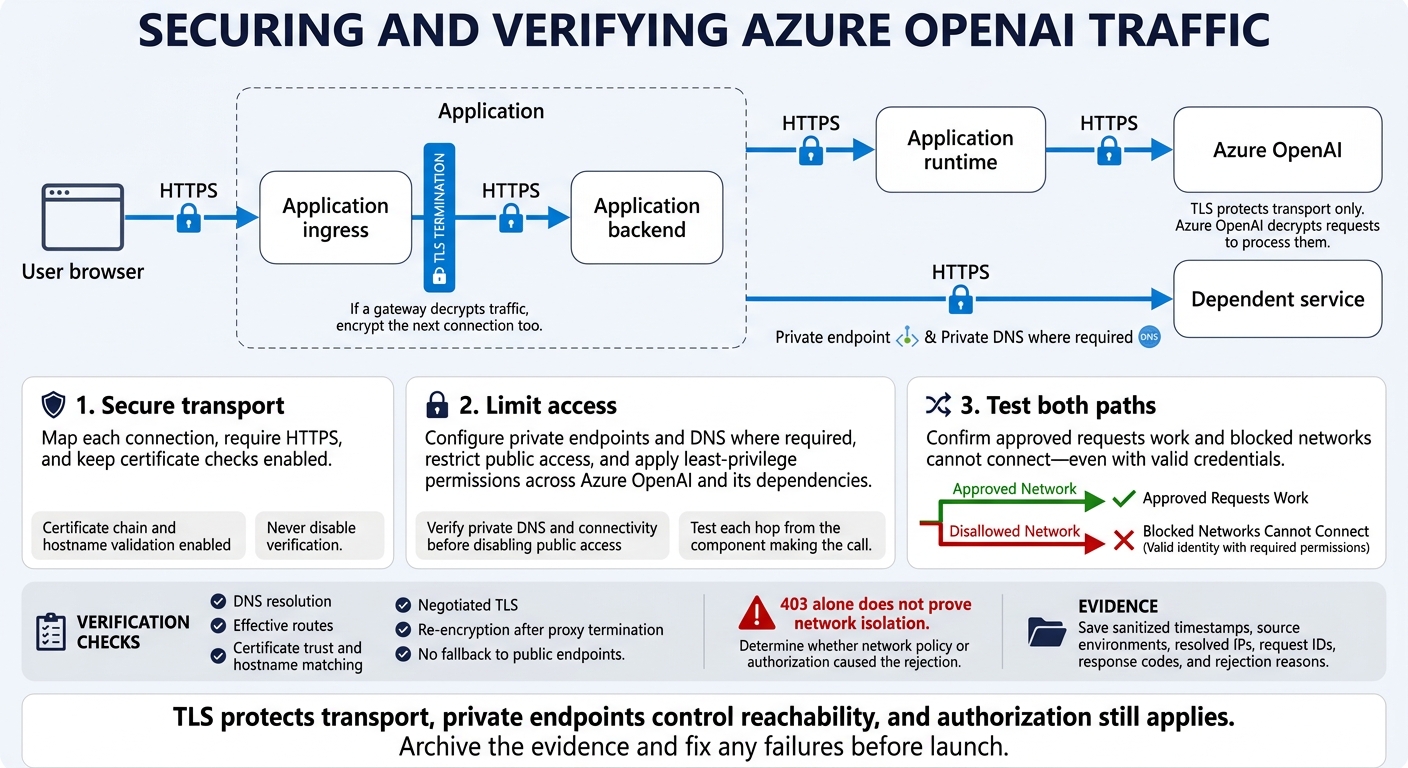
I use HTTPS on every hop - not just the Azure OpenAI connection - to protect prompts, responses, and retrieved files in transit. Private endpoints limit network access, but they do not replace TLS. If a gateway decrypts traffic, I encrypt the next connection too.
My setup covers 3 steps:
- Secure transport: Map each connection, require HTTPS, and keep certificate checks enabled.
- Limit access: Configure private endpoints and DNS where required, restrict public access, and apply least-privilege permissions across Azure OpenAI and its dependencies.
- Test both paths: Confirm approved requests work and blocked networks cannot connect - even with valid credentials. A
403alone does not prove network isolation.
Before launch, I check what the traffic actually does, save sanitized test records, and fix gaps in DNS, TLS, access rules, and logging.
Azure OpenAI Encryption in Transit: Secure Every Hop
How to use and secure Azure OpenAi using Private Endpoints | Full Demo
Step 1: Set Up HTTPS and TLS
Use an https:// endpoint for every client-to-Azure OpenAI hop in your map. TLS encrypts request headers, prompts, and responses during transport only. Azure OpenAI must decrypt each request to process it.
Check the current Azure AI services and dependent-service docs for supported TLS versions and minimum-version controls. Use your map to apply TLS controls first, then restrict access paths.
Secure SDK and REST Calls
Use supported, up-to-date client libraries, and configure the endpoint from your Azure OpenAI resource. Keep certificate chain and hostname validation enabled, and reject HTTP URLs in application configuration.
If certificate validation fails, fix the trust store, hostname, or proxy certificate configuration. Never disable verification.
Send a test request over HTTPS from the application runtime to check certificate validation and TLS negotiation. An HTTP error after the handshake still confirms TLS connectivity - but not model access. Avoid -k or --insecure; both bypass certificate verification.
Compare TLS, Private Endpoints, and Payload Encryption
| Control | What it protects | Implementation role and limits |
|---|---|---|
| TLS | Requests and responses during transport | Require HTTPS on every connection. Protection ends at the TLS termination point. |
| Private endpoints | Network reachability through a private IP | Combine with DNS and public-access restrictions. |
| Application-level encryption or redaction | Selected values before transmission | Encrypted prompt content must be decrypted before the model can use it. |
If the model doesn't need a sensitive value, redact or tokenize it before building the request. Don't send it encrypted and expect the model to interpret it.
Once you've confirmed HTTPS, move to private endpoints and DNS controls, and restrict which networks and identities can reach the endpoint.
Step 2: Set Up Private Access and Endpoint Controls
With HTTPS in place, limit which networks and identities can reach Azure OpenAI. Use private-only access for CUI, ITAR, or other sensitive data that must stay inside your boundary.[2]
Create Private Endpoints and Set Up DNS
In the Azure portal, open the Azure OpenAI resource’s Networking settings and create a private endpoint. Select the subscription, resource group, VNet, and subnet used by your app. A private endpoint alone does not guarantee that data stays within your security boundary.[2]
Configure private DNS for the Azure OpenAI endpoint, then link the VNets that need name resolution. Check the traffic map to identify which client and dependency hosts need private resolution. Before disabling public access, test DNS resolution and private connectivity from the app subnet.
Restrict Public Access and Secure Dependencies
| Access mode | Exposure | Required controls | Tradeoff |
|---|---|---|---|
| Public | Internet-accessible | API keys only | Highest exposure. |
| Restricted public | Limited to allowed IPs | IP allowlisting + API keys | Lower exposure, but still public. |
| Private-only | Private IP access | Private endpoints + Entra ID + RBAC | Requires DNS and VNet integration. |
Once you’ve verified private connectivity, disable public network access. Apply the same private access setup to dependent services. Test each hop from the component making the call: app access does not prove that services can reach one another.
Set Identity and Outbound Access Controls
Pair private networking with least-privilege authorization. Review egress rules and remove broad allowlists. Where supported, configure service-managed egress controls separately.
Treat blocking CUI/PII detection and reversible redaction as safeguards - not replacements for network controls.[3][5]
Document the approved path for verification in Step 3.
Step 3: Test Traffic Paths and Fix Setup Gaps
Use the approved path from Step 2 as your baseline. Then test that every allowed connection works - and every blocked connection stays blocked.
Document and Verify Each Connection
Update the traffic-flow record from the introduction with observed results, not intended settings. Use the Markdown table below to track each connection. Record each hop separately, including service-initiated requests and proxy terminations.
| Source | Destination | Protocol | TLS terminates | Endpoint type | DNS result | Identity | Evidence |
|---|---|---|---|---|---|---|---|
| User browser | Application ingress | HTTPS | Ingress or application | Approved endpoint | Resolved IP | User authentication | Certificate validation and request trace |
| Application ingress | Application backend | HTTPS | Backend | Internal endpoint | Resolved private IP | Backend identity | Re-encryption and route checks |
| Application runtime | Azure OpenAI | HTTPS | Service endpoint | Private endpoint | Resolved private IP | Workload identity | Successful request and network-path evidence |
| Application or calling service | Dependent service | HTTPS | Service endpoint | Approved endpoint | Resolved IP | Caller identity | Request and access logs |
For each tested path, verify certificate trust, hostname matching, and negotiated TLS. Check that traffic is re-encrypted after every proxy termination and that private paths cannot fall back to public endpoints.
Test Allowed and Blocked Access
Send a real request from the approved application environment. Then repeat it from a disallowed network using a valid identity with the required permissions. An authentication failure does not prove network isolation.[4] Run the same tests for dependencies and service-initiated workflows.
From each runtime, check DNS resolution, effective routes, certificate validation, and SDK TLS compatibility. Confirm that transport stays encrypted and that blocked paths remain unreachable.
Keep sanitized records of timestamps, source environments, resolved IPs, request IDs, response codes, and rejection reasons. A 403 alone is not enough: determine whether network policy or authorization caused the rejection. Also confirm that failed private-path requests do not fall back to public endpoints.
Use these results to fix the failed control - not just the symptom.
Fix DNS, TLS, Access, and Logging Gaps
Map each failure to one control plane: DNS, TLS, access, or logging. Correct public DNS resolution on private paths, tighten overly broad allowlists, and remove unnecessary public dependency routes and embedded keys. Restore certificate verification, encrypt proxy-to-backend traffic, and enforce log sanitization.
Use a logging proxy to verify outbound bytes, and sanitize content before it enters logs or stored transcripts.[5] Correlate proxy logs, which provide wire-level evidence, with Application Insights traces, which show application-level behavior. Give each finding an owner, a retest date, and an assigned person responsible for drift monitoring.
Conclusion: Review Production Readiness
Once you’ve verified the traffic paths, run through the final release checklist:
- Verify HTTPS/TLS on every hop, required private endpoints, and working private DNS.
- Disable or tightly limit public access, restrict inbound and outbound rules, and apply least-privilege AI governance identities.
- Secure dependencies, pass both allowed- and blocked-access tests, and sanitize monitoring.
Archive the evidence and fix any failures before launch.
Keep the roles clear: TLS protects transport, private endpoints control reachability, and authorization still applies.
FAQs
How can I automate TLS and private-access checks?
Use a layered approach: route Azure OpenAI traffic through an Azure-native gateway, such as Ryshe Quanta. This puts TLS and network policy enforcement, traffic monitoring, and audit trails in one place.
Add automated adversarial scanning to check access controls, data leakage, and configuration. Use Azure Application Insights to track request patterns and policy enforcement. Run regular assessments to verify the architecture, encryption, and audit requirements.
How do I diagnose a network-related 403 error?
Check the Application Insights logs for the failure’s reason code, correlation ID, source IP, and timestamp [1]. A 403 Forbidden error typically means your application rejected the request because its security signature was invalid or its timestamp fell outside the allowed tolerance window [1].
Also check whether network controls, such as Azure API Management or firewall rules, blocked the traffic before it reached your application’s cryptographic validation logic [1].
Does private-only access satisfy CUI or ITAR requirements?
No. Private-only access alone does not satisfy CUI or ITAR requirements. Private networking and encryption in transit matter, but compliance also requires data governance, hard-stop CUI detection that blocks prohibited content before it reaches model endpoints, full audit traceability, proper access controls, and export control classification. Network isolation cannot replace data-level oversight and verification.
Frequently asked questions
How can I automate TLS and private-access checks?
Use a layered approach: route Azure OpenAI traffic through an Azure-native gateway, such as Ryshe Quanta. This puts TLS and network policy enforcement, traffic monitoring, and audit trails in one place. Add automated adversarial scanning to check access controls, data leakage, and configuration. Use Azure Application Insights to track request patterns and policy enforcement. Run regular assessments to verify the architecture, encryption, and audit requirements.
How do I diagnose a network-related 403 error?
Check the Application Insights logs for the failure’s reason code, correlation ID, source IP, and timestamp [1]. A 403 Forbidden error typically means your application rejected the request because its security signature was invalid or its timestamp fell outside the allowed tolerance window [1]. Also check whether network controls, such as Azure API Management or firewall rules, blocked the traffic before it reached your application’s cryptographic validation logic [1].
Does private-only access satisfy CUI or ITAR requirements?
No. Private-only access alone does not satisfy CUI or ITAR requirements. Private networking and encryption in transit matter, but compliance also requires data governance, hard-stop CUI detection that blocks prohibited content before it reaches model endpoints, full audit traceability, proper access controls, and export control classification. Network isolation cannot replace data-level oversight and verification.