AI-Powered Manufacturing Quoting Copilots
Compare dedicated apps, ERP-connected copilots, and custom Azure builds to resolve manufacturing quoting bottlenecks while preserving human approvals.
In this article
- 1. Dedicated Manufacturing Quoting Applications
- RFQ Intake and Costing
- Integration and Governance
- Workflow Fit and Review Controls
- Automating CNC Quoting: The AI System That Cuts Quoting Time 90%
- 2. ERP- and MRP-Connected Quoting Copilots
- RFQ Intake and Costing
- Integration and Governance
- Workflow Fit and Review Controls
- 3. Custom Azure Quoting Copilots
- RFQ Intake and Costing
- Integration and Governance
- Workflow Fit and Review Controls
- System Integration, Data Ownership, and Governance
- Azure Architecture and System Connections
- Pricing Approvals and Drawing Security
- Workflow Fit for Shops, Plants, and Enterprises
- Estimator Review and Seller Approval
- Pilot Scope, Costs, and Measures
- Conclusion: Choose by Quoting Bottleneck
- FAQs
- How do I calculate ROI for a quoting copilot?
- How much historical quote data do I need?
- How do I test a copilot before trusting its estimates?
- Frequently asked questions
- How do I calculate ROI for a quoting copilot?
- How much historical quote data do I need?
- How do I test a copilot before trusting its estimates?
Originally published October 26, 2026.
I’d choose a quoting copilot based on where quotes get stuck - not how much AI it includes. (Use this AI readiness recommendation to find your starting point.) Start with one or two part families, keep cost and delivery calculations tied to approved records, and require human approval before any quote reaches a customer.
I compare three approaches:
- Dedicated quoting applications: For repeatable shop RFQs, with CAD intake, cost estimates, and draft quotes. Check supported processes, ERP handoffs, and estimator review controls.
- ERP/MRP-connected copilots: For quoting built around existing item, pricing, and production records. Check data quality, permissions, routings, and capacity before accepting prices or dates.
- Custom Azure copilots: For workflows that cross systems or plants. You control extraction, cost rules, review screens, and approvals - but also maintain the integrations and security.
Quick Comparison
| Approach | Best fit | Main dependency | Review focus |
|---|---|---|---|
| Dedicated application | Repeatable shop quoting | Supported geometry and current shop rates | Technical assumptions and costs |
| ERP/MRP-connected copilot | Quote-to-production handoffs | Reliable item and production records | Pricing, routing, and capacity |
| Custom Azure copilot | Cross-system or multi-plant quoting | Owned rules, integrations, and access controls | Source records, exceptions, and release gates |
My rule across all three: AI drafts; people approve. Keep estimated lead time separate from the promised delivery date, protect drawings, and record revisions and overrides. Then judge the pilot by quote time, cost variance, reviewer effort, rework, and total upkeep - not extraction accuracy alone.
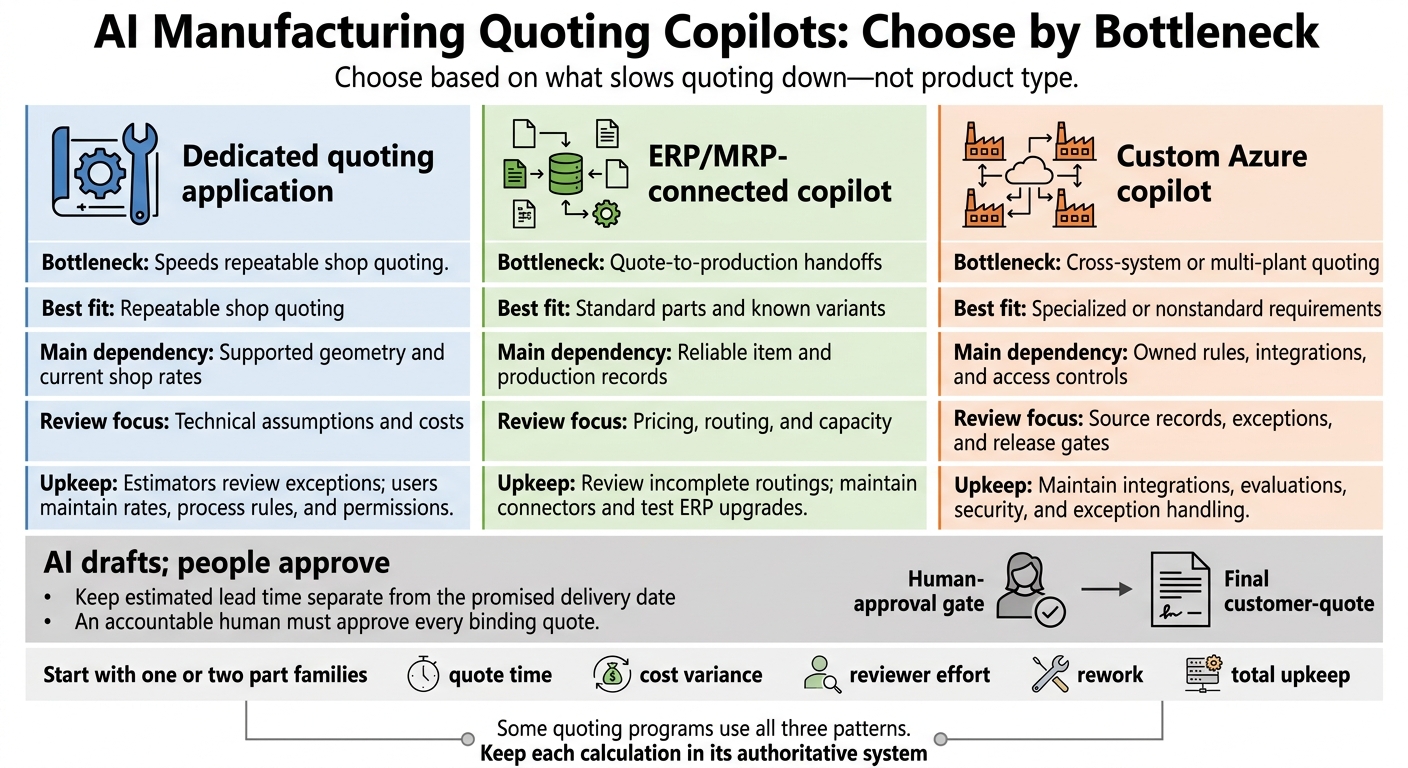
AI Manufacturing Quoting Copilots: Choose by Bottleneck
1. Dedicated Manufacturing Quoting Applications
RFQ Intake and Costing
Dedicated quoting applications turn RFQ packages into structured estimates using CAD data and shop rules. Intake should record the part revision, quantity breaks, material, finish, tolerances, certifications, and requested delivery date. Feature recognition can flag geometry that affects routing and cycle-time estimates. But geometry is input, not a production plan. Unsupported files, missing callouts, and unclear drawings should prompt clarification - not guesses.[4][6][8]
Show each cost before adding margin: material, scrap, setup, programming, machine time, labor, tooling, finishing, inspection, outside processing, freight, and overhead. Use process-specific routing templates and shop rates. Check whether machine rates already include labor or overhead so you don’t count either twice. Keep markup and gross-margin rules separate, and compare estimates with actual job costs to catch outdated rates or unrealistic cycle times.[10][11][5][9] Keep these figures linked to master data.
Use routings and capacity data to draft a tentative lead time for review. Prepare customer quote language, exclusions, and assumptions for the seller to check. The estimate should remain linked to governed data and controlled revisions throughout this process.
Integration and Governance
Connect material catalogs, work centers, supplier prices, customer records, and drawing revisions to their systems of record. An approved quote should transfer more than a PDF into ERP/MRP. It should pass along the part revision, BOM, routing, quantity, price, and promised date.
Assign owners for pricing rules and master data. Require role-based drawing access, controlled downloads, revision history, and an audit trail showing who changed assumptions, when, and why.[7]
Workflow Fit and Review Controls
Choose based on whether the shop needs a fast quote generator or a broader quoting workflow. CAD-first tools suit shops with repeatable part RFQs. Plants need support for local work-center rates, while enterprises need multi-site approval controls. Mixed-process assemblies and unusual jobs call for more estimator review. Also, distinguish quote-only tools from those that generate BOMs and routings.
Before release, the estimator should check geometry, tolerances, cycle times, tooling, inspection, and supplier costs. The seller should confirm margin, freight, exclusions, customer terms, and delivery commitments, checking those commitments against capacity and outside-processing limits.
Require approval for low margins, unfamiliar materials, export-sensitive drawings, and low-confidence extraction. Pilot one part family using historical RFQs and actual costs, then measure cost variance, rework, and quote speed.[12][5][9]
Automating CNC Quoting: The AI System That Cuts Quoting Time 90%
2. ERP- and MRP-Connected Quoting Copilots
When quoting runs inside ERP, the ERP is the biggest bottleneck to AI as the focus shifts from intake speed to item data, production logic, and approval controls.
RFQ Intake and Costing
In Dynamics 365 Business Central, Copilot can draft sales lines, but it cannot determine manufacturability. Accurate costing still relies on production BOMs, routings, inventory, and actual costs.
Keep sales entry separate from production planning. Sales quotes hold customer terms; production orders use BOMs and routings to validate how the item will be made. ERP-connected assistance can help with intake, quote drafting, and review, but production data still sets the limits on cost and promised delivery dates.
Use ERP data to draft prices and delivery dates, then check both against inventory and production capacity. Data access and pricing controls are therefore the main governance risks.
Integration and Governance
Check licensing, configuration, permissions, and integrations before the pilot. Limit integrations to keep restricted costs hidden and prevent approved pricing from being overwritten.
Workflow Fit and Review Controls
The fit depends on how much of a quote you can trust to existing item and production records. ERP-connected assistance suits repeat-part and assembly-to-order work when item and pricing data are already reliable.
For custom work, require estimator sign-off before the seller accepts a price or delivery date. Check the requested delivery against inventory and capacity - not the sales-line date. Send unresolved item matches, missing production data, and pricing exceptions for review.
3. Custom Azure Quoting Copilots
When ERP-connected quoting is too rigid for workflows that span systems, a custom Azure build lets you control intake, costing, and approvals across plants.
RFQ Intake and Costing
Use Azure AI Document Intelligence to turn RFQ fields into structured records, with a revision, timestamp, and source trail. Store each submission separately, and leave revision conflicts unresolved until confirmed. Feed extracted material, quantity breaks, finish, tolerance, and inspection requirements into versioned cost rules - not AI-generated pricing logic.[13][15]
Extraction does not prove manufacturability. Reliable routings and machine times require geometry analysis, validated estimating models, historical jobs, or engineering review. Make missing cost drivers visible. Keep customer requirements separate from approved defaults and estimator overrides.[13][14]
Integration and Governance
Keep cost and capacity data in their source systems. Connect ERP/MRP and plant data through Azure Functions, Logic Apps, or Service Bus. Calculate standard, expedited, and alternate plant lead times using routings, machine calendars, material receipts, outside-processing queues, and inspection requirements - not a date generated by an LLM.[16]
Feed those traceable inputs into the draft review screen rather than presenting a free-form AI answer.
Workflow Fit and Review Controls
Draft prices, terms, exclusions, and assumptions from approved templates. Place each field beside its supporting evidence: drawing page, revision, cost-rule version, routing, and capacity record. Reviewers can accept, correct, reject, or defer fields. Block release when mandatory terms are missing, technical requirements remain unresolved, or commitments lack approval.
The level of control depends on scale. Shops need a simple review screen. Plants need routing and quality exceptions. Enterprises need shared masters, plant-specific permissions, and separate approval roles.
A custom build fits when reviews must span systems or plants, similar to other AI agents in manufacturing that handle cross-functional data. Budget for maintaining integrations and rules - not just document extraction.
System Integration, Data Ownership, and Governance
Once the workflow fits, define which system owns each record - and which data the copilot can trust.
Give each data domain one owner: ERP owns customers, items, vendors, orders, and rates; MRP owns routings, work centers, schedules, and capacity; CRM owns opportunities and contacts; PLM owns approved structures and revisions; CAD owns native files; and production systems own job status and completion data. Treat email and Microsoft 365 as intake channels, not source systems.
Shared data helps keep records consistent. But stale routings, incorrect units, obsolete revisions, duplicate part numbers, and unapproved rates can flow into quotes and production. Set explicit acceptance criteria for data quality, effective dates, revision status, exception handling, and permitted write-backs.
Governance requirements also depend on the deployment pattern:
| Dimension | Dedicated quoting application | ERP/MRP-connected copilot | Custom Azure copilot |
|---|---|---|---|
| System connections and source of truth | Verify update authority for imports and connector write-backs | Preserve ERP/MRP authority through controlled connector permissions | Enforce domain ownership and write-back rules across integrations |
| Ownership and export | Check data-export rights, tenant ownership, exit terms, and whether normalized data, source links, outputs, approvals, and audit events are exportable | Verify export scope through connectors and APIs | Store governed records and exportable work products in the customer’s Azure environment |
| Approval and release controls | Verify approval gates and transfer of approved quote data | Use ERP approval workflows and restrict pricing overrides | Enforce custom approval paths before pricing, capacity, or order write-backs |
| Access controls | Validate tenant isolation, roles, plant boundaries, and document permissions | Test inherited ERP access at field and document levels | Apply identity roles, application permissions, row-level filters, and network boundaries |
| Auditability | Verify evidence, revision, override, and approval history | Supplement transaction history with AI inputs and retrieved evidence | Record calculations, model versions, overrides, approvals, and append-only audit logs |
Azure Architecture and System Connections
Custom Azure architectures work when teams need explicit ownership, integration, and audit rules.
Use Azure AI Document Intelligence to extract RFQ data, Azure AI Search to retrieve approved content, and Azure OpenAI to interpret information and draft responses. Azure Functions runs deterministic cost and lead-time logic, while Durable Functions coordinates seller review and approved write-backs. Microsoft Entra ID controls identity, Azure Key Vault protects secrets, and Azure Monitor tracks service health. Keep geometry processing separate.[18][19][20][21]
Use supported APIs for live inventory and capacity checks, events for approved engineering changes, and scheduled synchronization for reference archives. Record how current the data is and whether a source has failed, so an unavailable source doesn't silently turn into a commitment based on stale data. Test synchronization recovery and safe operation during source-system outages - not just successful extraction.[18][19][20][21]
Pricing Approvals and Drawing Security
Governance covers more than ingestion. It also defines what the copilot may retrieve, calculate, and expose.
Enforce customer and plant boundaries in retrieval, not just application screens. Validate extracted fields before running calculations, and treat retrieved text as data - never instructions. Use approved, effective-dated rates and explicit approval thresholds.
Before releasing a quote, verify revision lineage and confirm that estimates link to source records. Each override should record the original value, replacement, user, reason, and approval. Keep native drawings in an access-controlled repository, index only the metadata needed for discovery, and define retention and download rules. For sensitive or export-controlled technical data, assess deployment, personnel access, model-processing boundaries, and contractual requirements. Azure hosting alone does not establish compliance.[18]
Ryshe’s Quanta could provide policy controls and observability between applications and approved model endpoints, with append-only, hash-stamped AI-call records.[17] In the actual deployment, test whether access restrictions block users without permission, events are fully recorded, and tampering is detected. Also validate retention and investigation workflows. These records supplement - not replace - ERP transactions, engineering approvals, identity controls, and legal review.
Workflow Fit for Shops, Plants, and Enterprises
After governance, look at where quoting gets stuck: the shop, plant, or enterprise level. Match the workflow to the bottleneck: shop speed, plant coordination, or enterprise control.
In a shop, the owner or estimator can approve the quote. In a plant, sales, estimating, engineering, operations, and purchasing each approve their part. Enterprises need shared approval policies that keep plant-specific rates, capabilities, suppliers, units, currencies, and customer terms intact. A central quote must reflect the plant that will make the part.
| Pattern | Quoting bottleneck solved | Key dependency | Review load and upkeep |
|---|---|---|---|
| Dedicated manufacturing quoting application | Speeds repeatable shop quoting. | Unusual parts may fall outside supported processes. | Estimators review exceptions; users maintain rates, process rules, and permissions.[22][6] |
| ERP/MRP-connected copilot | Coordinates plant quoting when item and production data are already reliable. | Gaps in production records delay approval. | Review incomplete routings; maintain connectors and test ERP upgrades.[23][24][27] |
| Custom Azure copilot | Connects quoting across systems or plants. | Cross-system rules and handoffs need clear ownership. | Maintain integrations, evaluations, security, and exception handling.[25][26] |
The approval path depends on who owns the risk.
Estimator Review and Seller Approval
The estimator checks technical fit and cost assumptions against source evidence - not confidence scores alone. The seller approves commercial terms and release. AI drafts; humans approve.
| Review control | Dedicated application | ERP/MRP-connected copilot | Custom Azure copilot |
|---|---|---|---|
| Evidence-linked confidence | Verify links to RFQ text, drawings, or models. | Connect outputs to ERP and document evidence. | Build field-level evidence and uncertainty displays. |
| Missing-data exceptions | Verify configurable release blocks. | Apply required fields and workflow rules. | Route gaps to the responsible department. |
| Revision alerts | Verify document and quote revision coverage. | Use authoritative ERP revision records. | Reconcile revisions across connected sources. |
| Overrides and margin approvals | Verify permitted changes and threshold support. | Apply ERP permissions and authorization rules. | Build permissioned overrides and plant, currency, and deal-size thresholds. |
| Seller sign-off | Verify approval gates before sending. | Gate quote release and order creation. | Build an explicit authorized release gate. |
Keep estimated lead time separate from the promised date. Operations must validate capacity, queues, labor, tooling, inspection, and plant calendars. Purchasing must confirm material and outside-process commitments. Unverified dependencies must stay visible and require approval - not turn into an AI-generated delivery promise. An accountable human must approve every binding quote.
Once the workflow is defined, test it on a narrow part family before expanding.
Pilot Scope, Costs, and Measures
Limit the pilot to one or two part families, and test the full path from intake through approved handoff. Have experienced estimators set the baseline.
Measure intake completeness, extraction error rate, estimate variance, turnaround time, override frequency, and quote-to-order rework by process and part family. Don't roll everything into one accuracy score. Track queue time separately from work time.
Separate software, integration, data cleanup, training, and maintenance costs. Where applicable, include usage-based CAD and document processing, connector work, rate cleanup, reviewer instruction, evaluation, and support. Prices depend on scope, volume, systems, and delivery terms.
Expand only after revision conflicts are resolved, required fields are complete or waived, lead-time evidence is visible, and review time drops without more rework. Block customer-facing quote release until approval is complete.
Conclusion: Choose by Quoting Bottleneck
Choose based on what slows quoting down - not product type. Find the delays in RFQ intake, cost logic, lead time, drafting, or approvals. Let that bottleneck guide your choice of pattern, rather than a feature list.
| Operating context | RFQ complexity | Human review | Recommended pattern |
|---|---|---|---|
| Shop with repeatable part families | Standard geometry and repeatable parts | Review exceptions and approve release | Dedicated applications |
| Plant needing continuity from quote to production | Standard parts and known variants | Validate routing and capacity assumptions | ERP-connected copilots |
| Enterprise with specialized costing or governance | Specialized or nonstandard requirements | Estimator-led review with explicit approval gates | Custom Azure builds |
Some quoting programs use all three patterns. Use a hybrid when geometry analysis, ERP/MRP records, and proprietary costing sit in different systems. Keep each calculation in its authoritative system, and use custom Azure orchestration to handle handoffs, policy checks, and audit trails.
FAQs
How do I calculate ROI for a quoting copilot?
Calculate ROI by measuring labor savings, fewer errors, and financial gains. Start by tracking the hours spent on routing, data entry, and manual cost verification for each RFQ [1][2].
Next, track shorter response times, more early-payment discounts secured, and costs avoided by reducing rework, rush shipping, and production delays [2][3]. Manufacturers typically see full ROI within 4 to 6 months [2].
How much historical quote data do I need?
There’s no universal minimum for historical data. Focus on depth, not volume. For example, using up to 15 years of job history can help turn manual quoting into same-day automated workflows [1].
Your data doesn’t need to be perfect. It needs to be reliable and well-structured in the areas your copilot uses. Standardized job history, real-time shop floor metrics, and master data give it accurate context [1][2].
How do I test a copilot before trusting its estimates?
Run the copilot alongside your manual processes during the pilot. Compare its estimates with historical data before full deployment. Treat it as a first-pass reader - not the final authority.
Require human review. Show how each estimate was reached, along with supporting citations, so your team can check the results. Add hard-stop guardrails, including liability disclaimers or required escalations, when estimates exceed set risk or dollar thresholds.
Frequently asked questions
How do I calculate ROI for a quoting copilot?
Calculate ROI by measuring labor savings, fewer errors, and financial gains. Start by tracking the hours spent on routing, data entry, and manual cost verification for each RFQ [1][2]. Next, track shorter response times, more early-payment discounts secured, and costs avoided by reducing rework, rush shipping, and production delays [2][3]. Manufacturers typically see full ROI within 4 to 6 months [2].
How much historical quote data do I need?
There’s no universal minimum for historical data. Focus on depth, not volume. For example, using up to 15 years of job history can help turn manual quoting into same-day automated workflows [1]. Your data doesn’t need to be perfect. It needs to be reliable and well-structured in the areas your copilot uses. Standardized job history, real-time shop floor metrics, and master data give it accurate context [1][2].
How do I test a copilot before trusting its estimates?
Run the copilot alongside your manual processes during the pilot. Compare its estimates with historical data before full deployment. Treat it as a first-pass reader - not the final authority. Require human review. Show how each estimate was reached, along with supporting citations, so your team can check the results. Add hard-stop guardrails, including liability disclaimers or required escalations, when estimates exceed set risk or dollar thresholds.