AI Foundry Secret Integration with Azure Key Vault
Don't treat connection metadata as proof; verify identity, network path, retrieval, rotation and audits before production.

In this article
- Zero-Trust AI Agents: Secure Microsoft Foundry Workflows
- Set Up Identity, Permissions, and Network Access
- Identify the Vault Caller and Grant Access
- Separate Secret Permissions From Encryption-Key Permissions
- Check Firewall Rules and Private Connectivity
- Configure and Test the Foundry–Key Vault Integration
- Configure Customer-Owned Secret Storage Where Supported
- Trace Credential Storage and Retrieval
- Test Retrieval and Diagnose Failures
- Rotate Credentials and Keep Audit Records
- Rotate Credentials With Testing and Rollback
- Collect and Link Audit Records
- Conclusion: Confirm Production Readiness
- FAQs
- How do I check whether my Foundry project supports my own vault?
- How can I prevent cached secrets from delaying rotation?
- What happens to my AI workload if Key Vault is unavailable?
- Frequently asked questions
- How do I check whether my Foundry project supports my own vault?
- How can I prevent cached secrets from delaying rotation?
- What happens to my AI workload if Key Vault is unavailable?
Originally published October 25, 2026.
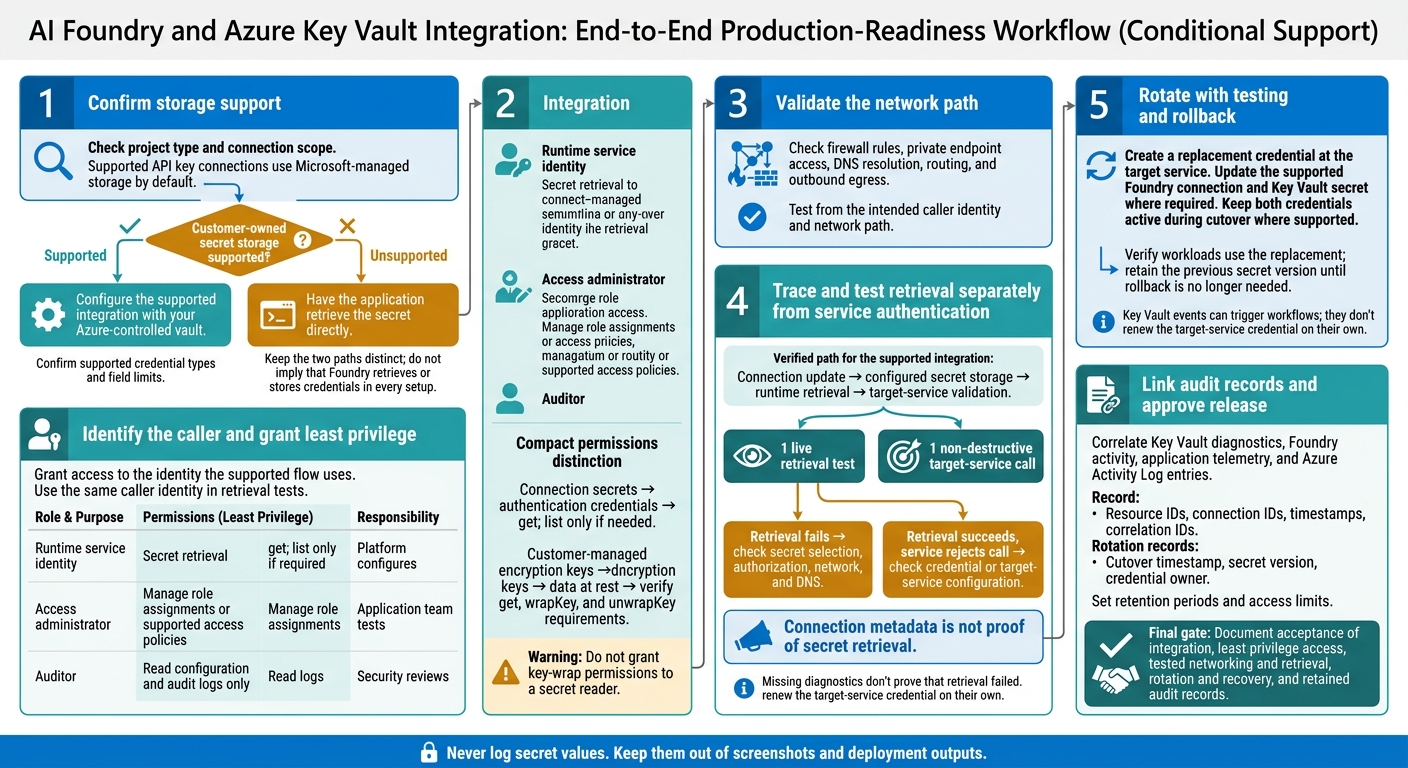
Before I connect AI Foundry to Azure Key Vault, I check the project type, connection scope, and AI starting point. Supported API key connections use Microsoft-managed storage by default; using a vault in your subscription depends on the setup.
I use these checks before release: (part of a broader AI Readiness Assessment)
- Storage: Confirm supported credential types, field limits, and whether customer-owned storage is supported.
- Access: Identify the caller and grant only the secret permissions it needs - not encryption-key permissions.
- Networking and testing: Check firewall rules, private connectivity, and DNS. Run 1 live retrieval test and 1 non-destructive service call using the intended identity and network path.
- Rotation and audit: Test credential replacement and rollback, then link vault and application records without logging secret values.
My rule: connection metadata is not proof of secret retrieval. I verify the vault lookup and the target-service call separately - before treating the setup as ready.
AI Foundry–Azure Key Vault Production Readiness
Zero-Trust AI Agents: Secure Microsoft Foundry Workflows
Set Up Identity, Permissions, and Network Access
Once you confirm where the secret lives, restrict who can retrieve it and how the caller reaches Key Vault.
Record the AI Foundry and Key Vault resources, along with their owning subscription and tenant. If the caller is an AI agent, assign a dedicated Microsoft Entra agent identity so its access can be audited. Platform configures access; security reviews the design.
Identify the Vault Caller and Grant Access
Identify the runtime identity that calls Key Vault. Check it against the supported connection flow and vault audit records. Grant access to the identity that flow uses, with only the secret permissions it needs.
| Actor | Required access | Responsibility |
|---|---|---|
| Runtime service identity | Secret retrieval: get, plus list only if required | Platform configures; application team tests |
| Access administrator | Manage role assignments or supported access policies | Platform team, with security approval |
| Auditor | Read configuration and audit logs only | Security team |
Use that same caller identity in retrieval tests.
Separate Secret Permissions From Encryption-Key Permissions
Secret retrieval supplies credentials. Encryption-key operations protect data at rest. Do not grant key-wrap permissions to a secret reader.
| Check | Connection secrets | Customer-managed encryption keys |
|---|---|---|
| Purpose | Retrieve authentication credentials | Protect data at rest |
| Calling identity | Identity used by the supported connection flow | Identity specified by the encryption integration |
| Data-plane operations | get; list only if needed | Verify get, wrapKey, and unwrapKey requirements |
Platform owns configuration; security approves key access and recovery controls.
Check Firewall Rules and Private Connectivity
If network restrictions apply, check private endpoint access, firewall rules, DNS resolution, routing, and outbound egress from the caller’s network.
The application team should test retrieval through the intended network path, while security reviews the resulting access records. Use this same path in the retrieval test that follows.
Configure and Test the Foundry–Key Vault Integration
Configure Customer-Owned Secret Storage Where Supported
Using the identity and network path defined above, check whether your Azure AI Foundry deployment model supports customer-owned secret storage. With this setup, the secret stays in your Azure-controlled vault.
If your resource doesn’t support this setup, have the application retrieve the secret directly. Don’t assume Foundry will store the credential for you. Keep secret values out of screenshots, deployment outputs, and logs.
Trace Credential Storage and Retrieval
After setup, document the retrieval path from the connection update through runtime access. Record who updates the connection, which vault stores the secret, which identity retrieves it, and how the target service validates the credential. Include resource IDs, connection IDs, timestamps, and correlation IDs - but never secret values.
Verify the retrieval path for your integration. Connection metadata alone does not prove that a vault lookup occurred.
Test Retrieval and Diagnose Failures
Once you’ve traced the path, run one live retrieval test, followed by one non-destructive target-service call. Review only the secret metadata needed for troubleshooting, without exposing the value.
Correlate Key Vault audit logs with application telemetry. Missing diagnostics don’t prove that retrieval failed.
Treat Key Vault retrieval failures and target-service authentication failures as separate issues. If retrieval fails, check secret selection, authorization, and the network or DNS path. If retrieval succeeds but the target service rejects the call, check the credential or target-service configuration.
Rotate Credentials and Keep Audit Records
After retrieval testing, assign owners for intelligent automation of credential rotation and audit workflows.
Rotate Credentials With Testing and Rollback
Use the connection and vault identifiers recorded during retrieval testing to create a replacement credential at the target service. Then update the supported Foundry connection and Key Vault secret where required.
Keep both credentials active during cutover where supported. Verify that workloads use the replacement credential, and retain the previous secret version until rollback is no longer needed.
| Method | Outage risk | Effort | Rollback | Auditability |
|---|---|---|---|---|
| Manual | High (human error and timing issues) | High | Manual revert | Low |
| Scheduled | Moderate (sync gaps) | Medium | Version pinning | High |
| Event-driven | Low (automated cutover) | High (initial setup) | Automated rollback | Highest |
Each method needs target-specific procedures or automation. Supported Key Vault events can trigger workflows, but they don't renew the target-service credential on their own.
Record the cutover timestamp, secret version, and credential owner in the audit trail.
Collect and Link Audit Records
Send Key Vault diagnostics and Foundry activity to Log Analytics or Application Insights. Link these records to Azure Activity Log entries using the resource IDs, connection IDs, timestamps, and correlation IDs recorded during retrieval testing.
Set retention periods and access limits. Never log secret values.
Conclusion: Confirm Production Readiness
Use these controls as the final production gate for the Foundry–Key Vault integration. Before release, require documented acceptance of integration, least-privilege access, tested networking and retrieval, rotation and recovery procedures, and retained audit records.
FAQs
How do I check whether my Foundry project supports my own vault?
In the Azure portal, check your Azure AI Foundry project’s settings or deployment template for an explicit reference to your Azure Key Vault resource [1]. This link lets the project securely store and retrieve secrets.
Also, confirm that role-based access control (RBAC) permissions give the specific Azure AI service identity read access to your vault [2].
How can I prevent cached secrets from delaying rotation?
During the cutover window, configure your application to accept both the current and previous secret versions. This keeps requests using a cached key valid [1].
After the window closes and the new secret has reached every part of your environment, retire the old version [1]. This approach avoids downtime without requiring immediate cache invalidation [1].
What happens to my AI workload if Key Vault is unavailable?
If Azure Key Vault is unavailable, your AI workload can’t retrieve the secrets it needs to authenticate and run securely. This typically leads to a 500 Internal Server Error because the application can’t authenticate with required services or decrypt the data it needs [1].
Log access failures in Application Insights to help troubleshoot issues. Use Azure Monitor to monitor your environment and send automated alerts that help your team support availability [1].
Frequently asked questions
How do I check whether my Foundry project supports my own vault?
In the Azure portal, check your Azure AI Foundry project’s settings or deployment template for an explicit reference to your Azure Key Vault resource [1]. This link lets the project securely store and retrieve secrets. Also, confirm that role-based access control (RBAC) permissions give the specific Azure AI service identity read access to your vault [2].
How can I prevent cached secrets from delaying rotation?
During the cutover window, configure your application to accept both the current and previous secret versions. This keeps requests using a cached key valid [1]. After the window closes and the new secret has reached every part of your environment, retire the old version [1]. This approach avoids downtime without requiring immediate cache invalidation [1].
What happens to my AI workload if Key Vault is unavailable?
If Azure Key Vault is unavailable, your AI workload can’t retrieve the secrets it needs to authenticate and run securely. This typically leads to a 500 Internal Server Error because the application can’t authenticate with required services or decrypt the data it needs [1]. Log access failures in Application Insights to help troubleshoot issues. Use Azure Monitor to monitor your environment and send automated alerts that help your team support availability [1].