Azure Logic Apps Private Endpoint Patterns
Compare private inbound, outbound, and combined patterns for Logic Apps Standard — DNS, routing, storage, and compliance checks.
In this article
- 1. Private Inbound Access
- Traffic isolation
- VNet placement and routing
- Private DNS
- Maintenance and industry fit
- 2. Private Outbound Integration
- Traffic isolation
- VNet placement and routing
- Private DNS and dependencies
- Maintenance and industry fit
- 129 - Securing Azure Logic Apps (Standard) with Private Endpoints
- 3. Combined Private Inbound and Outbound Access
- Traffic isolation
- VNet placement and routing
- Private DNS and dependencies
- Maintenance and industry fit
- Compare Traffic Paths and Setup Requirements
- Inbound and Outbound Traffic Isolation
- VNet Placement, Subnets, and Routing
- Private DNS, Storage, and Runtime Dependencies
- Maintenance and Industry Fit
- Benefits and Limits of Each Pattern
- Choose a Pattern and Verify Production Readiness
- FAQs
- How can I add private access without disrupting existing workflows?
- How can I handle SaaS callbacks with private-only ingress?
- What evidence demonstrates private access for compliance audits?
- Frequently asked questions
- How can I add private access without disrupting existing workflows?
- How can I handle SaaS callbacks with private-only ingress?
- What evidence demonstrates private access for compliance audits?
Originally published October 26, 2026.
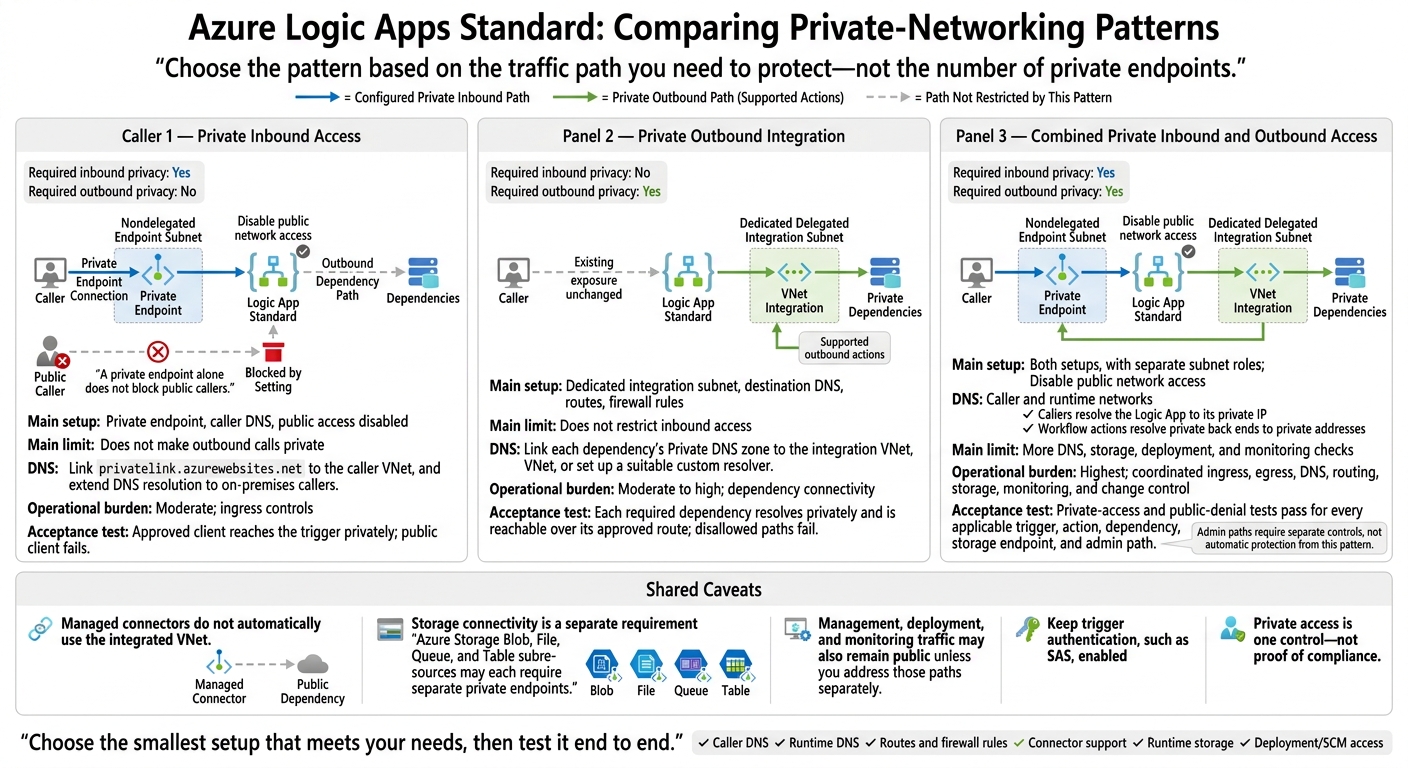
I choose Azure Logic Apps Standard networking by checking two paths: who calls the workflow and what the workflow calls. Use a private endpoint for inbound access, VNet integration for outbound access, or both. For private-only inbound access, disable public network access - a private endpoint alone does not block public callers.
Quick Comparison
| Pattern | Private path | Main setup | Main limit |
|---|---|---|---|
| Private inbound | Calls into the workflow | Private endpoint, caller DNS, public access disabled | Does not make outbound calls private |
| Private outbound | Supported calls to private resources | Dedicated integration subnet, destination DNS, routes, firewall rules | Does not restrict inbound access |
| Combined | Both paths | Both setups, with separate subnet roles | More DNS, storage, deployment, and monitoring checks |
My rule: choose the smallest setup that meets your needs, then test it end to end. Check connector support, DNS, routing, runtime storage, and deployment access. Managed connectors do not automatically use the integrated VNet.
For AEC, manufacturing, and aerospace workflows, I also check authentication, permissions, and audit controls. Private access is one control - not proof of compliance.
Azure Logic Apps Standard: Private Networking Patterns
1. Private Inbound Access
Traffic isolation
A private endpoint gives callers a private IP path into the Logic App. Keep trigger authentication, such as SAS, enabled, and disable public network access. The endpoint alone does not block public ingress.
VNet placement and routing
Place the endpoint in the caller VNet or a reachable peered network. Limit access to approved subnets, on-premises links, or partner networks that need it. If workflows also call private back ends, add outbound integration next.
Private DNS
Link privatelink.azurewebsites.net to the caller VNet, and extend DNS resolution to on-premises callers.
Maintenance and industry fit
Use this pattern for internal AEC intake or manufacturing and aerospace workflows when only the trigger path needs private access. Plan for DNS upkeep and VPN or ExpressRoute access for deployment and administration. If both inbound and outbound traffic need isolation, pair this pattern with outbound integration.
2. Private Outbound Integration
Traffic isolation
Use this pattern when only outbound calls need private access. Logic Apps Standard VNet integration gives built-in HTTP and SQL actions a private outbound path to dependencies through the VNet. Managed connectors run separately and don’t automatically use that path. Check each trigger and action before choosing this pattern.[4][9]
VNet placement and routing
Use a dedicated integration subnet, and connect to other networks through peering, VPN, or ExpressRoute. Enable Route All when outbound traffic needs centralized firewall inspection. Firewall rules must allow runtime storage access and required connector control traffic - not just calls to business APIs.[4][5][11]
Private DNS and dependencies
Link each dependency’s Private DNS zone to the integration VNet, or set up a suitable custom resolver. Test DNS resolution from the integrated workflow runtime.
VNet integration covers the Logic App’s outbound path; downstream services still need their own private-access setup. Azure Storage Blob, File, Queue, and Table subresources may each require separate private endpoints.[4][7][10]
Maintenance and industry fit
Choose outbound-only integration for workflows that call private AEC document repositories, manufacturing plant and quality systems, or aerospace engineering and configuration-management repositories.
Monitor subnet capacity, DNS links, endpoint health, firewall and routing changes, and retry rates. After network or connector changes, re-test workflow retries and runtime storage access.[9] Use the combined pattern when inbound requests also need private access.
129 - Securing Azure Logic Apps (Standard) with Private Endpoints
3. Combined Private Inbound and Outbound Access
Use this pattern when both inbound requests and outbound dependency calls must stay private.
Traffic isolation
Use a private endpoint for inbound requests and VNet integration for outbound calls, and disable public inbound access. Managed connectors may still use public Azure endpoints. Management, deployment, and monitoring traffic may also remain public unless you address those paths separately.[1][2]
Verify that routing and DNS keep both application traffic paths private.
VNet placement and routing
Treat the private endpoint and outbound integration as separate attachments. Check the inbound caller path and outbound dependency path, including any VPN or ExpressRoute links. If traffic requires inspection, confirm that it passes through the firewall or network virtual appliance (NVA).[1][2]
Private DNS and dependencies
Check DNS at both ends. Callers must resolve the Logic App to its private IP, while workflow actions must resolve private back ends to private addresses. Test an actual dependency call and confirm its destination address and route.[2]
Once routing and DNS checks pass, validate the controls used to maintain private access.
Maintenance and industry fit
For production AEC, manufacturing, or aerospace workloads, validate private access with DNS, routing, and access-control checks. For ITAR or CUI workloads, pair network isolation with RBAC and audit controls.[1][2]
Compare Traffic Paths and Setup Requirements
The tables below compare the three patterns by traffic path, network placement, DNS, and operational risk.
Inbound and Outbound Traffic Isolation
Use this matrix to check which paths stay private, which need separate controls, and where managed connectors still bypass the VNet.[4][8][13][14]
| Pattern | Inbound exposure | Outbound privacy | Connector constraints | Remaining public paths |
|---|---|---|---|---|
| Private inbound access | Private; public access disabled | No guarantee of private egress | Review actions separately | Outbound services; SaaS webhooks may need public callbacks |
| Private outbound integration | Existing exposure unchanged | Private for supported actions | Managed connectors need separate controls | Public triggers, managed connector services, and required public callbacks |
| Combined private inbound and outbound access | Private; public access disabled | Private for supported actions | Check trigger, action, and callback compatibility | Managed connector services and required public callbacks |
Next, check subnet placement and routing.
VNet Placement, Subnets, and Routing
Keep the private endpoint subnet separate from the delegated integration subnet. Peering is not transitive, and Route All needs verified UDRs and return routes. Outbound and combined patterns also need dependency routing and inspection.
Leave enough room in integration subnets for scaling and upgrades. NAT Gateway provides predictable public egress only when traffic follows its subnet path.[8][16]
| Pattern | Subnet requirements | Hybrid access | Routing controls | Common routing failures |
|---|---|---|---|---|
| Private inbound access | Nondelegated endpoint subnet | Caller routes through peering, VPN, or ExpressRoute | Caller routes; NSGs and UDRs subject to endpoint network policies | Unreachable subnet; missing return route |
| Private outbound integration | Dedicated delegated subnet with scaling headroom | Dependency routes through hybrid links | Integration-subnet NSGs, UDRs, and firewall rules | Blackholed default route; asymmetric routing |
| Combined private inbound and outbound access | Both subnet types | Separate caller and dependency routes | Separate ingress and egress policies | Missing transit; managed connectors bypassing integration routes |
Even with the right network paths, DNS and storage issues can prevent the design from working.
Private DNS, Storage, and Runtime Dependencies
Inbound patterns rely on caller DNS. Outbound patterns rely on runtime DNS. Combined patterns need both, and hybrid resolution may need conditional forwarding.
Check custom DNS settings, including WEBSITE_DNS_SERVER and WEBSITE_DNS_ALT_SERVER where used. Storage connectivity is a separate requirement for runtime startup and workflow execution.[7][12][15]
| Pattern | DNS scope | Private endpoint targets | Storage requirements | Failure checks |
|---|---|---|---|---|
| Private inbound access | Caller networks and hybrid resolvers | Logic App | Private storage requires outbound connectivity | Caller DNS; deployment and SCM access |
| Private outbound integration | Runtime network | Dependencies and required storage subresources | Runtime access to configured storage | Runtime DNS; storage firewall; ports 443/445 where applicable; content over VNet settings |
| Combined private inbound and outbound access | Caller and runtime networks | Logic App, dependencies, and required storage subresources | Storage and content access across outbound controls | Startup, execution, content over VNet settings, deployment, SCM access, and monitoring |
Use these checks to trace failures to their likely source.
| Symptom | Likely cause | Validation step | Corrective action |
|---|---|---|---|
| Storage runtime fails | Incomplete storage networking or content configuration | Test required storage resolution, ports 443/445 where applicable, and runtime settings | Correct endpoints, DNS, firewall rules, and content over VNet settings |
| Unexpected public egress IP | Route All disabled, managed connector execution, or NAT bypass | Check connector type, effective routes, and destination-observed source IP | Correct VNet routing or UDR/NAT design; control managed connector access separately |
| Public caller reaches the workflow | Public access enabled or an alternate endpoint exposed | Test from an untrusted public network; inspect networking settings | Disable public access; remove or protect alternate paths |
Once the network path is clear, assign owners and validate the design in production.
Maintenance and Industry Fit
Assign platform, network, and DNS owners. After relevant changes, retain endpoint approvals, DNS answers, firewall logs, destination-observed source addresses, and pass/fail test results. Identify the affected triggers and actions so the test records show that the selected pattern works end to end.
Treat the industry fits below as operating examples, not compliance determinations.
Pattern Operational burden AEC fit Manufacturing fit Aerospace fit Key acceptance test Private inbound access Moderate; ingress controls Private project intake Private plant event intake Internal engineering portals Approved client reaches the trigger privately; public client fails. Private outbound integration Moderate to high; dependency connectivity Private document-system access ERP, PLM, and MES integration Private engineering-data access Each required dependency resolves privately and is reachable over its approved route; disallowed paths fail. Combined private inbound and outbound access Highest; coordinated ingress, egress, DNS, routing, storage, monitoring, and change control Private intake and approvals Intake-to-plant integration Segmented engineering workflows Private-access and public-denial tests pass for every applicable trigger, action, dependency, storage endpoint, and admin path.
Benefits and Limits of Each Pattern
Choose the pattern based on the traffic path you need to protect - not the number of private endpoints. This table summarizes the earlier traffic-path guidance and compares coverage, complexity, and the work required to run each pattern.[17]
| Pattern | Advantages | Limitations | Prerequisites |
|---|---|---|---|
| Private inbound access | Limits workflow invocation to private-network callers when public access is disabled. | Does not isolate outbound traffic. External webhook providers may not reach private triggers. | Standard Logic App, inbound private endpoint, caller private DNS, and disabled public access for private-only ingress. |
| Private outbound integration | Lets workflows reach private APIs, databases, storage, and on-premises systems through VNet integration. | Does not restrict ingress. Requires checks of routing, DNS, firewall rules, and connector behavior. | Standard Logic App, delegated integration subnet, destination DNS, and approved routes and firewall rules. |
| Combined private inbound and outbound access | Protects both invocation and downstream connections. | Adds DNS, storage, deployment, monitoring, and troubleshooting work. Managed connectors may still use Microsoft-hosted paths. | Both networking patterns, separate subnet roles, private storage connectivity, and deployment/SCM access. |
Choose the smallest pattern that protects the required traffic path. These trade-offs apply to Standard Logic Apps; Consumption does not support VNet integration in the same way.[6] Costs increase as more paths need private access, monitoring, and governance.
Private access does not grant authorization. Private networking limits who can reach a resource, but it does not replace identity and policy controls. Keep Entra ID authentication, managed identities, least-privilege permissions, secret storage in Key Vault, encryption, and retention/audit controls.
For export-controlled or sensitive data, treat network isolation as one control - not proof of compliance.
Choose a Pattern and Verify Production Readiness
Choose the simplest pattern that keeps the required caller and destination paths private.
| Pattern | Required inbound privacy | Required outbound privacy | Hybrid network path | DNS/routing complexity | Operational burden | Typical fit |
|---|---|---|---|---|---|---|
| Private inbound | Yes | No | If needed | Moderate | Moderate | Private project or plant event intake |
| Private outbound | No | Yes | If needed | High | Moderate to high | Private document, manufacturing, or engineering-system access |
| Combined | Yes | Yes | If needed | Very high | High | Private intake connected to private back ends |
Use the matrix to narrow your choice, then test the selected path end to end. Check the caller path, runtime path, and shared dependencies separately.
- Test DNS from the actual caller networks and runtime network. Confirm that private destinations resolve to the intended private IP addresses.
- Check routing, NSGs, and firewall behavior against approved paths.
- Verify backend storage connectivity, including Azure Files where used.[3]
- Test REST triggers, webhook callbacks, and every connector the workflow uses.
- Disable public access for private-only ingress. Then confirm that private calls succeed and public calls fail.
- Confirm deployment and SCM access through approved CI/CD agents or jumpboxes.
- Assign owners for monitoring, DNS, routing, and workflow failures. Document emergency procedures and handoff responsibilities.
FAQs
How can I add private access without disrupting existing workflows?
Roll out in phases, with integration first. Review your architecture’s dependencies and security requirements to ensure the private endpoint configuration keeps existing data residency rules and access controls in place.
Start with a controlled pilot on one system to test traffic paths and performance. Set clear milestones, and validate read-only paths before enabling write-back to keep the system stable and services running.
How can I handle SaaS callbacks with private-only ingress?
External SaaS services can’t reach your Azure Logic Apps private endpoint directly. Callbacks need a bridge.
Deploy Azure API Management (APIM) or an Application Gateway in a public-facing subnet to act as a secure proxy. Configure the proxy to accept callbacks and forward them to your Logic App’s private endpoint within your virtual network. This keeps the workflow’s ingress private-only.
Ryshe specializes in these secure system integrations.
What evidence demonstrates private access for compliance audits?
Evidence includes traceable audit logs with timestamps, user context, and reasoning, plus documentation of data residency and security controls in place [1][2][3]. These records help show that data stays in a secure environment and support NIST 800-171 and CMMC compliance reviews [1][2].
Continuous monitoring keeps compliance documentation current, so reviewers have an up-to-date audit package [1][2].
Frequently asked questions
How can I add private access without disrupting existing workflows?
Roll out in phases, with integration first. Review your architecture’s dependencies and security requirements to ensure the private endpoint configuration keeps existing data residency rules and access controls in place. Start with a controlled pilot on one system to test traffic paths and performance. Set clear milestones, and validate read-only paths before enabling write-back to keep the system stable and services running.
How can I handle SaaS callbacks with private-only ingress?
External SaaS services can’t reach your Azure Logic Apps private endpoint directly. Callbacks need a bridge. Deploy Azure API Management (APIM) or an Application Gateway in a public-facing subnet to act as a secure proxy. Configure the proxy to accept callbacks and forward them to your Logic App’s private endpoint within your virtual network. This keeps the workflow’s ingress private-only. Ryshe specializes in these secure system integrations.
What evidence demonstrates private access for compliance audits?
Evidence includes traceable audit logs with timestamps, user context, and reasoning, plus documentation of data residency and security controls in place [1][2][3]. These records help show that data stays in a secure environment and support NIST 800-171 and CMMC compliance reviews [1][2]. Continuous monitoring keeps compliance documentation current, so reviewers have an up-to-date audit package [1][2].