Contract Clause Extraction Pipeline on Azure
Build a secure Azure pipeline that extracts contract clauses with source-tracking, auditable AI calls, and mandatory human approval.
In this article
- Secure File Intake and Storage
- Connect Microsoft 365 and Business Systems
- Separate Storage Zones and Preserve Originals
- Queue Work and Prevent Duplicate Processing
- Extract Clauses and Validate Results
- Run OCR and Retain Layout References
- Choose Extraction Methods and Require Citations
- Manage Processing States and Failures
- Review and Deliver Results Under Access Controls
- Build a Review App With Source Evidence
- Set Access Controls and Audit Rules
- Publish Approved Records to Business Systems
- Test Quality, Cost, and Production Readiness
- Measure Extraction and Review Accuracy
- Track Latency and Cost per Approved Contract
- Assign Production Owners and Release Gates
- Analyze Contracts using Azure AI document Intelligence
- Plan Implementation and Delivery Support
- Pilot One Contract Family
- Assess Implementation Support From Ryshe
- Conclusion: Preserve Evidence and Govern Every Output
- FAQs
- How do I set accuracy thresholds for each clause type?
- What happens when a contract changes after approval?
- How can I protect the pipeline from malicious contract text?
- Frequently asked questions
- How do I set accuracy thresholds for each clause type?
- What happens when a contract changes after approval?
- How can I protect the pipeline from malicious contract text?
Originally published October 25, 2026.
I’d start with one contract family and require source links and human approval before publishing any extracted clause. The goal is a reviewed record - not a legal opinion. This approach aligns with AI governance for regulated industries, where human oversight is non-negotiable.
Here’s how I’d build the Azure pipeline:
- Protect the files: Control access, scan uploads, preserve originals, and prevent duplicate jobs.
- Extract and check: Use Document Intelligence for text and layout, then rules or Azure OpenAI for clause extraction. Flag missing terms and conflicts.
- Review and deliver: Show reviewers the source text, log decisions, and send only approved records to business systems.
- Test before launch: Measure accuracy, processing time, and dollar cost per approved contract. Assign owners, prepare rollback steps, and plan 30 days of post-launch support.
I’d keep source tracking and access controls in place throughout - and scope any Ryshe implementation support around clear deliverables and team training. Automation prepares the record; authorized reviewers decide whether it’s ready.
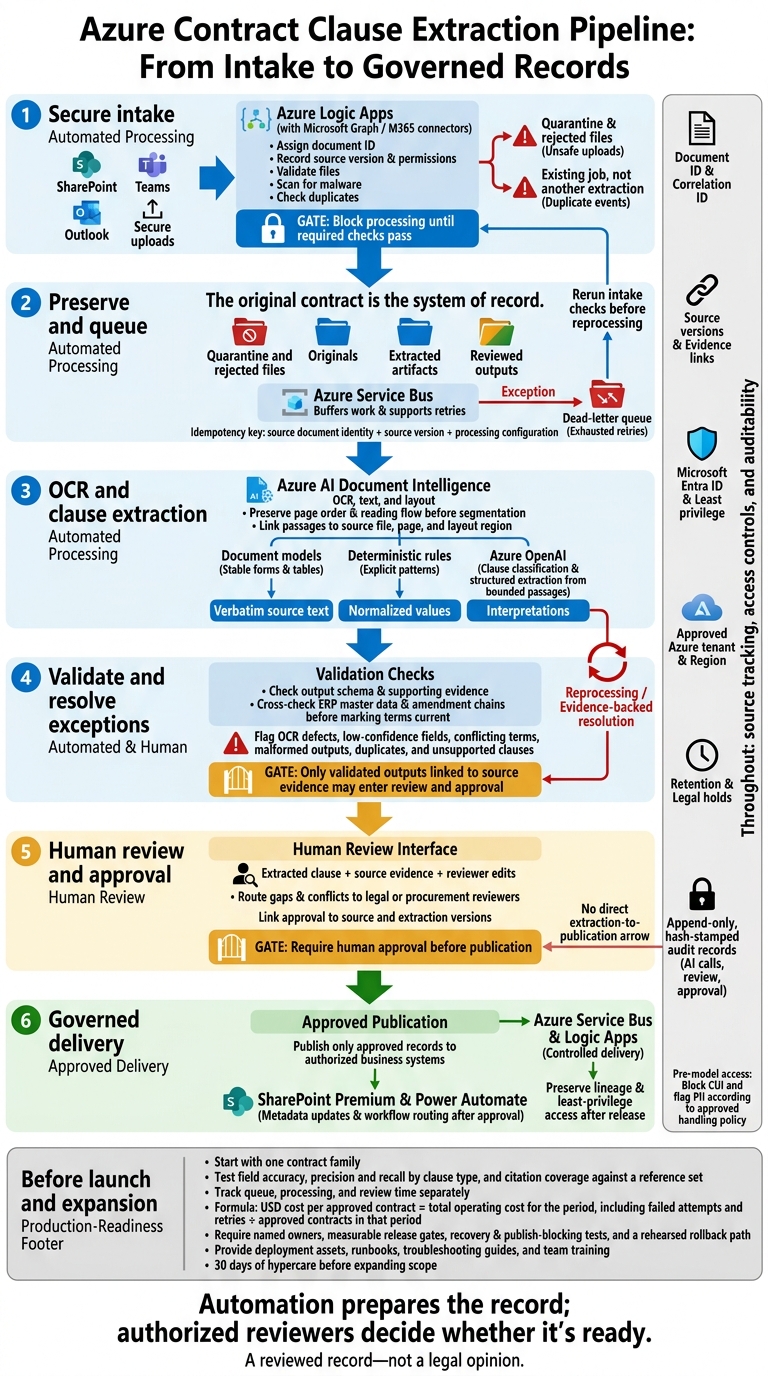
Azure Contract Clause Extraction Pipeline
Secure File Intake and Storage
Connect Microsoft 365 and Business Systems
Use Microsoft Graph or Microsoft 365 connectors to bring in files from SharePoint, Teams, and Outlook. Route secure uploads through a single intake boundary.[1][5] Set connector permissions and track source versions so copying a file doesn’t expand access.
Assign a document ID before processing. Record the source location, source version, uploader, receipt time, project/matter ID, business unit, document type, retention class, and correlation ID. Keep source permission metadata for downstream authorization.
Use UTC internally and show explicit time zones in US-facing displays. Carry the correlation ID through extraction and delivery.
Separate Storage Zones and Preserve Originals
The original contract is the system of record. Set up storage zones to protect that evidence.
| Zone | Purpose | Access and consumers | Retention |
|---|---|---|---|
| Quarantine and rejected files | Hold uploads pending checks; isolate failed or unsafe files | Intake and scanning services; authorized security and support staff | Approved deletion schedule, per security policy |
| Originals | Preserve source bytes, hashes, and version relationships | Preservation service; authorized read-only consumers | Records schedule and applicable legal holds |
| Extracted artifacts | Store OCR, layout, and extraction files | Processing services and authorized reviewers | Defined processing lifecycle |
| Reviewed outputs | Hold approved clause records | Authorized business users and delivery services | Business-record retention schedule |
Keep evidence separate from processing outputs so the original file stays untouched. Block processing until required checks pass. Validate files, scan for malware, and check for duplicates before release.
Leave original bytes unchanged, and retain their hashes and version links. Block CUI and flag PII before model access, following the approved handling policy.[5] Use Microsoft Entra ID, customer-managed keys in Azure Key Vault where required, and storage-level retention and legal holds.[5]
Queue Work and Prevent Duplicate Processing
Carry the document ID and correlation ID through every job state to maintain lineage. Use Azure Logic Apps to orchestrate intake and Azure Service Bus for buffered work queues that support retries.[2]
Build an idempotency key from the source document identity, source version, and processing configuration. Check it before starting work. Duplicate events must link to the existing job - not start another extraction.
Track explicit job states, and limit queue send and receive permissions to the responsible services. Keep incomplete uploads and failed scans out of the extraction queue.
Send failures that have exhausted their retries to a dead-letter queue. Include the correlation ID, failure reason, and retry history. Run intake checks again before reprocessing, and log each state transition so recovery preserves document lineage.[2]
Once a job is approved, pass its document ID, hash, and correlation ID into OCR and clause extraction.
Extract Clauses and Validate Results
Run OCR and Retain Layout References
Once intake is complete and the file is approved for processing, run OCR with Azure AI Document Intelligence for scanned and digital contracts. Link each passage to its source file, page, and layout region so reviewers can trace every clause back to the evidence.
Segment only after OCR preserves page order and reading flow. Keep clauses linked across pages and table cells. Store exhibits and amendments separately from the base agreement.
Choose Extraction Methods and Require Citations
Use the lightest method that fits the task. Store verbatim source text, normalized values, and interpretations in separate fields. Send low-confidence or unsupported results to human review.
| Method | Suitable tasks | Required evidence | Limits |
|---|---|---|---|
| Document Intelligence document models | Structured fields and tables in standardized forms or legacy PDFs | Returned field values and source locations | Best for document types with stable layouts and clear fields |
| Deterministic rules | Explicit date formats, identifiers, and fixed phrase patterns | Exact matched text and offsets | Wording changes and exceptions can prevent a match |
| Azure OpenAI | Clause classification and structured extraction from bounded passages | Supporting quotations and source references | Plausible wording is not proof; validate each result |
Manage Processing States and Failures
Track each document through OCR, extraction, validation, review, approval, and delivery. A typical flow is: OCR complete → segmented → extracted → validated → review required → approved → delivered. Let routine documents move automatically into review, and send exceptions to the appropriate reviewer.
Log every AI call in an append-only, hash-stamped audit record so each extraction has a verifiable audit trail. Before marking a term current, check it against ERP master data and amendment chains. Keep conflicts visible rather than silently choosing one term over another.
| Failure | Handling | Resume condition |
|---|---|---|
| OCR defects | Flag broken text, reading order, or table alignment; reprocess affected pages | Evidence is readable and traceable |
| Low-confidence fields | Send to human review with the source passage and extracted value | Reviewer confirms or corrects the field |
| Conflicting terms | Cross-check the agreement against amendments and side letters | Current terms are reconciled and approved |
| Malformed outputs | Reject invalid schemas; allow a limited number of retries | Output passes schema and evidence checks |
| Duplicates | Reuse the existing processing result and preserve the audit trail | No second approved record is created |
| Unsupported clauses | Mark the clause for review and record the disposition | Reviewer supplies an evidence-backed outcome |
Only validated outputs linked to source evidence may enter review and approval. To determine the best next steps for your specific environment, find the right AI starting point for your organization.
Review and Deliver Results Under Access Controls
Build a Review App With Source Evidence
After validation, send only evidence-linked outputs to human review. Build a review app that displays each extracted clause, its source evidence, and reviewer edits.[2] Link approvals to the source and extraction versions, and route gaps or conflicts to legal or procurement reviewers. Require human approval before publication - this is the final human checkpoint.
Review and access controls must work together. Extend the existing audit log to cover review and approval.[7]
Set Access Controls and Audit Rules
Use Microsoft Entra ID and least-privilege roles for reviewers and services.[8] Restrict review access and keep approved records traceable after release. Keep AI processing within your approved Azure tenant and region.[7][8]
Use Microsoft Purview for governance and SharePoint Premium for document classification.[4] Before full deployment, test access controls in staging environments that mirror production.[6]
Publish Approved Records to Business Systems
After reviewers approve a record, use Azure Service Bus and Logic Apps to publish it to downstream systems through controlled delivery channels, preserving lineage.[2][7] Use SharePoint Premium and Power Automate to update metadata and route workflows after approval.[1][9]
Test Quality, Cost, and Production Readiness
Measure Extraction and Review Accuracy
Before go-live, test the full pipeline under controlled conditions. Use contracts that reflect expected contract types and scan quality, including the document families and failure modes you'll encounter in production. Define a reference set, then score clause extraction against it. Measure field accuracy, precision and recall by clause type, and citation coverage.[2]
Score reviewers against reference answers, and track corrections and time spent per contract. Set go/no-go thresholds. Block release until automated data checks and hard-match reconciliation with source systems pass.[3] Test recovery, retries, replay, and publish-blocking behavior. Confirm that failed runs cannot publish unapproved records or create duplicate downstream records.
Use the same test set to measure operating cost and latency.
Track Latency and Cost per Approved Contract
Use Azure Application Insights to link each stage - from intake through downstream acknowledgment - under one ID. Track queue, processing, and review time separately. Also track OCR pages, model usage, orchestration, storage, networking, monitoring, and reviewer effort.[5]
Calculate USD cost per approved contract by dividing total operating cost for the period, including failed attempts and retries, by the number of approved contracts in that period.
Use these cost and latency results to assign release accountability and set approval gates.
Assign Production Owners and Release Gates
Use a signed readiness checklist covering quality, model and prompt control, access control, compliance checks, and operations. Assign a sign-off owner and an escalation contact for each area.
Require release approval based on results from the evaluation set, along with a rehearsed rollback path. If release fails, pause publication, reconcile affected records, and replay only verified work. Plan 30 days of hypercare before expanding scope.[3]
Analyze Contracts using Azure AI document Intelligence
Plan Implementation and Delivery Support
Use the readiness results from the prior section to set the pilot scope and decide where your team needs support.
Pilot One Contract Family
Start with one contract family. Before building, define the representative document set, security requirements, reviewer duties, and acceptance thresholds. Test the approved Azure pipeline’s complete intake-to-review workflow before expanding the scope.
Name owners for business value, exception handling, legal review, security and compliance, and engineering delivery. Set milestones for document review, configuration, validation, and handoff. Each milestone needs an owner, a deliverable, and acceptance criteria. Resolve conflicting field definitions in a shared data dictionary before configuration begins.[3]
Your team must be able to run the system independently after handoff. Require architecture diagrams, runbooks, troubleshooting guides, and production-ready Azure deployment assets.[3][9] Give reviewers hands-on training focused on source evidence and exception handling.[3]
With the pilot scope fixed, match delivery support to the work your team cannot cover.
Assess Implementation Support From Ryshe
Scope a senior-led Ryshe delivery team around those gaps: Azure architecture, document automation, Microsoft 365 and business-system integration, production validation, and production handoff.
Require named delivery leads, milestones, client-owned deliverables, and knowledge transfer. Clearly separate implementation work from post-launch support.
Use Quanta as an additional governance gateway for policy enforcement and observability when the architecture calls for it. Keep Azure security controls in place.[5]
Conclusion: Preserve Evidence and Govern Every Output
A clause isn’t ready for business use without source evidence. Keep that evidence attached from intake through approval so reviewers can support their decisions.[2][4]
After approval, use governed delivery to preserve lineage and least-privilege access. This ensures your data governance framework remains actionable rather than theoretical. With Ryshe Quanta, maintain an append-only, hash-stamped audit record of every AI call.[2][3][7] Move from AI proof of concept to production only when the evidence, controls, and output schema meet measurable acceptance criteria.[3][6]
FAQs
How do I set accuracy thresholds for each clause type?
Set an accuracy target for each clause type. Test each extraction model against a representative test set. Allow fully automated output only when the measured accuracy for that clause type meets your target. Otherwise, route it to human review as an exception.
Configure and train models by document type, validate them during “Configure & Train,” and monitor them after deployment. Use feedback and performance in actual use to improve accuracy and tighten or relax thresholds. [1][2]
What happens when a contract changes after approval?
The pipeline should re-ingest updated documents, extract key terms again, and reconcile them across the main contract and any amendments or addenda. It should then regenerate downstream outputs, such as purchase orders, under the required controls.
Discrepancies need human review and approval before changes take effect. These include pricing or payment changes and conflicts with approved terms. Routine updates flow automatically.
Regular monitoring can check compliance with prices and discounts, along with the effects of contract expiration or renewal. [1][2]
How can I protect the pipeline from malicious contract text?
Deploy the Ryshe Quanta enterprise AI context gateway within your Azure tenant. It sits between your applications and model endpoints, enforcing security policies and providing observability for every AI call.
Add exception handling to your orchestration logic so documents that don’t meet expected formats or standards go to human reviewers instead of being processed automatically. Staff can then identify and validate potential risks or inconsistencies.
Frequently asked questions
How do I set accuracy thresholds for each clause type?
Set an accuracy target for each clause type. Test each extraction model against a representative test set. Allow fully automated output only when the measured accuracy for that clause type meets your target. Otherwise, route it to human review as an exception. Configure and train models by document type, validate them during “Configure & Train,” and monitor them after deployment. Use feedback and performance in actual use to improve accuracy and tighten or relax thresholds. [1][2]
What happens when a contract changes after approval?
The pipeline should re-ingest updated documents, extract key terms again, and reconcile them across the main contract and any amendments or addenda. It should then regenerate downstream outputs, such as purchase orders, under the required controls. Discrepancies need human review and approval before changes take effect. These include pricing or payment changes and conflicts with approved terms. Routine updates flow automatically. Regular monitoring can check compliance with prices and discounts, along with the effects of contract expiration or renewal. [1][2]
How can I protect the pipeline from malicious contract text?
Deploy the Ryshe Quanta enterprise AI context gateway within your Azure tenant. It sits between your applications and model endpoints, enforcing security policies and providing observability for every AI call. Add exception handling to your orchestration logic so documents that don’t meet expected formats or standards go to human reviewers instead of being processed automatically. Staff can then identify and validate potential risks or inconsistencies.