Data Integration Best Practices: A 2026 Guide
Explore 8 data integration best practices for building reliable, secure pipelines, from CDC and data quality checks to identity-based access and governance.
A purchase order syncs from the ERP at 2 a.m., a retry posts it twice, and nobody notices until finance reconciles the month. There's no outage, no red dashboard, no failed job to rerun. There's just a wrong number that has already flowed into a report, a forecast, and maybe a payment.
Most integration failures look like that. A schema changes upstream and a pipeline loads nulls for three days. Two systems define the same part number differently and a quality report double counts. A pilot works, then stalls because nobody can sign off on production access. The connectivity worked in every case. The controls around it didn't.
That's why data integration best practices aren't really about choosing a tool. They're about the decisions you make before and around the pipeline, who owns the data, what gets checked, what happens on a retry, and how you'll prove a number is right. I frame each practice below around the specific failure it prevents, with a concrete step and a named pattern or tool you can use this quarter.
Get these eight right and integrations stop being fragile plumbing. They become a system your team can operate, audit, and safely build automation and AI on top of.
1. Establish Clear Data Ownership and Governance From the Start
The failure this prevents is the stalled pilot. The pipeline runs, the dashboard looks good, and then someone asks who approved joining payroll data to project records, or who owns a definition that's now wrong. Nobody can answer, so production waits.
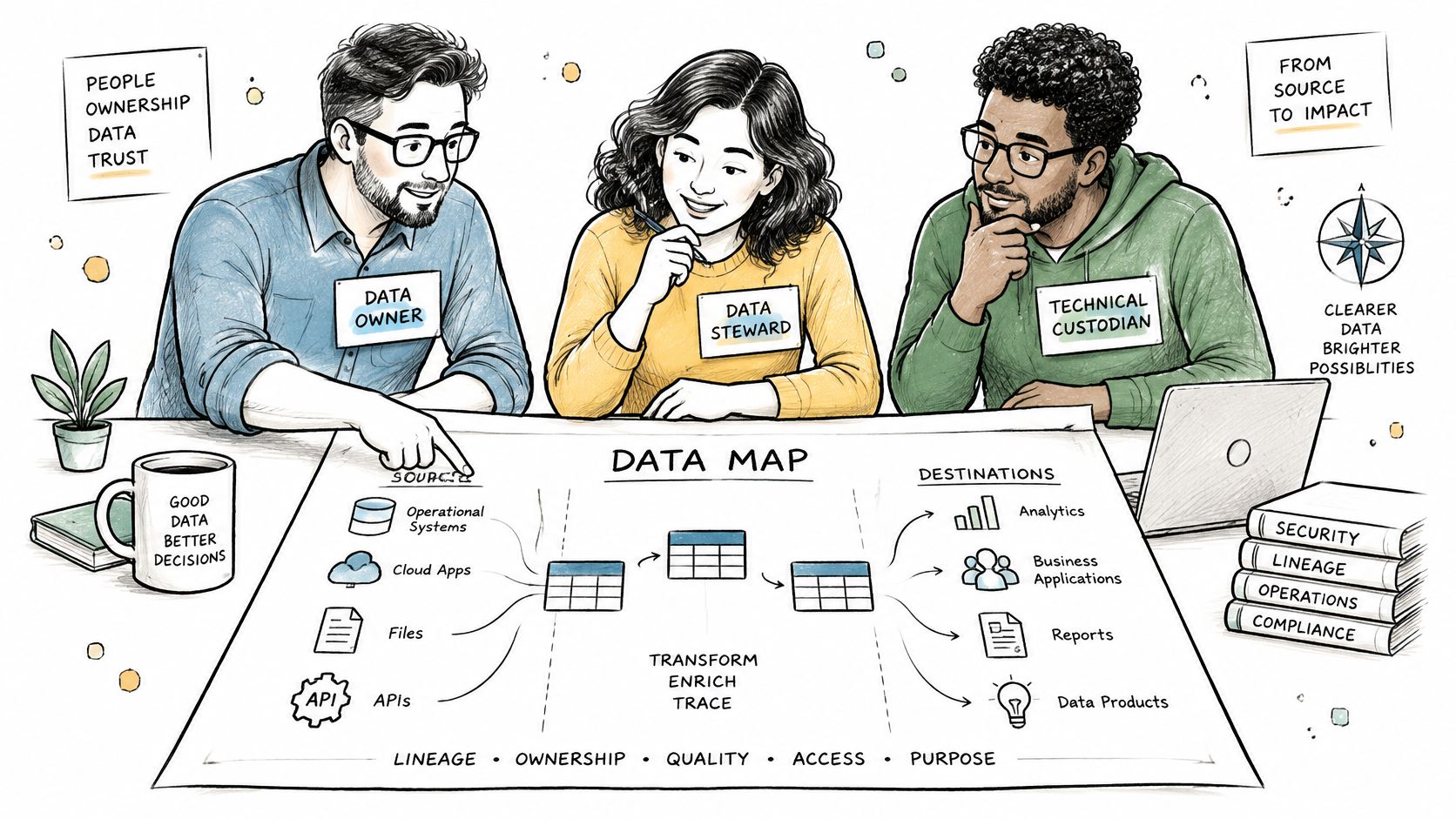
Assign three named roles to every source system and integrated dataset before you build anything. The owner approves schema changes and access. The steward owns definitions and quality issues. The technical custodian owns the pipeline and recovery. One person can hold two roles on a small feed, but the roles can't be blank.
Build a Source System Register First
Start with a simple register, then formalize it in a catalog. NIST's big data interoperability framework supports a canonical contract covering owner, business meaning, schema, lineage, permitted use, freshness, quality rules, security classification, and recovery. That same discussion notes a 2024 Progress DataDirect survey found APIs were used by 78% of respondents, while only 17% believed data users knew the number of available data sources very well. Connectivity without discoverability is why teams rebuild the same feed three times.
- Register every feed: List owner, steward, custodian, refresh frequency, sensitivity, and retention rule before design starts.
- Catalog it: Use Microsoft Purview to catalog Azure and Microsoft 365 sources and track lineage, or start with a maintained spreadsheet if that's what you'll update.
- Make ownership an acceptance criterion: Write it into each integration scope using your data governance framework, and review assignments quarterly after staffing or system changes.
For an engineering firm connecting ERP and document repositories, this means mapping each project document type to a named owner before the first sync. That one decision decides retention, audit, and who resolves a bad record later.
2. Use Incremental Loading and Change Data Capture
Full extracts are simple and brutal. You copy the entire table every night, the window keeps growing, and eventually the extract itself slows the ERP or MES that's supposed to be running the plant. Worse, deletes hide inside a full copy unless you diff carefully.
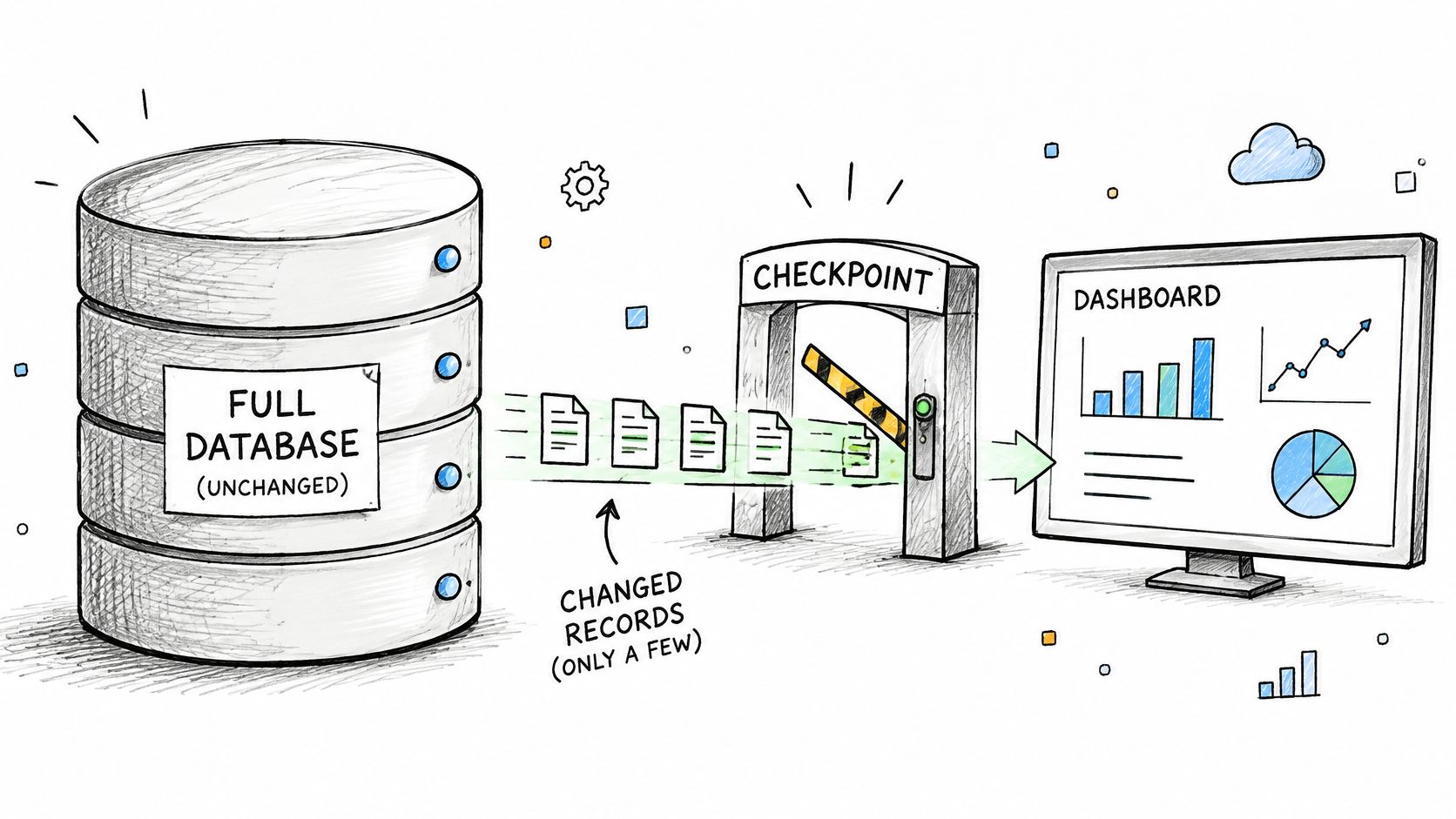
Move only what's changed. Incremental loading pulls records inserted, updated, or deleted since the last successful load. Change data capture, or CDC, reads those changes from transaction logs or change tracking tables, so you're not running heavy queries against live operational tables just to find new rows.
Say a manufacturer replicates MES quality records into an analytics store. A nightly full extract takes hours and still misses intraday defects. With CDC, Debezium, the open source platform from Red Hat, streams row level changes into Kafka topics continuously, and the analytics store stays current in minutes without hammering the source.
Watermarks Are Where This Breaks
- Confirm support first: Check whether the source supports native CDC, change tracking, or only a reliable updated timestamp before you design the pipeline.
- Store the watermark in a control table: Update it only after a successful write to the target, never before. If the load fails halfway, the next run picks up where the last good run stopped.
- Reconcile anyway: Schedule a weekly or monthly full reconciliation to catch drift and missed deletes that incremental logic can't see.
Practical rule: If you can't state exactly which timestamp or log position a load resumed from, you don't have incremental loading. You have a partial copy and a hope.
CDC isn't always worth it. Small, slow changing reference tables are cheaper to reload fully. Use CDC where volume, freshness, or source system load hurts.
3. Validate Data Quality at Ingestion
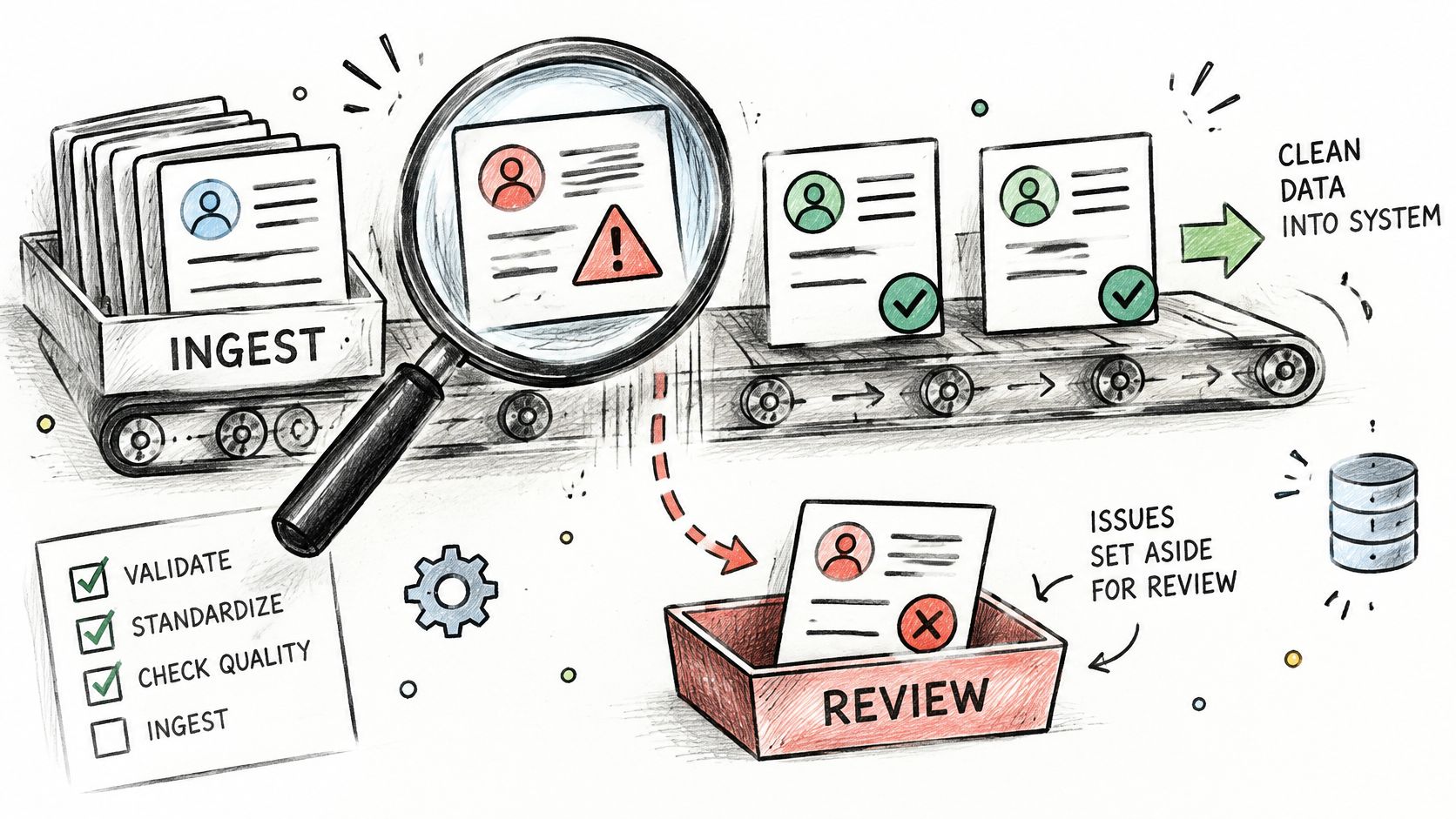
Checking data when a report looks wrong is checking it weeks late. By then the bad records have already reached a dashboard, a customer, or a model training set, and nobody trusts any of it. Validate where data enters the integration layer instead.
Run schema conformance, required fields, referential integrity, value ranges, duplicate detection, and business rules such as valid purchase order status values on every load. Records that fail don't get dropped. They go to a quarantine table with the failure reason attached, so a person can fix the source or the rule.
NIST's data quality guidance identifies completeness, accuracy, integrity, consistency, and timeliness as core components, and stresses that assessment runs across a dataset's lifecycle rather than as a single inspection. That matches practice. A one time cleanup before go live decays within a quarter.
Start Small and Route Failures to a Person
- Pick high impact rules first: Start with the checks tied to real decisions, then expand. A procurement feed might validate invoice totals against purchase orders before anything posts to ERP reporting tables.
- Use a real framework: Great Expectations lets you define expectation suites and run them against pipeline outputs in CI and in production.
- Assign the queue: Route failed records to a named owner with a resolution SLA, and read the cost of bad data before deciding that queue can wait.
Track pass rates over time and treat a declining score as an incident signal, not background noise. A pass rate sliding from near perfect usually means an upstream change nobody announced, which is exactly what you want to catch early.
4. Standardize Schemas With a Canonical Data Model
Every system describes the same entity its own way. The ERP calls it a job, scheduling calls it a project, and finance uses a cost code that means something slightly different. Join those naively and your reports argue with each other forever.
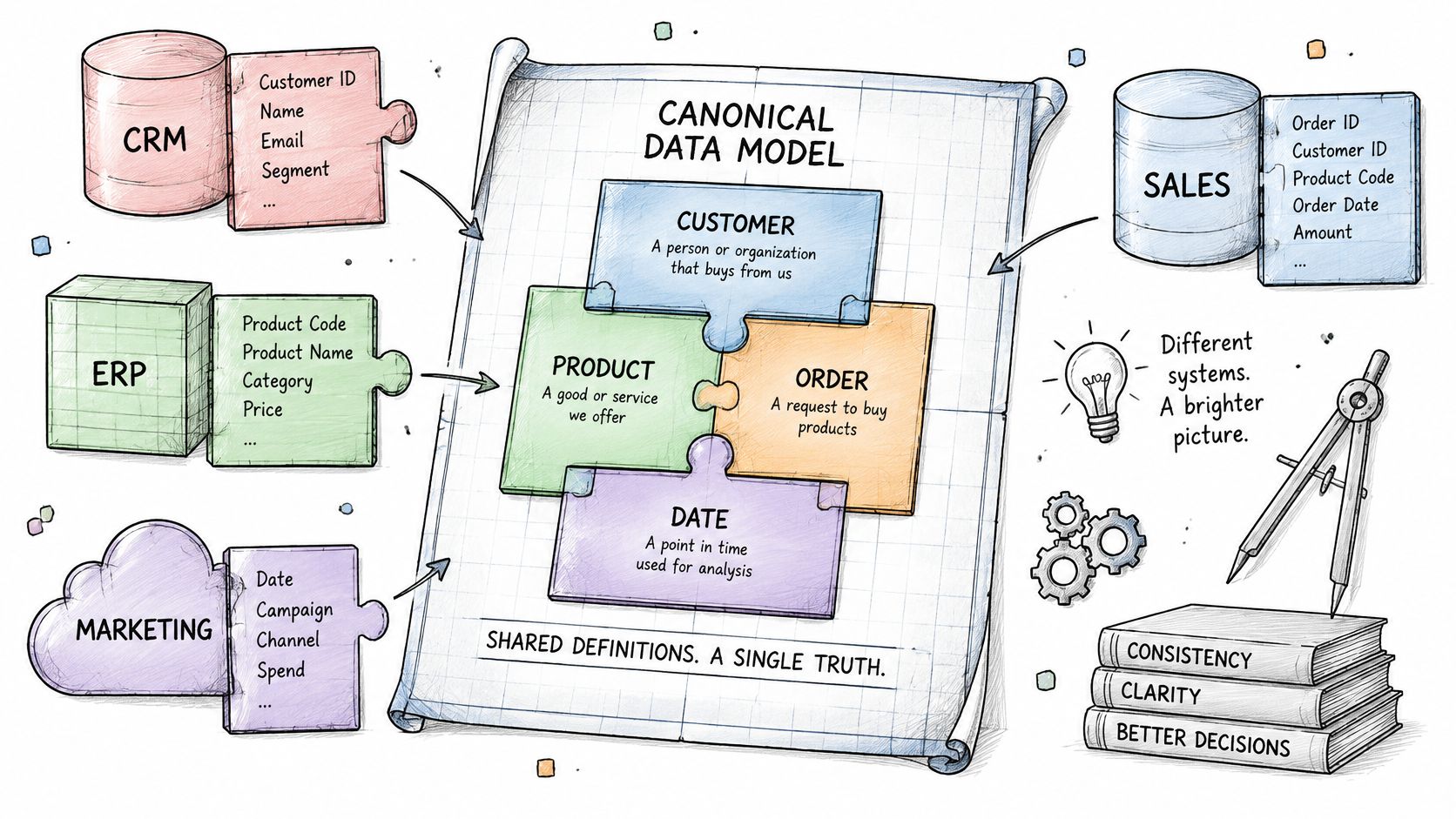
A canonical data model fixes this by defining shared definitions and common identifiers once. Each source maps into the canonical model, instead of into every other system. Add a fifth system later and you write one mapping, not four new point to point translations.
The trade-off is upfront work. Canonical modeling forces hard conversations early about what a vendor, part, or project is. That feels slow in week two and saves you months in year two, when point-to-point logic has encoded five conflicting definitions.
Start With the Entities That Cause Arguments
- Pick five to ten entities: Begin with the ones causing the most reporting disputes, usually project, vendor, part, customer, and cost code.
- Keep source keys: Maintain a cross reference table for identifiers rather than overwriting source keys, so you can always trace a canonical record back to where it came from.
- Gate changes: Require steward sign off before anyone changes a shared definition, because every downstream consumer inherits that change.
Say an aerospace program maps part numbers across engineering, supplier, and quality systems to a single enterprise key, with source identifiers preserved in the cross reference. In Microsoft Fabric, the same idea shows up as dimensional models that conform project and cost code dimensions across ERP and scheduling data. Either way, the join stops being an opinion.
5. Choose an ELT Pattern With a Centralized Storage Layer
The classic pattern is extract, transform, and load. IBM's ETL overview traces ETL to the 1970s, before cloud computing, when it moved data from operational systems into destinations for computation and analysis. The staged discipline still holds. What changed is cheap storage and elastic compute, which flipped the order for many teams.
ELT loads raw data into a central storage layer first, then transforms it there using the platform's compute. Keeping the raw copy is the point. When business logic changes, and it will, you reprocess history from raw instead of begging the source system for data it may no longer have.
In Microsoft centric environments, that foundation is often Microsoft Fabric with OneLake, holding ERP extracts and document metadata in one lakehouse while Power BI reads only the curated layer. The usual organization is medallion style, with bronze for raw, silver for cleansed and conformed, and gold for business ready tables.
Keep the Raw Layer Boring and Immutable
- Never edit raw in place: Keep raw data immutable and partitioned by load date, so any downstream table can be rebuilt and audited.
- Document each layer: Write down the purpose and quality expectations for bronze, silver, and gold, including who may consume each one.
- Set retention on day one: Define archival rules for raw zones before storage costs and compliance questions force a rushed decision.
Say a manufacturer lands MES and quality data raw, then builds curated quality KPIs in gold for predictive models. When the defect definition changes, the team rebuilds gold from bronze in an afternoon. Without the raw layer, that same change becomes a source system archaeology project.
6. Design Pipelines for Idempotency, Recovery, and Observability
Pipelines will fail. Networks drop, APIs throttle, sources go down for patching. The question isn't whether a run fails, it's whether a retry creates duplicates, and whether anyone finds out before a business user does. The duplicated purchase order from the opening is an idempotency failure, not bad luck.
An idempotent pipeline produces the same result when rerun. You get that by merging on stable business or source keys, never on generated row numbers, and by checkpointing progress so recovery resumes instead of restarting blindly. A document processing integration that uses document IDs as merge keys can safely reprocess an invoice without posting it twice.
Streaming makes this harder, not easier. The 2025 data streaming survey from Conduktor found 86% of respondents struggle with integration across different streaming platforms, with duplicate events and inconsistent schemas among the leading quality problems. More real time capability without deduplication and replay controls just delivers wrong data faster.
Monitor Freshness, Not Just Success
A job that succeeds while loading zero rows is a failure wearing a green checkmark. Azure Data Factory and Fabric Data Pipelines support retry policies and failure notifications, but you still need your own thresholds.
- Alert on freshness and volume: Define expected row counts and maximum staleness per critical feed, and alert on breaches.
- Dedupe deliberately: Follow proven webhook idempotency and deduplication patterns on Azure for event driven feeds.
- Test the rerun: Replay a failed batch in a non production environment and prove the target doesn't change.
If a business user is your monitoring system, you'll always learn about failures at the worst possible moment, in a meeting, with the wrong number on screen.
7. Secure Integrations With Identity Based Access and Least Privilege
Integrations are attractive targets because they're powerful and forgotten. A pipeline often runs under a shared account with broad read and write access, a password that never rotates, and a connection string sitting in a config file. Compromise that one credential and an attacker inherits every system it touches.
Replace stored secrets with identity. Azure pipelines can authenticate to Azure SQL and storage through managed identities instead of connection strings, so there's no password to leak. Microsoft 365 connectors should use Entra ID app registrations with admin consented, narrowly scoped Graph permissions rather than a service account with a mailbox and a password.
The governing principle is least privilege. Each pipeline gets only the permissions its job requires, read only by default, write access added deliberately and documented. That shrinks the blast radius when something goes wrong, and it gives auditors a clean story about who, or what, touched regulated data.
Inventory Credentials Before They Expire on You
- List every credential: Record each integration account, secret, and certificate with an owner, expiration date, and rotation schedule.
- Use a managed vault: Store any secret you can't eliminate in a vault such as Azure Key Vault, never in code or pipeline variables in plain text.
- Review the logs: Include integration accounts in regular security reviews and alert on unusual access patterns, not just failed logins.
Say an aerospace supplier connects engineering and quality systems under export control obligations. Managed identities, scoped permissions, and access logging aren't nice extras there. They're how you demonstrate, during an audit, exactly which system accessed controlled technical data and when. I wouldn't sign off on a regulated integration without them.
8. Version, Test, and Document Integration Logic as Code
An integration built by clicking in a designer, with logic living only in production, is unmaintainable the day its author goes on vacation. You can't review it, test it, or roll it back. You can only edit it live and hope.
Treat pipelines, mappings, and transformations as code. A dbt project defines transformations as tested SQL models with documented lineage in Git. Azure DevOps or GitHub Actions workflows then promote Fabric or Data Factory artifacts from development to production the same way every time, with no manual clicking in the production environment.
The discipline behind this is older than the tooling. The reason it matters now is scale. Matillion's data integration and AI readiness report found 64% of surveyed organizations reported that data teams spend more than half their time on repetitive or manual tasks. Manual promotion and undocumented fixes are exactly where that time goes.
Tests and Contracts Are the Documentation That Stays True
- Parameterize environments: Keep environment specific settings out of code and manage them through parameters or variables, so the same artifact deploys everywhere.
- Test every critical model: Write data tests for keys, nulls, accepted values, and row count reconciliations, and run them in CI before promotion.
- Require data contracts: Make documentation of inputs, outputs, and dependencies part of each change request, not a cleanup task for later.
Say a cost code mapping changes. With versioned code, the change arrives as a pull request, a steward reviews the contract update, tests run against known inputs, and rollback is a revert. Without it, someone edits production at midnight and finance finds out at month end. That's the entire argument.
How the eight data integration best practices compare
| Item | Best For | Example Tools | Main Trade-off |
|---|---|---|---|
| Establish Clear Data Ownership and Governance from the Start | Regulated or document-heavy data environments | Microsoft Purview | Requires ongoing organizational commitment |
| Use Incremental Loading and Change Data Capture | Large, frequently updated operational datasets | Debezium, Kafka | More complex to implement than full reloads |
| Validate Data Quality at Ingestion | Keeping unreliable records out of reports and models | Great Expectations | Rules require domain expertise and maintenance |
| Standardize Schemas with a Canonical Data Model | Combining data across multiple business systems | Microsoft Fabric, dimensional models | Significant upfront modeling and alignment effort |
| Choose an ELT Pattern with a Centralized Storage Layer | Sharing and reprocessing data across analytics and AI workloads | Microsoft Fabric OneLake, Databricks | Requires storage lifecycle and compute cost management |
| Design Pipelines for Idempotency, Recovery, and Observability | Reliable production integrations that can recover from failures | Azure Data Factory, Fabric Data Pipelines | Requires careful design and monitoring configuration |
| Secure Integrations with Identity-Based Access and Least Privilege | Reducing credential risk and supporting compliance | Microsoft Entra ID, Azure managed identities | Fine-grained access can take more effort to configure |
| Version, Test, and Document Integration Logic as Code | Teams that need safe, traceable integration changes | dbt, Azure DevOps, GitHub Actions | Requires engineering discipline and tooling setup |
Turning Integration Practices Into a System Your Team Can Run
Don't try to implement all eight practices across every feed at once. That's how integration programs become platform programs, and platform programs stall. Sequence the work by the failure that's hurting you most, and apply the full set of controls one critical pipeline at a time until the pattern is boring and repeatable.
Start this quarter with ownership and quality checks, because they unblock everything else. A source system register and a small set of ingestion validations cost little and immediately tell you which feeds you can trust. A 2024 Reltio survey of 204 mid sized and large organizations found 88% believed breaking down data silos would substantially improve operational efficiency, and respondents identified poor data quality and weak integration with existing systems as primary causes of AI initiatives failing or stalling. The appetite is there. The controls usually aren't.
Then add incremental loading and canonical keys as each pipeline moves toward production, followed by idempotent recovery, freshness alerting, and identity based access. Finish with code based deployment and data contracts so the result survives staff changes. Treat every practice as a written acceptance criterion in the scope, not as an aspiration somebody mentions in a kickoff deck. If a pipeline can't name its owner, state its freshness target, prove a safe rerun, and show its quality pass rate, it isn't production ready yet, whatever the demo looks like.
Measure whether it's working. Track pipeline failure hours, manual reconciliation time, duplicate record rates, and time to detect and fix defects per feed. Those numbers tell you where integration debt costs money, which is a stronger funding argument than a platform replacement pitch. Sometimes a governed reconciliation layer or a well tested interface is the right increment. Not every problem needs a replatform, and I recommend proving value on one painful workflow before committing to a broad rebuild.
If you bring in an outside partner, hold them to the same standard. Our data foundation work at Ryshe starts with a Data Health Check that audits sources, quality, integration points, and tooling, and the build step delivers architecture, pipelines, and governance as infrastructure as code, fully documented. The final step is production validation, team training, and documentation handoff, after which the platform runs independently with no ongoing dependency on us. That's the test for any provider. Can your team operate, change, and audit the system after they leave? If the answer is no, you haven't bought an integration capability. You've rented one, and the failures will resume as soon as the attention moves on.
If your ERP, CRM, engineering, and document systems still need manual reconciliation to agree with each other, we can build the governed pipelines, quality controls, and monitoring to fix that and hand your team a documented platform it owns outright. Visit Ryshe to start with a Data Health Check and a prioritized integration roadmap for your most painful feed.