Cloud Services Consulting: Scope, Process and Operations
Cloud services consulting explained: the services included, how engagements run, architecture and migration choices, security, and ongoing support.
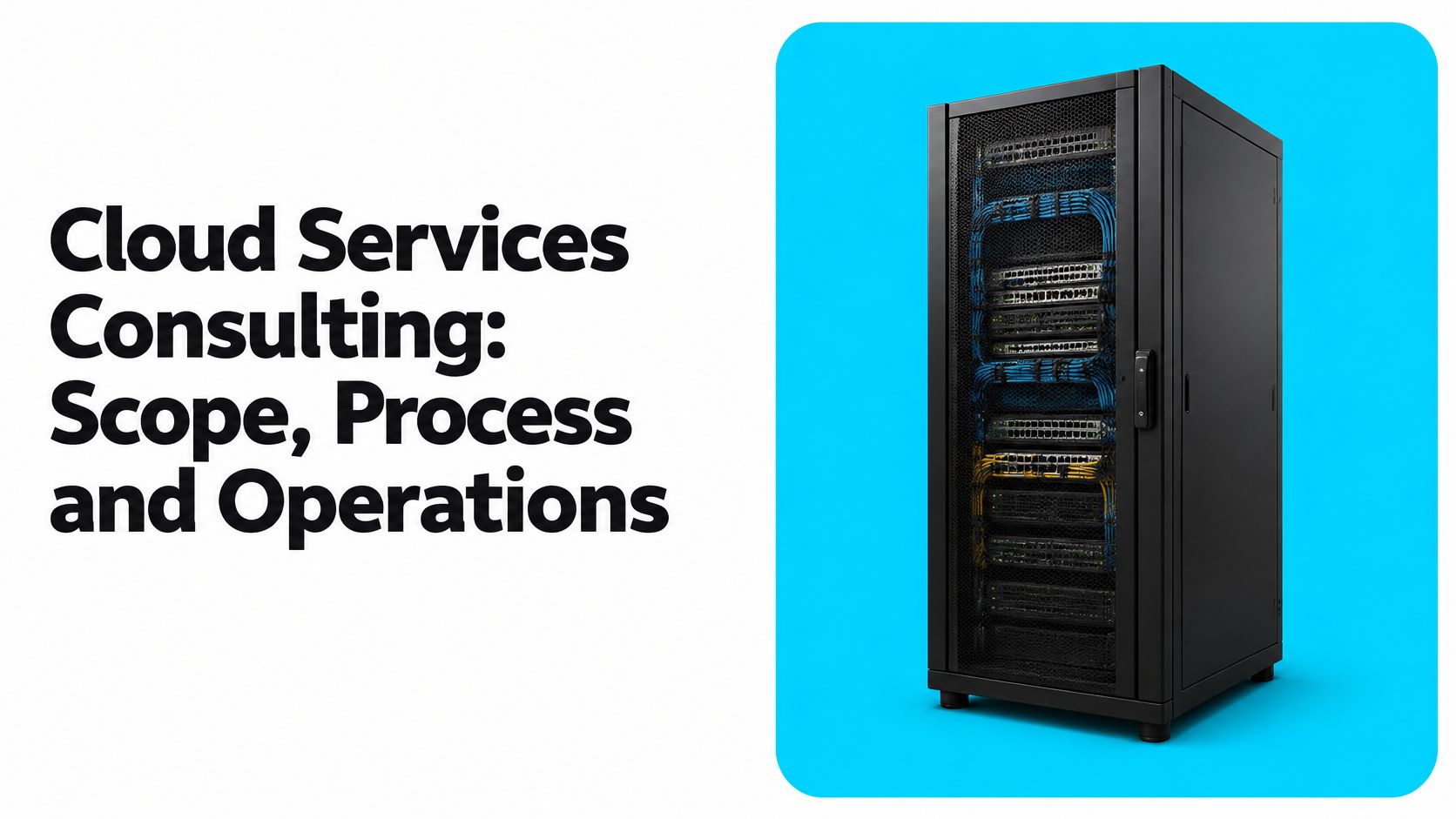
Your workloads are already scattered. Email and files sit in Microsoft 365, a few servers run in Azure, the ERP is still on premises, and every new request turns into a debate about access, cost, and who owns the fix when something breaks. Nothing is fully broken, but nothing is governed either. That's the point where cloud services consulting should stop being about moving boxes and start being about operating control.
What Cloud Services Consulting Covers
Think of a consultant as the architect and site supervisor, not the crew carrying boxes into a finished building. The crew matters, but the drawings, sequencing, and inspections decide whether the building is safe to occupy. Cloud work follows the same logic. Migration is visible, so buyers focus on it. The decisions before and after the move determine whether you can run the environment.
Six connected service areas
The Gartner public cloud spending forecast put worldwide public-cloud end-user spending at $723.4 billion in 2025, compared with $595.7 billion in 2024. That growth explains the demand, but it also explains the scope creep. You're rarely buying one move. You're buying assessment, design, integration, controls, and ongoing operation for systems that keep changing.
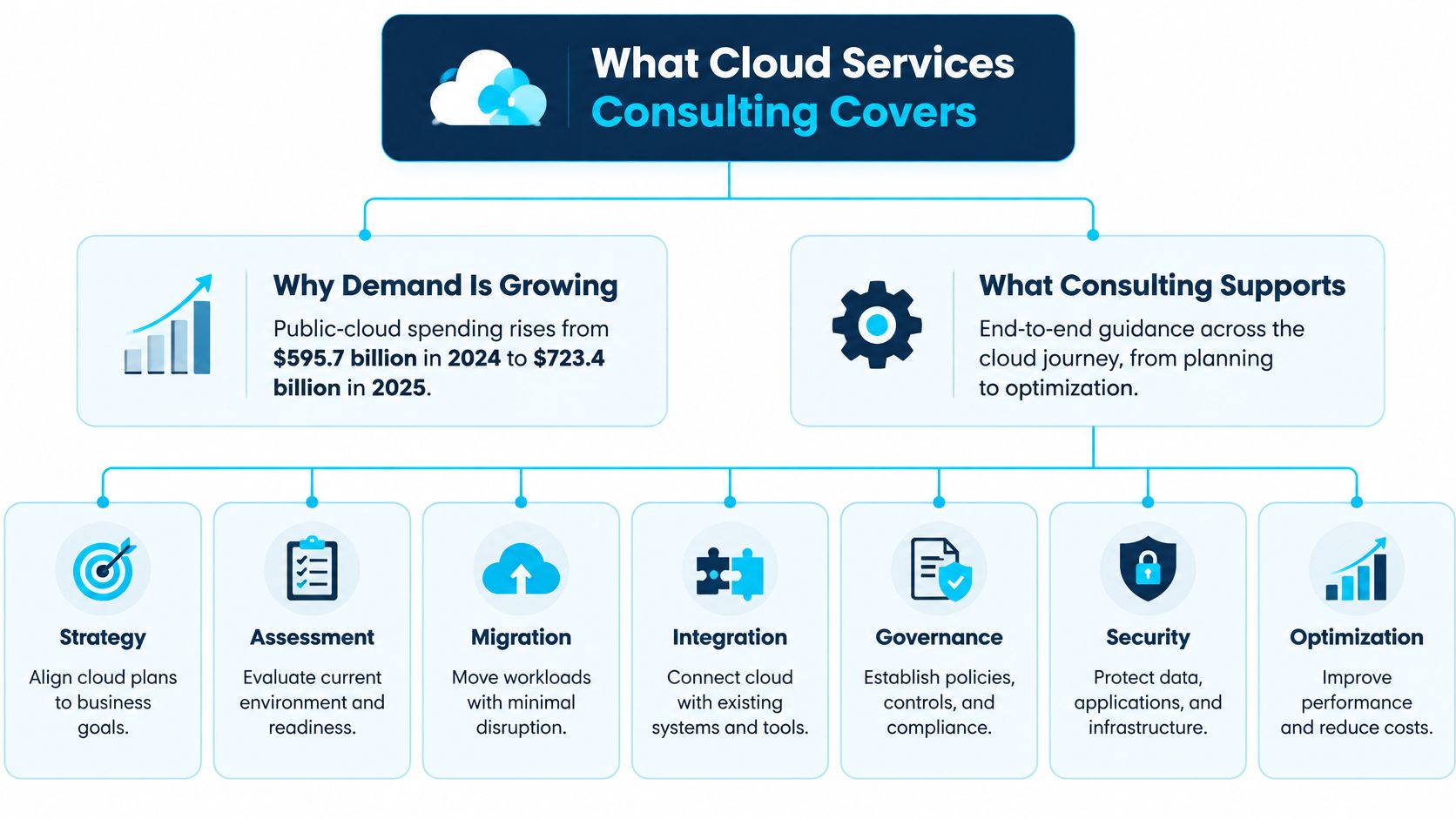
| Service area | What the consultant does | Typical deliverable |
|---|---|---|
| Assessment | Inventories workloads, costs and dependencies | Workload inventory and readiness scorecard |
| Architecture design | Defines the target landing zone and patterns | Landing-zone design and responsibility matrix |
| Migration | Moves workloads in planned waves | Migration runbook and cutover plan |
| Integration | Connects cloud and on-premises systems | Integration map and API inventory |
| Security and governance | Sets identity, policy and compliance controls | Control baseline and compliance evidence set |
| Operations and support | Monitors, tunes and hands over the environment | Runbooks, service-level objectives and support model |
Assessment comes first because you can't sequence what you haven't inventoried. The consultant records each workload, its owner, its data, its dependencies, and what breaks if it stops. Skip this and you'll discover dependencies during cutover, when fixing them is most expensive.
Architecture design turns that inventory into a target. A landing zone is the prepared foundation where workloads land, with networking, identity, logging, and policy already in place. Without it, each team builds its own version and you get five incompatible environments instead of one.
Where projects actually fail
Migration moves the workload, and integration reconnects it to ERP, CRM, Microsoft 365, file stores, and data feeds. Security and governance decide who can do what, how you prove it, and how changes get approved. Operations and support keep the whole thing observable after go-live, with alerts, runbooks, and owners.
Most failed projects don't fail during migration. They fail because assessment was thin or governance was never built, so the moved workload has no clear owner, no cost control, and no tested way back.
Use this quick check on your current project:
- Inventory exists: Can you list every workload, owner, and dependency in one document?
- Target is drawn: Do you have a landing-zone design, not just a provider account?
- Controls are written: Are identity, logging, and backup rules defined before go-live?
- Handoff is planned: Does someone own monitoring and changes on day one after launch?
If two or more answers are no, you don't have a migration problem. You have a scope problem, and adding migration effort won't fix it.
How an Engagement Unfolds from Discovery to Handoff
A good engagement is a chain of decisions, not a calendar of tasks. Each phase ends when you sign off on something specific. If a phase ends with a status meeting instead of a decision, that phase isn't finished.
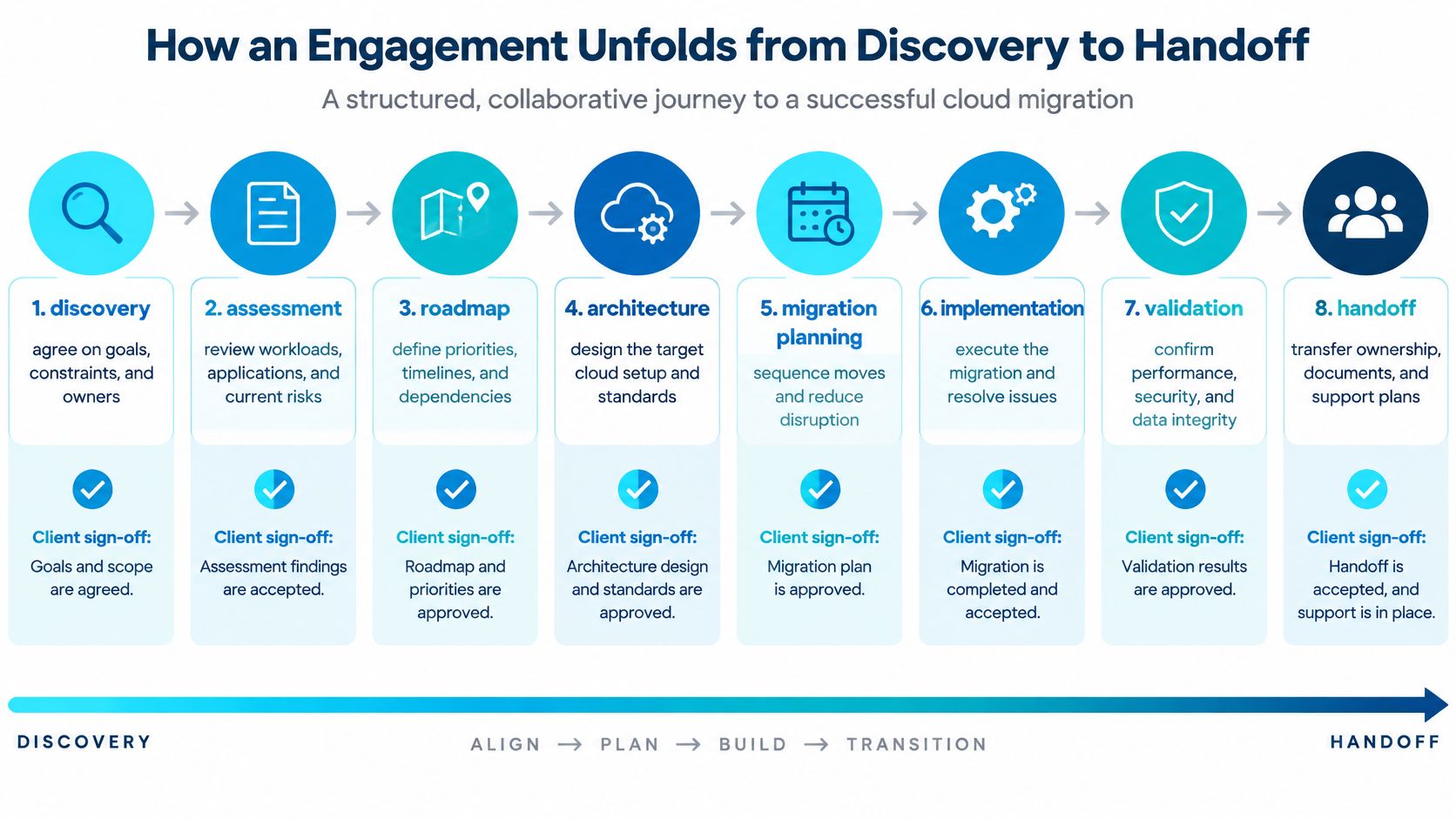
The eight phases and their sign-offs
Discovery. You agree the goals, constraints, budget guardrails, and named owners. Sign-off means stakeholders accept what success looks like and what is out of scope. Say a manufacturer wants faster purchase order processing, not just newer servers. That distinction changes everything downstream.
Assessment. The consultant inventories workloads and scores readiness, risk, and dependency depth. You sign off the inventory as complete. Anything missing here becomes a surprise later, so business owners, not only IT, should review it.
Target design. The team designs the landing zone, identity model, network layout, and responsibility matrix. You approve the design before build money is spent. This is the cheapest moment to change your mind.
Pilot. One low-risk workload moves first to prove identity, networking, monitoring, backup, and support handoffs. You sign off that the pattern works in production conditions, not in a slide deck. A reporting copy or a non-critical internal tool usually fits.
Migration waves. Remaining workloads move in groups, ordered by dependency and risk, each with a rollback path. You approve each wave's entry and exit criteria. Waves keep blast radius small. If wave two fails, wave one keeps running.
Integration and testing. Connected systems are tested against written acceptance criteria, including data accuracy, timing, and error handling. Business owners sign off, because they're the ones who'll notice wrong numbers.
Handoff. Runbooks, diagrams, access lists, and training transfer to your team. You sign off that your operators can run a normal week and handle a common incident without calling the consultant.
Ongoing support. Monitoring, tuning, cost reviews, and maturity checks continue on a schedule. You review results against service-level objectives and decide the next improvements.
Timing and the two phases teams compress
In a small estate, discovery and assessment can take a few weeks, while waves in a large, multi-site estate can run for several months. Duration follows dependency count and testing needs, not server count alone.
Teams most often squeeze the pilot and the handoff. Skipping the pilot means your first real test is a critical workload. Squeezing handoff means the consultant leaves with the knowledge in their head, and your team relearns it during the first outage. Protect those two phases even if you shorten others, because they convert a delivered project into an operable system.
Choosing IaaS, PaaS or SaaS for Each Workload
Start with one question per workload. What must the cloud model do for this system? Start by mapping workloads to the five characteristics in NIST's definition of cloud computing, which are on-demand self-service, broad network access, resource pooling, rapid elasticity, and measured service. If a workload doesn't need elasticity or self-service provisioning, a simple relocation may add cost without adding value.
The three models in plain terms
Infrastructure as a service (IaaS) rents you virtual machines, storage, and networks. The provider runs the physical estate, and you still own the operating system, patching, runtime, and application. You get control, and you keep the maintenance burden.
Platform as a service (PaaS) rents you a managed runtime, database, or integration platform. The provider patches and scales the platform, and you own your code, configuration, data, and access rules. You trade some control for less undifferentiated maintenance.
Software as a service (SaaS) rents you a finished application. The provider runs nearly everything, and you configure workflows and control your data and users. You gain speed, and you accept the provider's roadmap and limits.
| Layer | IaaS | PaaS | SaaS |
|---|---|---|---|
| Physical facilities and hardware | Provider | Provider | Provider |
| Virtualization and host platform | Provider | Provider | Provider |
| Operating system and patching | Customer | Provider | Provider |
| Runtime and middleware | Customer | Provider | Provider |
| Application code and configuration | Customer | Customer | Provider |
| Data, identity and access | Customer | Customer | Customer |
Read the last row carefully. Data, identity and access stay yours in every model. That's the confusion that causes breaches. Buying SaaS doesn't transfer accountability for who you gave access to or what data you put in.
The same workload, two different risk profiles
Say you're moving document processing that extracts data from purchase orders and submittals. On PaaS, you'd validate platform limits first. How large can files be, how long can a job run, where does data reside, which APIs connect to your ERP, and how do deployments get approved? The provider handles scaling and patching, so your testing focuses on throughput limits, API dependencies, and what happens when the platform throttles you during a month-end surge.
Put that same workload on IaaS and your checklist changes completely. You now write explicit procedures for patching, network segmentation, backup, and hardening, and you staff them. You also own capacity planning, so a surge becomes your problem to anticipate. IaaS can still be the right answer if the software needs a specific operating system or deep customization, but you should choose it knowing you've kept a maintenance job.
SaaS suits standard processes where your way of working doesn't need to differ, such as commodity email or a common customer relationship workflow. It fits poorly where a regulated approval chain or an unusual integration is the whole point.
The trade-off to name out loud
Every step from IaaS toward SaaS trades control for operating effort. Neither direction is automatically better. A licensing constrained engineering application may need IaaS, a new data pipeline usually belongs on PaaS, and a standard business function belongs on SaaS. Mixed estates are normal.
We don't introduce proprietary platforms that create new vendor dependencies, so the choice stays about fit and exit cost rather than lock-in. Before implementation, insist on the deliverables already defined for your engagement, applied per workload, so each system's responsibility split, dependencies, and service targets are written down and testable.
How to Migrate and Integrate Without Stopping Work
Keeping work running during a move isn't about speed. It's about sequencing, parallel running, and knowing how you'll go backward if a cutover misbehaves. These seven steps keep that discipline.
Seven steps, with the slip to avoid
Classify workloads by criticality and recovery need. A quality records system that stops shipments can't share a plan with a test server. The common slip is classifying by technical similarity, which groups systems by operating system instead of business impact.
Build a dependency map. Record links to ERP, CRM, Microsoft 365, file shares, data feeds, and scheduled jobs, including the quiet ones that run at night. Unmapped links cause most cutover surprises. Our legacy migration work moves customers off legacy data sources without breaking the business processes that depend on them, and that depends on this map being complete before anything moves.
Choose rehost, replatform, or refactor per workload. Rehosting moves a system largely as-is, replatforming swaps a component such as the database for a managed service, and refactoring rebuilds parts of the application. The slip is rehosting everything because it's fastest, then carrying old limits, old licensing, and old manual work into the new environment.
Pilot one low-risk workload. Prove identity, network paths, monitoring, backup, and support escalation with real users. The slip is piloting something so isolated that it proves nothing about your integrations.
Run waves with parallel running and a tested rollback. Keep the old source available while the new one proves itself, reconcile outputs, and rehearse going back. For the security and budget side of wave planning, the PushOps guide to cloud migration security and cost planning is a useful companion when you're setting controls and spend guardrails for each wave. The slip is having a rollback plan nobody has executed.
Test each integration against written acceptance criteria. Check data accuracy, timing, duplicate handling, and error alerts, not just whether a connection opens. Our Forge integration work covers ERP, CRM and Microsoft 365 integration, data pipelines and AI-ready foundations, APIs and custom business tools, and cross-system automation, and each of those needs its own pass or fail test. For a deeper look at connection patterns, see this overview of data integration platforms.
Cut over outside production peaks and confirm with the business owner. Pick a quiet window, freeze changes, and have the process owner validate real transactions before you declare success. The slip is letting the technical team declare completion while users are still working around gaps.
Moving legacy sources while processes keep running
A legacy database often feeds reports, labels, schedules, and a spreadsheet someone built years ago. Instead of switching it off, you can replicate its data into a cloud pipeline, point read-only consumers at the new copy first, and reconcile totals daily. Writers move last, once readers already trust the new numbers.
An API layer helps during the transition because it gives cloud and on-premises systems one stable doorway while the systems behind it change. Users keep working against familiar interfaces, and you replace what sits behind the doorway one piece at a time. That's slower on paper and much faster in practice, because you don't stop the plant to change the pipes.
Security and Sovereignty Controls to Design In
Sovereignty is often reduced to where data sits. That's too narrow. The useful question is broader. Can you keep operating, securing, and moving your workloads if a provider, region, policy, or contract changes? If the answer depends on hope, you have residency, not sovereignty.
Evidence that manual compliance is failing teams
A 2025 global cloud-security study found that compliance and legal issues were cited by 66% of respondents and 58% said compliance checks remained too manual, while 63% identified tool complexity as a major challenge. That combination matters. Teams aren't short of tools. They're short of controls that produce evidence automatically without adding another console to babysit.
Controls to design, in the order you'd build them
Start by classifying data and workloads by sensitivity, legal or export restrictions, recovery needs, and portability value. A controlled engineering drawing, a payroll extract, and a public marketing asset shouldn't share one rule set. Classification decides region, encryption, retention, and whether a workload can move at all.
Next, set identity boundaries. Use single sign-on, least-privilege roles, and separate administrative access from everyday access. Most cloud incidents become serious because an over-privileged account was available, not because encryption was missing. Network boundaries reinforce this, and private connectivity patterns such as those in this guide to Azure Logic Apps private endpoint patterns show how to keep integration traffic off public paths.
Then handle encryption and key control. Decide who holds the keys, who can rotate them, and what happens to encrypted data if you leave the provider. Client control matters here. Our clients own their data, code, configurations, documentation, and client-specific work product, while we keep our pre-existing frameworks and accelerators. That split should be contractual, not conversational.
Document a provider exit plan while you're still friends with the provider. It should name export formats, data volumes, egress steps, identity re-creation, and tested recovery procedures. An exit plan you've never tested is a paragraph, not a capability.
Finally, automate compliance checks so they emit evidence continuously. You want time-stamped control results an auditor can sample, not screenshots assembled under pressure before a review.
Design rule: Adding a second cloud provider adds options, but it also multiplies policy sets, identity models, and monitoring gaps. Multi-cloud isn't sovereign or resilient by default.
Questions you should answer in writing before sign-off
- Classification: Which workloads are restricted, and what rule restricts each one?
- Keys: Who can create, rotate, and revoke encryption keys today?
- Exit: How long would a full export and rebuild take, and when did you last test part of it?
- Evidence: Which controls generate evidence automatically, and which still need a person?
If you can't answer those four in writing, your security baseline isn't ready to sign, whatever the architecture diagram says.
Designing for Outages and Recovery
Uptime percentages hide the central question. What does an hour of failure cost a specific workflow? The Uptime Institute outage analysis reports that 57% of respondents in Uptime Institute's 2025 survey reported that their latest major outage cost more than $100,000, and failures at aggregated third-party cloud, colocation, and hosting providers were the second most commonly cited cause of IT service failure. Your provider can be the failure. Plan for that directly.
Calculate impact by workflow
Walk through your top workflows one at a time. If procurement intake stalls, purchase orders pile up in email and someone rekeys them later. If production scheduling halts, supervisors fall back to whiteboards and the schedule drifts for days. If quality records become unavailable, shipments wait, audits stall, and staff reconstruct evidence by hand.
Write down the cost of delay, rework, and penalties for each. You'll usually find a short list of workflows that justify expensive resilience and a long list that don't. That ranking is what keeps resilience spending rational. For a wider view of continuity structure, the Server Scheduler material on cloud infrastructure recovery planning helps frame how recovery planning connects to broader business continuity.
Design responses matched to the ranking
For top-tier workflows, use multi-zone deployment so one facility failure doesn't stop the service. Isolate dependencies so a failing reporting service can't take down order intake. Put queue-based buffering in front of intake points, so submissions wait safely and process when the downstream system recovers instead of being lost.
Long-running work needs special care, because a restart shouldn't restart a four-hour job from zero. Patterns for stateful task orchestration on Azure show how state can survive interruptions so work resumes from a checkpoint.
Then set two numbers per tier:
- Recovery time objective (RTO): How long the workflow may be down before harm becomes unacceptable.
- Recovery point objective (RPO): How much data, measured in time, you can afford to lose or re-enter.
A backup is not a recovery
A backup that has never been restored is a hope with a timestamp. Recovery is proven only by restoring.
Your restoration test should measure actual RTO and RPO performance under realistic conditions. Check application consistency, not just file presence. Confirm identity services are available, because a restored system nobody can sign into isn't recovered. Time the operator runbook with the people who'd run it at night, and record where they got stuck. Fix those points, then test again. That loop, not a backup success report, is your evidence.
Measuring Post-Migration Maturity and Ongoing Support
Go-live proves a workload runs in the cloud. It doesn't prove your organization can run it the same way in every plant, office, and engineering group. That gap is measurable, and it shows up clearly in manufacturing.
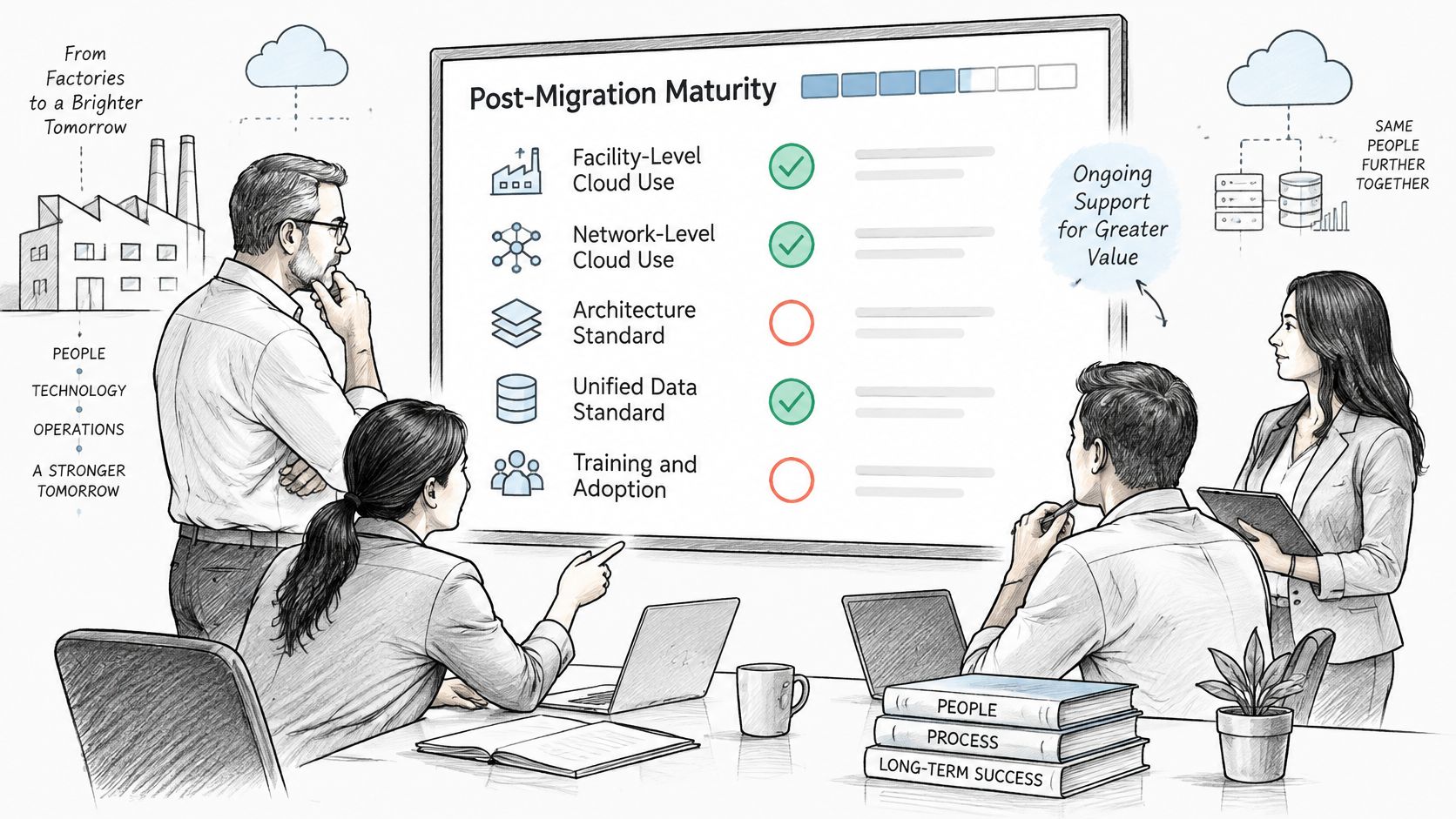
Adoption has outpaced standards
Deloitte's 2025 survey of 600 large U.S. manufacturing executives found that 57% use cloud computing at the facility or network level, yet only 45% report an architecture standard, 54% a unified data standard, and 48% a training and adoption standard.
| Standard | Share reporting it | Gap to cloud use (57%) |
|---|---|---|
| Architecture standard | 45% | 12 points below |
| Unified data standard | 54% | 3 points below |
| Training and adoption standard | 48% | 9 points below |
Read that as an operating warning. More organizations use cloud than have agreed how to build, describe, or teach it. Local teams fill the vacuum with local choices, and consistency disappears.
Four checks you can run after go-live
- Is the data trusted? Collect data-quality reports showing completeness, duplicate rates, and reconciliation against source systems. If users keep private spreadsheets because they don't trust the dashboard, you've failed this check regardless of what the pipeline logs say.
- Do integrations recover cleanly? Track integration error rates, retry success, and time to clear a failed queue. Deliberately pause a source system in a test window and watch whether alerts fire and work resumes without manual re-entry.
- Are workflows adopted? Measure active users, completion rates, and bypass behavior, such as approvals still happening by email. Adoption metrics tell you whether training and process design worked, or whether staff routed around the new system.
- Can AI applications be monitored and maintained? Keep model-monitoring logs for accuracy, drift, cost per request, and human overrides. If nobody can say who retrains or retires a model, it's unmanaged.
Ownership and justified variation
Assign a named owner for each standard after handoff, with authority to approve exceptions. Some local variation is justified, such as a plant with a different regulatory constraint or equipment interface. Variation that exists only because two teams built separately isn't justified, and it should be standardized on a dated plan.
Ongoing support should then cover continuous monitoring, quarterly reviews against your service-level objectives, cost and capacity tuning, and training refreshes for new staff. Treat those reviews as the deliverable. The migration was the event, but the reviews are where operating control either compounds or deteriorates.
Choosing a Cloud Consulting Partner and Your First Step
Don't start by comparing technology logos. Start by checking how a partner works when something is ambiguous, late, or wrong. Six criteria expose that quickly.
Six criteria to check against a real proposal
- Named and senior team: Are the actual people named, with roles you can hold accountable? We run every engagement with a named, two-person senior delivery team made up of a Solution Architect / Delivery Engineer and a Program Manager, and our Solution Architect / Delivery Engineer is the same person from month to month for a customer. Continuity matters because context walks out the door when teams rotate.
- Written acceptance criteria: Is each deliverable judged against criteria agreed before implementation, or against effort spent? Criteria turn disputes into inspections.
- Predictable pricing: Can you tell what next quarter costs before it starts?
- Client ownership: Do you own your data, code, configurations, and documentation at the end, in writing?
- Portable architecture: Could another competent team take over, or does the design depend on one proprietary platform only the vendor can operate?
- Discovery handled by an engineer: Does a senior engineer examine your actual constraints, or does a sales process fit you into a package? On our discovery call, a senior engineer, not a sales rep, walks through your challenges and recommends a path forward.
What the pricing models do to predictability
A fixed-scope assessment gives you a known price for a bounded answer, such as readiness or a target design. It's predictable, but it doesn't deliver ongoing change. Time-and-materials delivery is flexible and works when scope is uncertain, but your cost rises with every surprise, so predictability is weakest. A retainer for ongoing support reserves capacity for a steady monthly amount, which makes budgeting predictable and keeps the same team available, provided the roadmap and acceptance criteria stay explicit.
Match the model to the work. Buy an assessment when you need a decision, time-and-materials for a short uncertain investigation, and a retainer when you need continuous improvement after go-live.
Fit and your first step this week
A Microsoft and Azure focused firm fits when your estate already runs on Microsoft 365, Azure, and connected ERP, CRM, and engineering systems, because identity, data, and integration patterns align. A broader multi-cloud vendor may fit better if you deliberately run several providers at scale and need deep benches in each. Neither is superior in the abstract. Fit follows your estate.
This week, write four things on one page:
- Your workloads and the systems each one depends on.
- The named owner for each workload.
- The outage cost for your top three workflows, even as a rough operational estimate.
- The decision each stakeholder must make before work can start.
Bring that page to a readiness assessment request. It turns a vague conversation about moving to the cloud into a specific discussion about control, risk, and sequence, which is where a good engagement begins.
If you're weighing a migration, a Microsoft 365 and Azure integration, or support for a cloud environment that's live but not yet governed, we can help you turn that one-page workload list into a readiness assessment, a target design, and client-owned deliverables your team can operate. Visit Ryshe to book a discovery call with a senior engineer and map your first wave, your controls, and your handoff plan.