What Is Invoice Processing? a Practical Guide for AP Teams
What is invoice processing? Learn the stages, stakeholders, controls and challenges, and how automation changes cost and accuracy.
If your software can read almost every invoice, why do so many still sit waiting while someone chases a purchase order, fixes a price, or tracks down an approver? That gap is where many teams misread what invoice processing is. Reading a document is only the entry point. The harder work is proving the business should pay it, recording the liability correctly, and resolving every mismatch that blocks payment.
Automating that workflow can produce measurable savings per invoice, though the size of the gain depends on invoice volume, document format, and how much manual work remains.
The clearest way to judge the process is not how many pages your tools can scan. It is how many invoices travel from receipt to payment without anyone touching them, and how quickly the exceptions get resolved. Invoice processing works like an inspection before money leaves: once you see the controls behind each step, the difference between fast scanning and reliable processing becomes much clearer.
Invoice Processing Defined in Plain Terms
Invoice processing is the accounts-payable workflow that turns a supplier invoice into a validated, approved and paid transaction recorded in the company's books.
Picture a customs checkpoint for money leaving the business. Every invoice arrives claiming that goods or services were supplied and payment is due. Your team inspects that claim before allowing cash through.
Say a manufacturer orders steel, receives it at the loading dock, and later gets the supplier's bill. Before paying, someone has to receive the invoice, capture its data, check the supplier and amounts, match it against the purchase order or delivery record, route it for approval, record it in financial systems, and authorize payment.
Four terms worth separating
- Accounts payable: The function that owns the whole process and the money owed to suppliers.
- Invoice: The supplier's request for payment.
- Purchase order: The buyer's earlier commitment, including what was ordered and at what price.
- Goods-receipt record: Confirmation of what arrived.
Invoice processing checks the invoice against those records before any money moves.
Visual documents and structured invoices
A PDF looks like an invoice, but software may still have to extract every field from the page. By contrast, European Union legislation summarized by the European Commission defines an electronic invoice as one issued, transmitted, and received in a structured format that permits automatic and electronic processing. European Commission analysis estimates benefits of approximately €5.28 per e-invoice issued and €8.40 per e-invoice received, using a labor-cost assumption of €46 per hour.
A structured file can pass supplier identity, invoice number, tax, line items, and totals directly into an accounting or ERP system. That's why invoice processing is a controlled transaction lifecycle, combining capture, validation, duplicate and fraud checks, approval, and payment. It isn't just data entry.
The Stages Every Invoice Passes Through
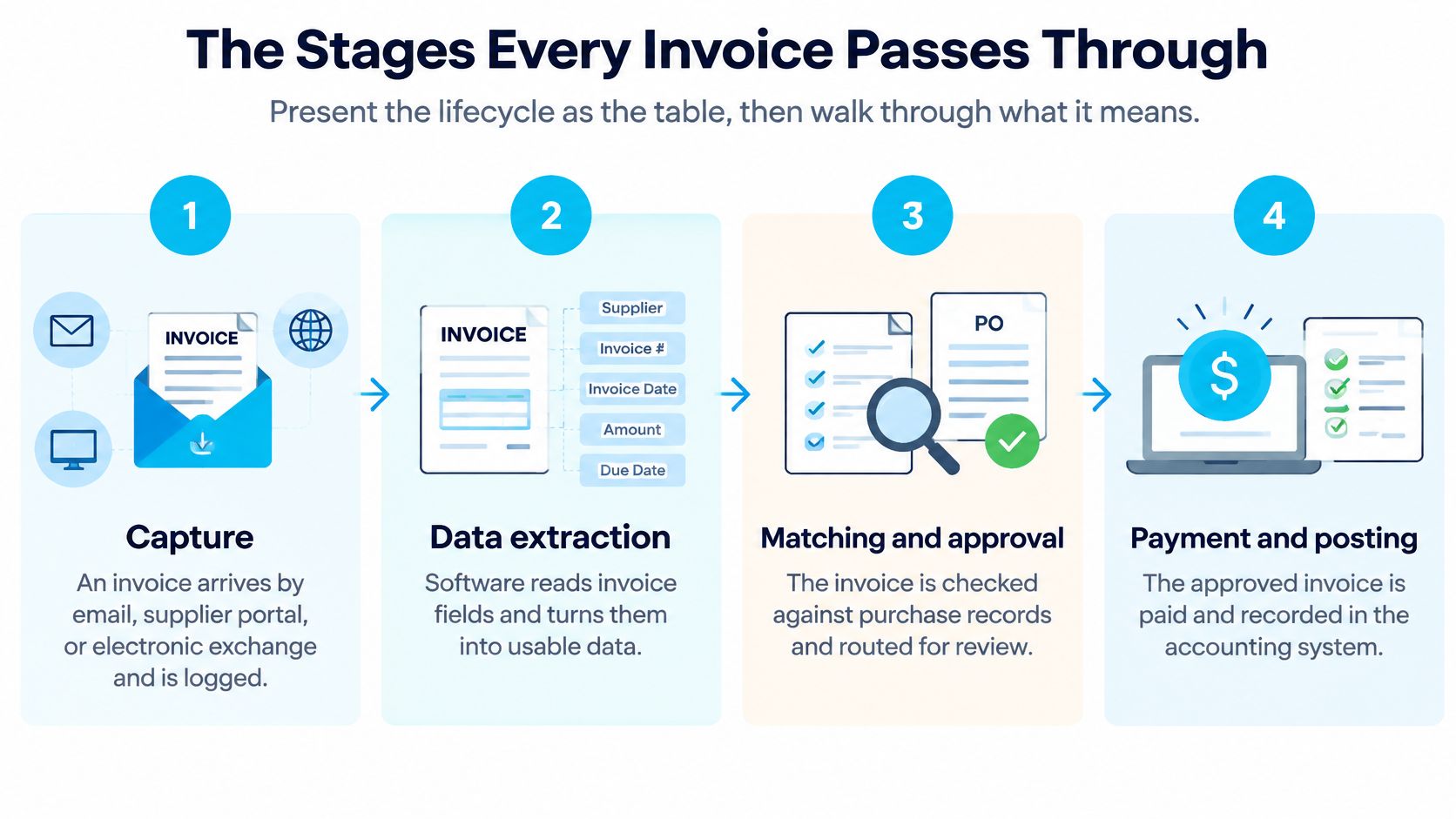
Every invoice should follow the same controlled path, whether it arrives on paper, as a PDF, or as structured data. The table below shows what happens at each stage and the payment problem that stage is designed to prevent.
Invoice lifecycle stages and what each one prevents
| Stage | What Happens | What It Prevents |
|---|---|---|
| Capture | Invoice received by email, portal or electronic exchange and logged | Lost or unlogged invoices |
| Data extraction | Supplier, number, dates, tax, lines and totals read into fields | Manual re-keying errors |
| Validation | Supplier, tax, currency and amounts checked against master data | Payments to unknown or incorrect suppliers |
| Duplicate check | Invoice number and amount compared with past invoices | Duplicate payments |
| Three-way match | Invoice compared with purchase order and goods receipt | Paying for undelivered or mispriced goods |
| Exception routing | Mismatches sent to a review queue with a named owner | Ambiguous invoices entering the payment run |
| Approval | Budget holder or project manager confirms the spend | Unauthorized commitments |
| ERP posting | Liability recorded with correct accounting codes | Misstated ledgers and cost reports |
| Payment authorization | Approved invoices scheduled and released | Late payment or payment before approval |
Why the three-way match matters most
The three-way match compares invoice quantities and prices with the purchase order and goods-receipt record before posting. If the order says 100 units, the dock received 90, and the invoice charges for 100, the invoice shouldn't pass just because extraction read it accurately.
That sequence creates a useful cause and effect chain. Structured extraction enables rule-based validation. Validation finds discrepancies before payment. Exception routing then keeps ambiguous invoices out of the payment run until a person resolves them.
Many teams are still far from that ideal. A 2025 accounts-payable survey reported that 66% of organizations still manually entered invoice data into their ERP. Organizations processing 5,001 to 10,000 invoices monthly spent more than five days on the task without automation, compared with about two days in mostly automated environments.
For a deeper operational walkthrough, a practical guide for AP teams is useful alongside your own process map. If your approvals run through Microsoft tools, compare that with an Azure Logic Apps purchase order approval integration to see how routing and system handoffs can be structured.
Before changing software, mark which stages in the table are manual in your business today. Those marks usually reveal where delay and rework begin.
An invoice isn't processed when it's readable. It's processed when it's proven, approved, posted, and ready to pay.
Who Owns Each Stage and Where Invoices Stall
Invoice delays often look like software problems, but they're frequently ownership problems. Each stage needs a person who can answer a specific question and move the invoice forward.
Who checks what
- Accounts-payable clerks: Capture invoices, validate fields, check duplicates, and manage payment readiness.
- Buyers or procurement staff: Confirm the purchase order, agreed price, and supplier terms.
- Receiving staff or site managers: Confirm that goods arrived or services were delivered.
- Project managers or budget holders: Approve the spend against the correct job, department, or budget.
- Controllers: Review accounting codes, tax treatment, accruals, and unusual transactions.
- Suppliers: Submit complete invoices with the right references, quantities, prices, and tax details.
No single group can validate everything. AP can see that an invoice is internally consistent, but only the receiver knows whether a delivery was short. Procurement knows the contracted price, while the budget holder knows whether the work belongs to their project.
Three common stall points
First, supplier-master data may not match the invoice. A supplier might trade under one name, bank under another, and appear in the ERP under a third. Validation then stops while someone investigates whether it's the same business.
Second, teams sometimes raise the purchase order after delivery. The goods may be legitimate, but the match still fails because the commitment wasn't recorded when the order was placed. AP then has to reconstruct approval after the fact.
Third, approval may be routed to someone who has changed roles or left the company. The invoice sits untouched, and nobody notices until the supplier calls.
Say a subcontractor submits an invoice tied to a progress claim. The site manager hasn't approved the percentage of work claimed, so the invoice enters the exception queue. If that queue has no named owner or response target, it can sit for weeks while the subcontractor chases AP for an answer AP can't give.
Segregation of duties adds another control. The person who creates or changes a supplier record shouldn't also approve that supplier's payments. Separating those duties makes fraudulent supplier setup and payment diversion harder.
Most stalled invoices aren't waiting for better extraction. They're waiting for a missing fact, a corrected record, or a decision from the right owner. Clear ownership is therefore part of the control system, not administrative decoration.
What Manual Processing Costs and What Automation Changes
Start with labor arithmetic, because it is the cost you can verify with a timesheet. An AccountingWEB industry benchmark describes manual processing as taking roughly 5 to 15 minutes per invoice, depending on complexity and re-keying from paper or PDF files.
Take an AP team handling 500 invoices per month. At 10 minutes per invoice, that works out to about 83.3 staff-hours monthly. Using a UK fully loaded finance-administration rate of £22 per hour, labor alone costs approximately £1,833 per month, before corrections, filing, and approval delays enter the picture.
Errors carry a second cost that arrives later, disguised as rework. Manual entry produces duplicate payments, keying mistakes, incorrect accounting codes, and missed approvals, and the benchmark below puts manual error rates at about 2%. Each mistake costs more than the original entry: someone reverses the posting, answers the supplier's query, and rebuilds the audit trail afterward.
Manual and automated work side by side
Manual versus automated accounts payable at a glance
| Metric | Manual AP | Automated AP |
|---|---|---|
| Invoices processed per AP FTE per year | 6,082 | 23,333 |
| Invoice error rate | About 2% | About 0.8% |
| Time to capture and key one invoice | 5 to 15 minutes | Extraction runs automatically; staff handle exceptions |
The throughput and error figures come from APQC-based accounts-payable reporting, which found approximately 6,082 invoices annually per AP FTE in a completely manual process and 23,333 in a fully automated one, with invoice-error rates of roughly 2% manually and 0.8% with automation.
The gap comes mainly from removing repeated touches. Staff stop opening attachments, keying the same fields, chasing approvals by email, and filing copies in several places. Validation rules also run on every document at the same standard, including duplicate checks that people tend to skip under pressure.
Treat these figures as directional benchmarks. Results vary with document variability, supplier discipline, matching quality, and how well the workflow connects to purchasing, receiving, and the ERP. The same upstream discipline applies in contract intelligence for manufacturers, where agreed terms only help when downstream transactions are checked against them.
Practical rule: Don't judge automation by extraction speed alone. Track whether the complete invoice reaches an approved ERP liability with fewer touches and fewer corrections.
Five measures test the whole loop: straight-through processing rate, first-pass match rate, exception rate, cycle time, and cost per invoice. Add duplicate-payment incidents and invoices per AP FTE for a fuller control picture. Of these, the two worth watching weekly are the share of invoices that reach a posted liability untouched and the time exceptions spend waiting for an owner. A tool that reads every invoice quickly while half of them still stall in a queue has only relocated the bottleneck.
Why PDFs Are Not Structured Invoices
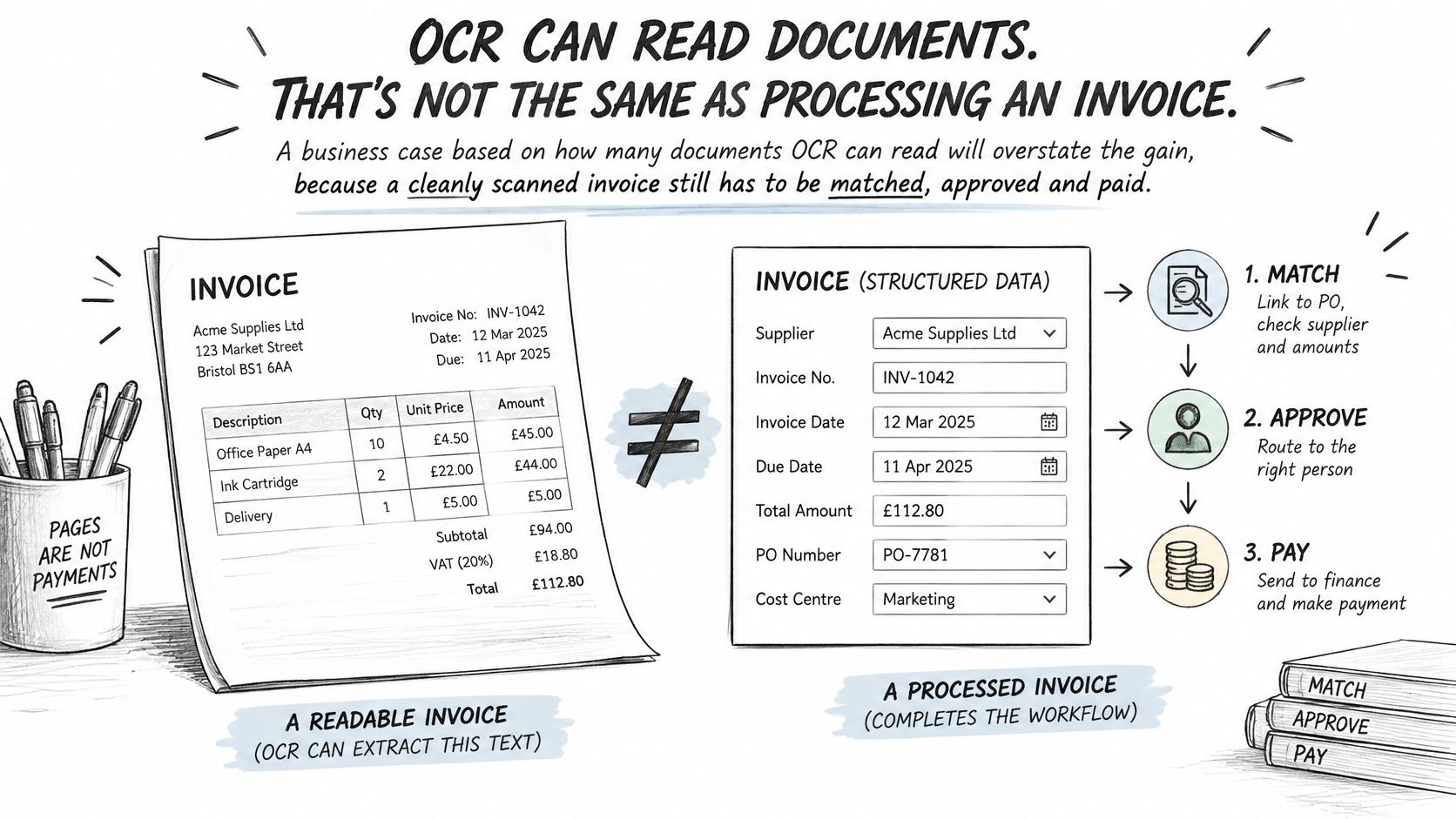
A business case built on how many documents OCR can read will usually overstate the gain. Reading an invoice and processing an invoice are different jobs. OCR works like a careful typist: it copies what is on the page, but it cannot confirm that any of it is true, and a cleanly scanned invoice still has to be validated, matched, approved, posted, and paid.
The European Commission defines eInvoicing as exchanging invoice data in a structured, machine-readable format that enables automated processing without manual input. A PDF carries a picture of that information for a person or OCR to interpret, while a structured invoice carries the data itself in defined fields a system can act on. Under the EU VAT in the Digital Age package adopted in March 2025, the European Commission eInvoicing guidance schedules structured eInvoicing and near-real-time digital reporting for cross-border EU transactions to become mandatory from 1 July 2030.
Structure alone does not produce a touchless result. Automation comes in degrees.
Straight through means everything lines up
An invoice can move without intervention only when supplier identity, purchase-order reference, tax fields, prices, quantities, receiving data, approvals, and duplicate checks all align. If one element fails, the invoice becomes an exception.
The remaining work concentrates in those exceptions. A buyer may need to confirm a price change, a site manager may need to verify a partial delivery, or AP may need the supplier to correct a tax number. Sharper OCR cannot supply facts that are missing from the document, and it cannot settle disagreements between systems about what was ordered or received.
Say two invoices arrive for the same job in the same week. The first is structured, carries the purchase-order number, matches the goods receipt, and passes every check, so it is paid untouched. The second is a scanned PDF missing its PO number. It reads cleanly but cannot be matched, so it raises a supplier query and waits until a buyer confirms the order.
Both documents were readable. Only one was processable.
The example shows why extraction accuracy is an incomplete measure. It tells you whether the software copied the page correctly, not whether the business can safely pay.
Measure two outcomes instead: the percentage of invoices reaching payment without human intervention and the average time taken to resolve an exception. Together, they show how much work automation removes and how well your team handles the work that remains.
Compliance Rules That Reshape the Workflow
Invoice processing used to be described as one universal workflow. That's becoming harder to defend because format, tax, reporting, and retention requirements now vary by jurisdiction.
The European Commission country guidance on eInvoicing states that Germany requires businesses to be able to receive EN-compliant B2B eInvoices from 1 January 2025. Issuing obligations are phased in for larger businesses from 2027 and extend to all businesses by 2028.
At EU level, the 2025 ViDA reforms allow national mandates and set a future default for structured intra-EU B2B invoicing. The harmonized obligation begins in 2030.
Build for change, not one country
The design challenge is avoiding a brittle workflow with one country's rules hard-coded into every step. A more durable operating model separates stable invoice data from local requirements:
- Canonical invoice data: Keep one internal representation of supplier, lines, taxes, totals, and references.
- Country-specific adapters: Convert that data into required local formats without rebuilding the core workflow.
- Tax validation: Check tax identifiers, rates, currencies, and transaction rules before posting.
- Audit trails: Record who received, changed, approved, and released each invoice.
- Correction and credit-note links: Connect amended documents to the original transaction.
- Access controls: Limit supplier changes, approvals, and payment release by role.
- Retention periods: Keep invoices and supporting evidence for the period each jurisdiction requires.
- Human review: Route ambiguous or high-risk transactions to a person instead of forcing automatic approval.
This matters especially for engineering, construction, industrial, and aerospace organizations. They buy across borders, handle subcontractor invoices, and match charges against purchase orders, goods receipts, contracts, or progress claims. A local format change shouldn't force them to redesign project approvals or receiving controls.
Compliance deadlines may therefore become the main reason to modernize. Labor savings still matter, but a workflow that can't receive, validate, retain, and report invoices in the required format creates a more immediate business risk.
Map Your Invoice Workflow Before You Automate It
Don't start by selecting extraction software. Start by proving where invoices wait, why they fail, and what a clean transaction should look like.
- List invoice types and volumes: Count recurring, project, subcontractor, and non-PO invoices separately.
- Map every manual step: Rank automation candidates by impact and feasibility, as we do in process discovery.
- Check supplier and PO discipline: Clean master data and timely purchase orders prevent many failed matches.
- Set tolerances and thresholds: Define acceptable price or quantity variances and field confidence levels for auto-approval.
- Assign exception ownership: Give every queue a named owner and response time.
- Record your baseline: Measure cycle time, error rate, cost per invoice, and straight-through rate before rollout.
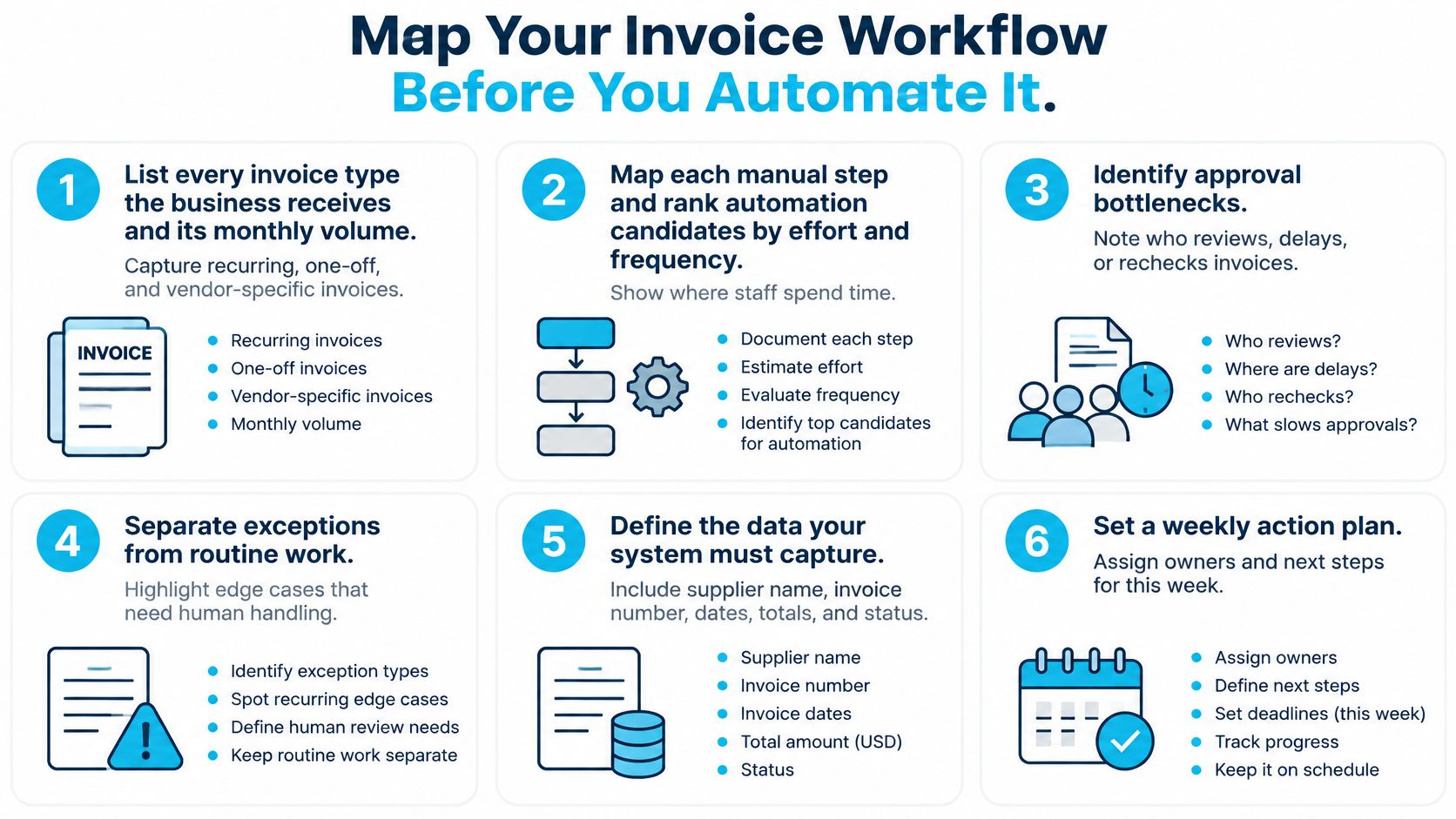
A practical first phase is a two-week document audit covering document types, volumes, workflows, and pain points. In weeks 1 to 2 of our Document Intelligence work, that's exactly what we audit before testing extraction against your own documents. For broader context on where invoice work sits upstream, read about automation in procurement, and compare implementation approaches in this overview of how to automate invoice processing.
Judge any provider, Ryshe included, against the six points above. Ask how it handles exceptions, what thresholds it uses, and how it reports straight-through rate against your baseline. Don't accept a vendor's figures in place of your own measurements.
If your AP team is ready to move from manual invoice handling to controlled automation, Ryshe Forge offers document and operations automation for invoice, purchase order, contract, and submittal processing, including intelligent intake, routing, approval, and compliance workflows. Visit Ryshe to discuss an audit of your document types, volumes, workflows, and pain points, and to build a practical automation roadmap measured against your own baseline.