Document Management Lifecycle: Every Stage Explained
Learn the document management lifecycle from creation and review to retention and disposal, with stage controls, metadata rules and failure points.
You've found the drawing the site team needs, but the approval is buried in an email thread. Someone has printed a different revision, and the shared drive contains a scan marked final that nobody can explain. Before releasing anything, you have to establish which document people can trust.
A document management lifecycle makes those decisions explicit. It assigns an owner, status, and set of controls as information moves from draft to working document to retained evidence. Scanning paper is only the beginning. The scan, email attachment, exported spreadsheet, and AI-generated summary all need rules for how they're used and what eventually happens to them.
The Six Stages of the Document Lifecycle at a Glance
Lifecycle stages, actions and controls
| Stage | What happens | Control to set | Typical owner |
|---|---|---|---|
| Create | Author drafts and names the file | Template and naming convention | Author |
| Capture and classify | Document enters the repository and gets type and project tags | Mandatory metadata at intake | Document controller |
| Review and approve | Reviewers mark up, approver sets status and version | Approval status and revision number | Reviewer and approver |
| Use and store | Users find, share and edit the document | Access permissions and check-in or check-out | Project team and IT |
| Retain | Document is kept for its schedule period | Retention category and trigger date | Records manager |
| Dispose or archive | Record is destroyed or moved to long-term storage | Disposition approval and audit log | Records manager and legal |
Create. An author starts a specification, purchase order, or inspection report using an agreed template and filename, rather than inventing a personal filing method.
Capture and classify. A document controller brings the document into the managed repository and assigns the information needed to identify its business purpose.
Review and approve. Reviewers check the content, resolve comments, and send the identified revision to someone authorized to release it.
Use and store. The project team works from approved information while IT maintains access, availability, and editing controls.
Retain. The records manager keeps the evidence for the period established by its schedule, measured from the applicable business event.
Dispose or archive. Authorized staff either destroy eligible records or transfer them into managed long-term preservation, recording what they did.
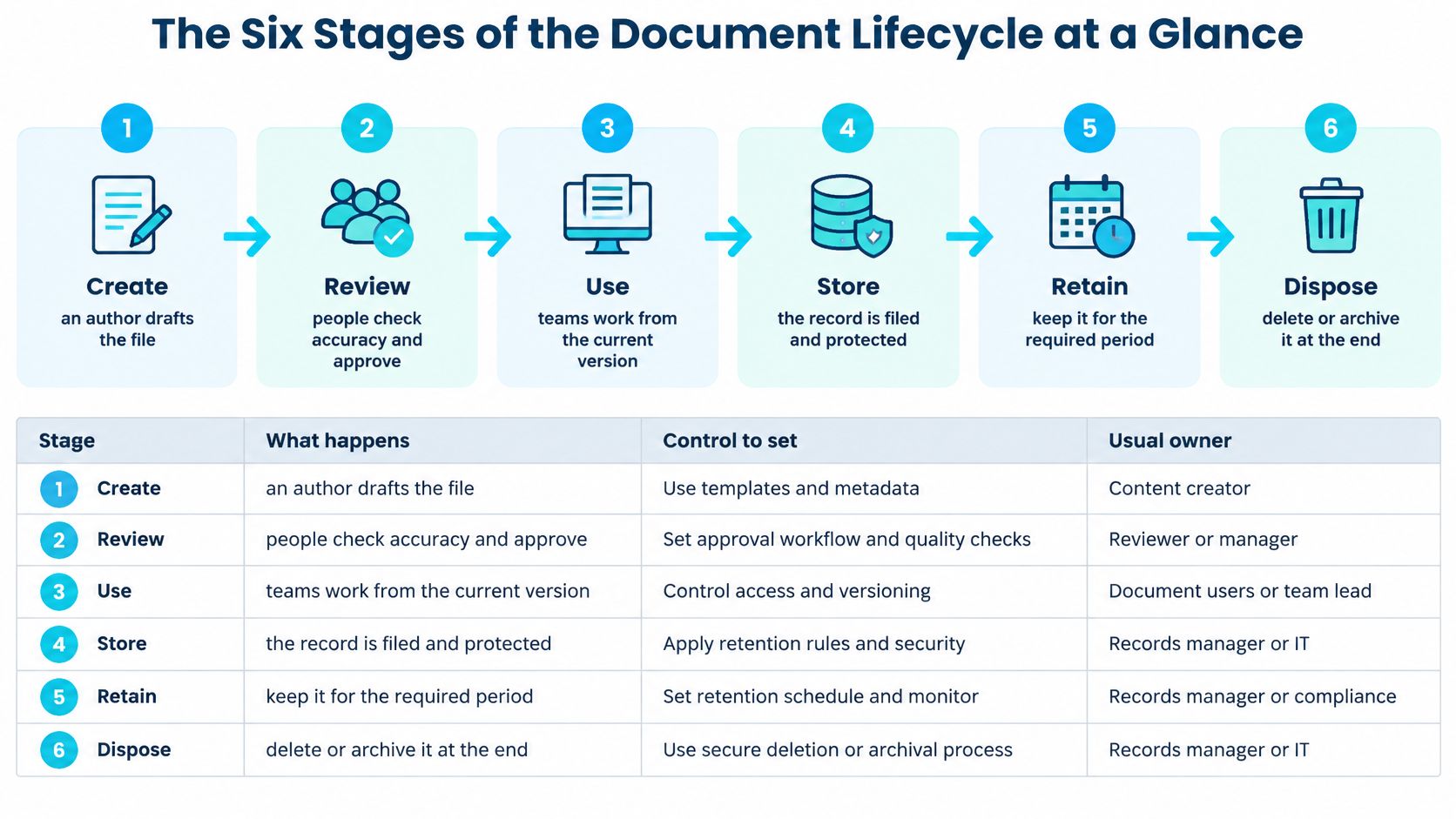
Read the map as a loop
The diagram separates review, use, and storage for simplicity. The operational table also makes intake explicit and combines use with storage, because staff need protection and retrieval controls while they're working. The labels matter less than ensuring no responsibility disappears between them.
A manufacturing work instruction illustrates the loop. An engineer drafts it, quality approves it, and operators use the released revision. If a machine change alters the setup procedure, the engineer creates a controlled revision and sends it through review again. The previous release remains identifiable rather than being overwritten.
Retention rules should be assigned early, even when their countdown won't begin until closeout, termination, or another event. Likewise, storing a draft doesn't mean it has entered its retention phase. Storage is an activity; retention is a governed obligation.
Apply a simple test to any file: Can you name its current stage, its owner, and the control that applies right now? If the answer requires guessing, you've found a lifecycle gap.
Why Documents Need a Managed Lifecycle, Not Just a Folder
Say a steel shop drawing sits in several project folders. Two copies are labelled final, another is superseded, and nobody can establish which one reached the fabricator. The folder structure tells you where the files are, but not which instructions were authorized.
If someone fabricates from the superseded drawing, the team may discover the mistake during installation. Finding the correct file afterward doesn't establish who issued the wrong one or whether the recipient acknowledged the replacement.
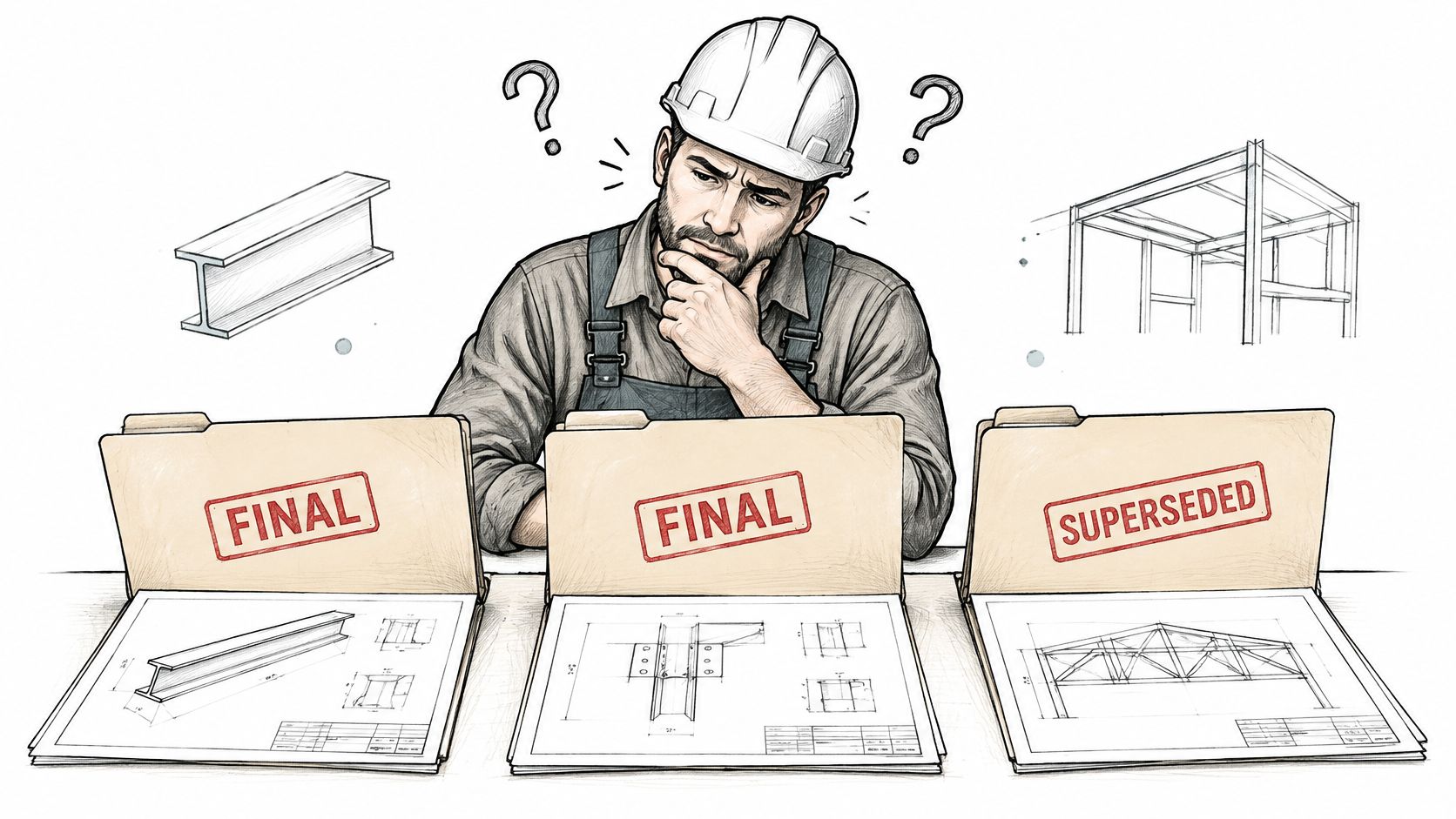
A location isn't a history
Think of a library. A book's position on a shelf is useful, but readers also need its edition, catalogue entry, and availability. Project teams need comparable context: release status, approval history, distribution evidence, and any restrictions on use.
A document carries information. A record provides evidence of an activity or decision. The same drawing can serve both purposes, so the system must protect its evidential value without making everyday retrieval cumbersome.
Lifecycle management also supports decisions about what no longer needs active storage. Documind's guide to reduce costs through information lifecycle management offers useful context for connecting information handling with storage and operational choices. Cost control shouldn't mean indiscriminate deletion, however. Staff need an authorized basis for removing material.
A folder answers where a file sits. A managed lifecycle establishes what people may do with it.
Ask these questions whenever ownership is unclear:
- Who owns it? Name the role accountable for its business purpose and release.
- Which copy is authoritative? Identify the version people should rely on.
- When can it be destroyed? Establish the governing schedule and any restriction that prevents disposal.
Creating, Classifying and Tagging Each Document
Metadata is the information that makes a document understandable outside the author's memory. For engineering, construction, and manufacturing records, use this minimum operational model:
- Stable identifier. Give the document an identity that survives a rename or repository move.
- Document type. Distinguish an RFI, specification, contract, inspection report, or work instruction.
- Project or asset. Connect it to the job, facility, equipment, or product it supports.
- Originator. Record the responsible person or organization.
- Creation and approval dates. Keep these separate. A draft's creation doesn't establish authorization.
- Revision. Identify the exact content issue.
- Security classification. Establish who may access or share it.
- Retention category. Connect the document to its approved schedule.
- Relationships. Link superseded revisions, supporting evidence, and related records.
ISO 15489 describes authoritative records through authenticity, reliability, integrity, and usability, with controls spanning creation, capture, and ongoing management. The list above translates those principles into practical intake fields, rather than claiming that every organization must use an identical form.
What missing fields actually break
Without a stable identifier and revision history, an approved submittal can become indistinguishable from a draft once someone renames it. Without event history, the project team may know that a drawing was approved but be unable to demonstrate who released it to construction.
Dates need clear meanings, too. An upload timestamp isn't necessarily the creation date, approval date, or contractual receipt date. Store each event explicitly when it matters to the workflow.
Consider an RFI log. Classifying incoming correspondence as an RFI allows the workflow to require a responsible reviewer, response due date, and open or closed status. The system can then flag approaching deadlines, but only if those fields are populated and validated. Recognizing the text alone won't establish accountability.
Test against untidy project documents
Define metadata and disposition rules before configuring extraction or approval routing. Test them against scanned markups, supplier PDFs, forwarded messages, and drawings with inconsistent title blocks, not just clean templates.
Make approval status and supersession machine-readable. A status field can guide search filters and routing; a red stamp embedded in an image may not.
Before accepting a new document, check:
- Identity and context. Can someone identify its type, project, originator, and stable reference?
- Release evidence. Are revision, approval status, and relevant event history recorded?
- Protection and future handling. Are access classification, retention category, and record relationships assigned?
If a required value is unknown, route the document for resolution rather than inserting a plausible guess.
Keeping One Authoritative Version Across Paper, Email and Cloud
Scanning doesn't finish the lifecycle. It creates another representation that someone must identify, protect, and eventually dispose of appropriately.
Mixed channels remain a practical concern: AIIM's document-processing study found that 61% of intelligent document-processing workflows still include paper, while 48% of respondents expected paper volumes to increase in the following year. Digital workflow design can't assume the original paper has disappeared.
A project record might combine a CAD drawing, a signed paper contract, an emailed markup, and an inspection report exported into Excel. Those items aren't automatically duplicates. Some contain distinct evidence, such as a signature, transmission instruction, or inspection decision.
Control the record across channels
Use a channel-neutral model:
- Identify the business record. Decide which transaction or activity the information documents. Group related material without treating every attachment as interchangeable.
- Designate the authoritative copy. Record which representation carries the approved content for the specified purpose.
- Preserve provenance. Capture source, sender, receipt or scan date, and the relationship to any original.
- Keep metadata aligned. When status changes, update connected repositories or make them resolve to the governing record.
- Coordinate disposition. Apply the appropriate schedule and holds across copies. Do not delete supporting evidence because another representation exists.
For the mechanics of revision numbering and controlled replacement, BoloSign's document version control explained provides additional context. Revision control and copy control are related, but they answer different questions: what changed, and where representations of that content exist.
A signed contract example
Suppose policy and legal review establish that a verified scan will serve as the authoritative working record. Store that scan with its contract identifier and signature context. Mark a distributed email attachment as a reference copy and include a pointer to the managed record.
Don't assume that this decision authorizes destruction of the paper original. Confirm its evidential and legal requirements separately. Preserve the email itself if its message records acceptance, instructions, or another business event not captured in the attachment.
Practical rule: Each record needs a designated authoritative copy, and each reference copy needs a clear connection to it.
For site printouts, include the document identifier and revision visibly. Give the person issuing controlled paper copies responsibility for withdrawing obsolete ones, rather than expecting field staff to discover replacements by chance.
Retention, Legal Holds and Safe Disposal
Disposition is an authorized decision, not a delete button. A file can be old, unused, and still ineligible for destruction.
U.S. federal electronic-records guidance calls for determining business function, business value, comparable record categories, and the applicable schedule before assigning a retention period. That guidance provides a useful control model, not a universal retention schedule for private engineering firms.
Follow this sequence:
- Classify the document. Determine the record class from its purpose, not just its file extension.
- Map the business activity. Establish whether it documents procurement, design approval, quality inspection, or another function.
- Assign the schedule and trigger. Record both the retention rule and the event that starts its countdown.
- Check holds. Legal or investigative restrictions must prevent otherwise eligible disposition.
- Preserve the authoritative version. Keep the content and context needed to understand the evidence.
- Execute and log. Record authorization, affected records, action, date, and outcome.
Start the countdown from the right event
A contract's upload date may have no bearing on its retention countdown. If the schedule starts at termination, the responsible team must record that event when it occurs. Assign the trigger rule at intake, then populate the actual trigger date when known.
The following examples are schedule-design starting points, not legal periods. Have the records manager and counsel confirm each rule for the relevant jurisdiction and obligations.
Typical retention triggers and disposition by record class
| Record class | Trigger event | Example retention period | Disposition action |
|---|---|---|---|
| Contracts and amendments | Expiry or termination | Post-termination period set by approved schedule | Secure destruction after hold check |
| Engineering drawings and specifications | Project closeout | Asset life plus policy period | Transfer to long-term archive |
| Submittals and RFIs | Project closeout | Project life plus warranty period | Destroy after schedule completion and hold check, then log |
| Invoices and purchase orders | Payment date | Period established by applicable tax rules and approved schedule | Destroy with audit record |
| Message date or policy category | Set by policy category | Automated deletion after hold check |
Warranty expiry alone shouldn't authorize destruction if another requirement or hold still applies. Likewise, archiving doesn't remove the need for access controls, format maintenance, or a future disposition decision.
Preserve context during migration
Organize retention metadata around identity, description, use, event plan, event history, and relation. Together, these describe the record, its permitted handling, planned actions, completed events, and connections to other evidence.
During migration, retain originating records and metadata until the destination is verified as reliable and secure. Use reconciliation counts, content hash comparisons, metadata completeness checks, and sampled human review. Where conversion intentionally changes files, validate the transformation rather than expecting identical hashes.
Check permissions, timestamps, revisions, and holds as well as content. Preserve disposition logs in tamper-resistant storage and require additional approval for exceptional deletion. Ryshe's guidance on GxP audit trails for AI workflows on Azure offers a related perspective on preserving traceable workflow evidence.
How AI Changes What the Lifecycle Must Keep
AI creates more than a faster way to read documents. It produces summaries, extracted fields, embeddings, prompts, model outputs, approval recommendations, and generated drafts. Each artifact needs a classification: business record, transitory copy, decision evidence, sensitive information, or a combination.
In 2025, 39% of organizations reported adopting AI for document use cases, including summarization, analysis, autofill, translation, and research, according to Adobe's report on security and GenAI document productivity. Adoption makes artifact handling an operational policy question, not just an experimental concern.
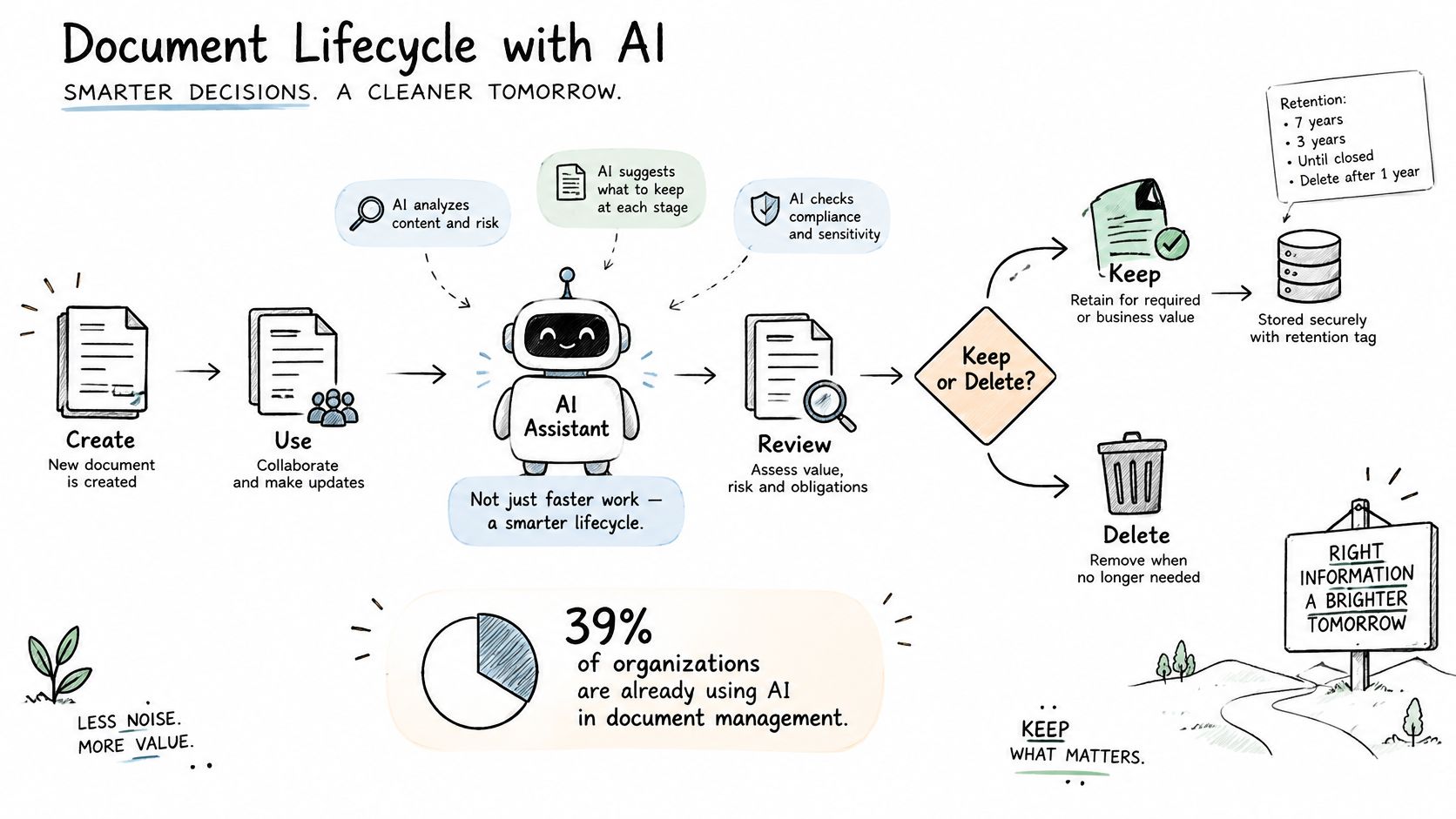
Keep evidence according to impact
Keeping everything indefinitely increases privacy, discovery, security, and storage exposure. Deleting every intermediate output can leave the organization unable to explain a consequential automated recommendation.
AI artifact risk tiers and what to keep
| Tier | Artifacts | Lifecycle rule |
|---|---|---|
| Tier 1 | Source documents and final approved decisions | Retain in full for the schedule period |
| Tier 2 | Summaries, extracted fields and approval recommendations that influence a decision | Retain model version, prompt, confidence score, human review and exceptions |
| Tier 3 | Embeddings, transitory prompts and low-value intermediate drafts | Delete under a documented policy after review |
These tiers describe business significance, not immutable artifact types. An embedding used in a consequential retrieval process may need different treatment from a disposable indexing artifact. Preserve confidence scores where available, but don't treat a high score as proof of correctness.
Trace a wrong deadline
Suppose an extraction tool misreads a contract notice deadline and proposes the wrong reminder date. A reviewer accepts it, and the project team acts on that reminder.
To investigate, staff need the source passage, extracted value, model version, relevant prompt or configuration, and review outcome. The model version helps establish which processing setup produced the error, although it doesn't guarantee an identical result on rerun.
Ryshe's discussion of AI document review for AEC provides context for placing review controls around these workflows. Set artifact retention when designing the task, including what happens when a source document is corrected, access is revoked, or deletion becomes due.
Where Lifecycles Break Down and How to Fix Them
In NARA's 2024 federal-agency records-management report, 71% of agencies said they met the deadline for managing all permanent records electronically, while 87% had a records-management directive. Having a directive and managing electronic records are distinct measures. Neither, by itself, proves that every record class has functioning controls.
For a project business, the useful question isn't how much content sits on a server. It's whether staff can demonstrate policy coverage, correct release, controlled retention, and authorized disposition.
Lifecycle symptoms, causes and fixes
| Symptom | Likely cause | Fix |
|---|---|---|
| Old drafts appear in search | No superseded status in metadata | Add a superseded flag and link to the current revision |
| Records kept past their period | No trigger date assigned at intake | Set retention category and trigger event at intake |
| Files missing after a repository is retired | Source decommissioned before migration check | Keep source until reconciliation counts and hash checks pass |
| Email retention not applied | Users must apply policy by hand | Apply retention automatically by message category |
| Records directive out of date | No scheduled review cycle | Review the directive every year and log the update |
Fix the control, not just the visible file
Removing an obsolete drawing from search results solves one immediate complaint. Updating the release workflow so it marks the previous revision as superseded prevents the same complaint when the next revision arrives.
Similarly, an overdue RFI may appear to be a reminder problem when the actual fault is a missing responsible party. Ryshe's guidance on RFI and submittal automation for AEC is relevant when mapping those handoffs. Notifications should follow an accountable workflow, not compensate for the absence of one.
Diagnostic test: Ask what information the system needed before the failure occurred, and who was responsible for supplying it.
Measure the control directly. Inspect whether records have valid categories, whether completed trigger events have dates, and whether disposition candidates pass a hold check. For exceptions, assign someone to resolve the cause rather than repeatedly clearing a warning.
Missing intake metadata is a useful first place to investigate. Resolving a classification while the author and project context are available is simpler than reconstructing it after staff leave and repositories change.
Map Your Lifecycle Before Automating Any Stage
Begin with an inventory, not a software demonstration. Your records manager, project leads, IT team, and legal reviewer need a shared view of what enters the business and where people lose control of it.
Put the work in this order
- List document types and annual volumes. Separate contracts, drawings, RFIs, inspection records, invoices, and work instructions. Include paper arrivals and email-based approvals so the inventory reflects actual work.
- Locate the failure point. For each type, identify whether the main problem occurs at capture, approval, operational use, retention, or disposition. Name the handoff and the accountable owner.
- Agree on metadata and retention rules. Have the records manager and legal approve the schedule before automating it. Specify how unknown values and trigger events will be resolved.
- Validate on real documents. Use representative project material, including poor scans and unusual supplier formats. Check approval status, supersession, access restrictions, and exception routing.
- Prove migration before cutover. Require reconciliation, content validation, and sampled human review. Keep the source available until the acceptance checks pass.
Automation should execute a defined decision. If staff haven't agreed whether a supplier attachment is a contract amendment or supporting correspondence, faster classification won't settle the governance question.
Make acceptance operational
In weeks 1-2 of our Document Intelligence work, we audit the client's document types, volumes, current processing workflows, and pain points. That establishes what the workflow must handle before implementation begins.
Production acceptance also needs to cover ownership after deployment. In weeks 6-8, we deploy with monitoring, exception handling, team training, and continuous accuracy improvement through feedback loops, then hand off a system the client's team can run.
For your own rollout, write acceptance criteria around business actions: an approver can identify the release, an operator can retrieve it, and a records manager can explain its retention treatment. Include failed extraction and missing-data cases, not just successful processing.
Choose the stage you'll fix first and name who signs off the retention schedule before automation begins. Start with a bounded document class where the team can verify the outcome, then expand only when the controls work.
Ryshe helps engineering and industrial teams connect document classification, extraction, and approval workflows with the governance needed for production use. Visit Ryshe to discuss your document environment, identify the lifecycle handoff that needs attention, and scope automation your team can operate and maintain.