Invoice Processing OCR: Accuracy, Limits, and Checks
See how invoice processing ocr extracts fields, where accuracy falls, and which validation checks stop a bad payment.
Correcting a single paper-invoice error costs an average of $53.50, according to an IBM-hosted e-invoicing white paper, which also reports that fully automated electronic processing can reduce accounts-payable processing costs by 90%. That comparison isn't a promise about an OCR engine. It's a business case for connecting document capture to validation, approval, and accounting, so a mistake doesn't become someone else's reconciliation problem.
Why Scanned Invoices Still Cost So Much
An accounts-payable clerk opens a supplier's emailed PDF. They enter the supplier, purchase order, tax, amount, and payment terms, then search for someone who can confirm the delivery. The document arrived electronically, but the work is still manual.
Say the invoice belongs to a manufacturing plant buying replacement parts. The clerk reads the total correctly but assigns the freight charge to tax. The invoice looks complete in the accounting system, yet someone must reopen the document, identify the mismatch, correct the entry, and possibly restart approval.
Invoice processing OCR, short for optical character recognition, removes part of that rekeying. It converts the characters in an image into machine-readable text that extraction software can organize into invoice fields. It doesn't, by itself, establish that those fields are correct or ready to post.
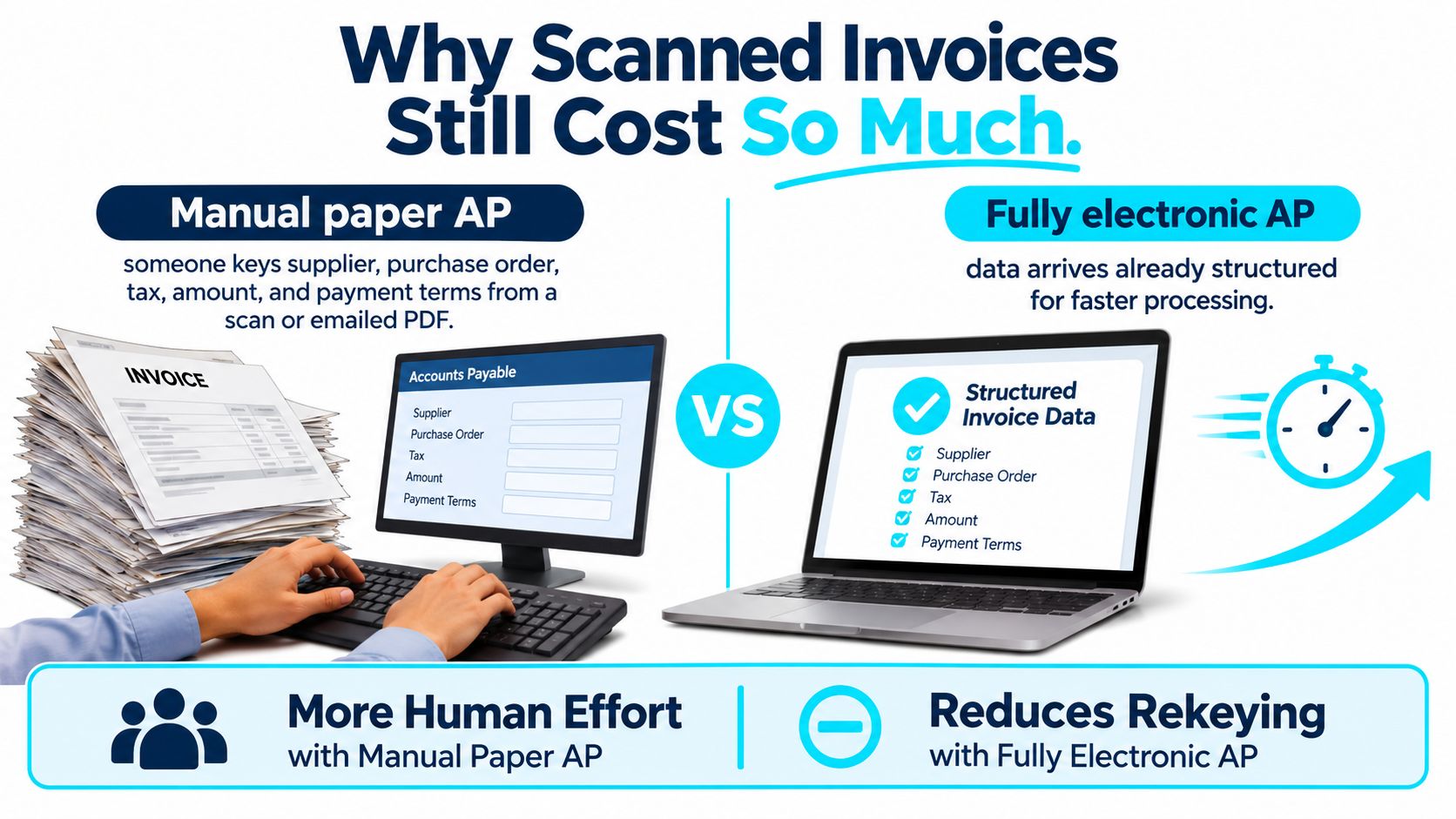
The expensive work happens around the read
The practical cost isn't just typing. AP staff also locate missing purchase orders, clarify descriptions, correct supplier records, chase approvals, and retrieve old documents during a dispute.
A useful business case separates those activities:
- Capture work: Opening attachments, scanning paper, and entering invoice details.
- Exception work: Resolving missing information, inconsistent amounts, and unmatched deliveries.
- Recordkeeping work: Preserving the original document and the evidence supporting its approval.
Automating capture while leaving the other work untouched can deliver questionable records to AP faster. Savings depend on scan quality, field complexity, the exception rate, and the connections between procurement and finance.
Treat historical automation benchmarks as a reason to examine the whole workflow, not as a guaranteed return for a particular project office or plant. The useful outcome is a record that someone can approve without reconstructing how the software arrived at it.
What Invoice Processing OCR Pulls From a Page
Accuracy numbers mean little until you know which document and which field they describe. Published results show how wide that spread runs.
Invoice OCR results by document and field
| Measure | Result | What was tested |
|---|---|---|
| English invoice items detected | 90.5% | Open-source pipeline, more than 150 vendors, English invoices |
| Czech invoice items detected | 88.2% | Same pipeline on Czech invoices |
| Values matched among detected items | 93–96% | English and Czech item values after detection |
| Invoice or document identifiers | About 90% | 102 digital and scanned invoices |
| Tax, net amount, and currency format | Near 60% | Weaker layout extractor on the same 102 invoices |
| Stronger extractor, overall | About 94% | Same 102-invoice evaluation setup |
| Clean digital invoices | 96.50% | Leading model in a 2025 test of eight multimodal models |
| Scanned invoices | 92.71% | Same leading model |
| Scanned receipts | 87.46% | Same leading model, poorer image quality |
These are separate evaluations, not a ranking of interchangeable products. The English and Czech invoice-extraction study reports approximately 90.5% and 88.2% item detection respectively, with 93–96% of detected values matched correctly across datasets covering more than 150 vendors. The 102-invoice results come from an arXiv evaluation of invoice extraction methods, and the 2025 multimodal-model scores come from Parseur's invoice-processing benchmark overview.
Reading characters and assigning meaning are different jobs
Reading a labeled packing list works the same way. Every word can come through clearly and you still cannot tell which quantity belongs to which item unless each label stays attached to its value.
Invoice capture carries the same distinction. Recognition reads characters. Field extraction assigns those characters to a supplier, invoice date, line item, or total.
A typical extraction pass works through:
- Supplier details: Vendor name, address, and identifying information used to find the supplier record.
- Document references: Invoice number, invoice date, currency, and purchase-order number.
- Line items: Description, quantity, unit price, and net amount, with each value attached to its correct row.
- Charges and settlement details: Tax, freight, invoice total, payment terms, and due date.
A clean character read can still produce a wrong invoice. A system might read the subtotal and grand total perfectly yet reverse their labels, so every digit is right and the payable amount is wrong.
Preserve the evidence behind each field
Keep page coordinates with extracted text so a reviewer can jump directly to the relevant area of the invoice. Store confidence scores too, while remembering that confidence is a model's estimate, not proof of correctness.
Line-item extraction needs particular care. A wrapped description can look like another row, and a repeated page header can look like an item. Preserve row relationships rather than flattening the page into an unordered collection of words.
Benchmark each document condition separately: electronic PDFs, scans, phone photographs, languages, supplier layouts, and table structures. A clean supplier PDF shouldn't conceal poor performance on a faded site-office scan.
Then normalize dates, currencies, decimal separators, and tax formats before running arithmetic. Keep the original text alongside each normalized value so reviewers can see the interpretation instead of guessing what the software changed.
Why One Accuracy Score Misleads Buyers
A single accuracy percentage is a weak purchasing criterion. It doesn't tell an AP manager which documents will need intervention, which fields will fail, or how long staff will spend resolving them.
Parseur's invoice-processing benchmark overview describes a 2025 test of eight multimodal models in which the same leading model scored 96.50% on clean digital invoices, 92.71% on scanned invoices, and 87.46% on scanned receipts. That overview also cites a 2024 AP study in which 53% of AP teams identified invoice exceptions as their top challenge.
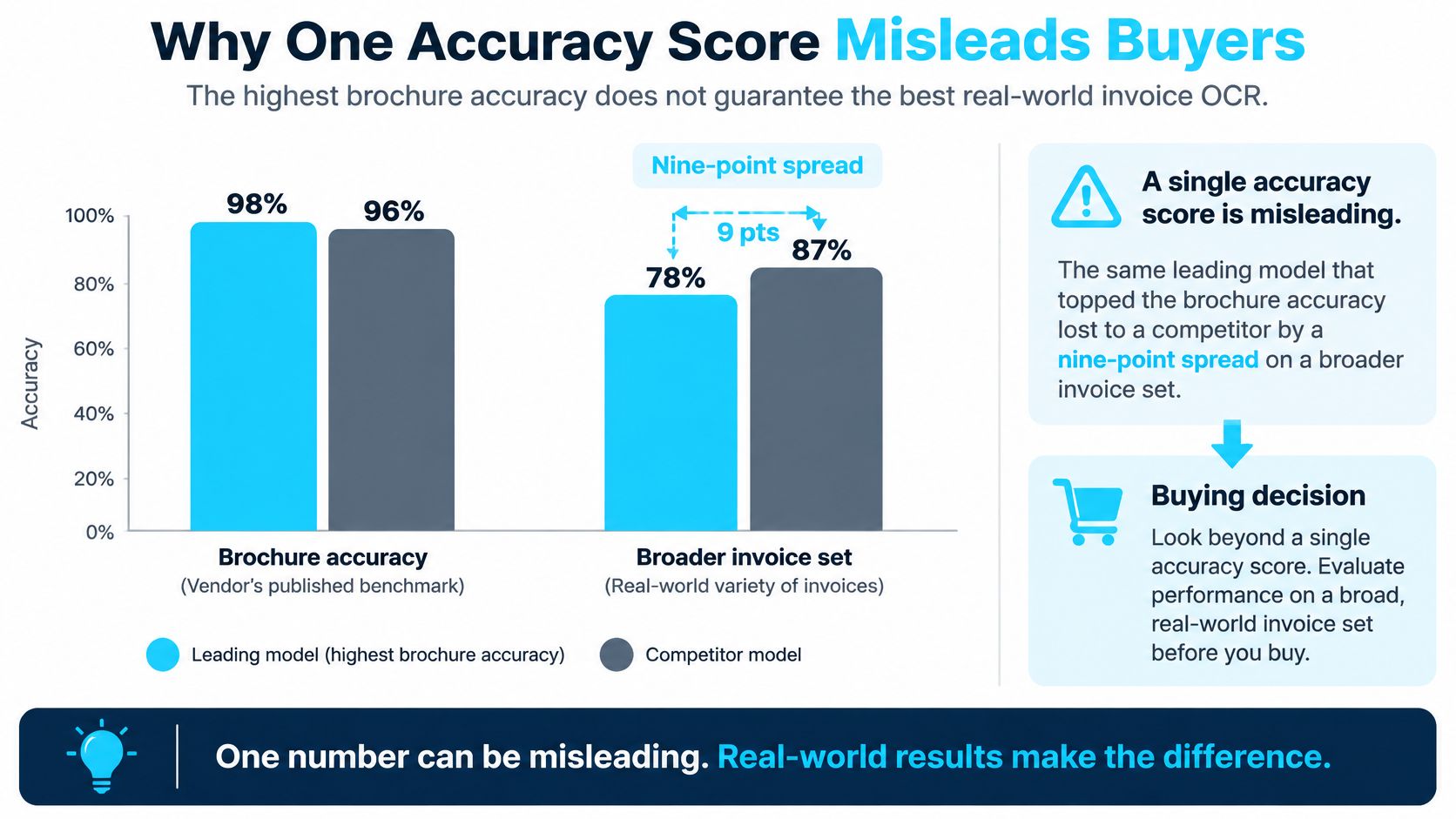
Test the documents that interrupt work
Consider a phone photograph taken beside a delivery bay. Skew, shadow, and glare can obscure a decimal separator. The production response should be a field-level confidence check and a review queue, with a request for a better image when the amount can't be verified.
A multi-page invoice presents a different problem. The first page may contain a carried-forward amount while the final total appears later. The system should establish document completeness and distinguish intermediate totals before releasing the record.
Wrapped descriptions can break line-item alignment. A reviewer needs the table image beside the extracted rows, not merely a warning that something went wrong. A supplier PDF whose labels move between versions needs layout-sensitive extraction and an escalation path when a value loses its expected context.
Buy exception handling, not just recognition
Construction, manufacturing, and aerospace inboxes can also contain stamps, handwritten annotations, and copies of legacy documents. Decide whether each annotation changes the invoice, provides supporting information, or should be ignored. Don't let the engine make that policy decision implicitly.
Practical rule: A confident read of the wrong field is still a failed invoice.
Ask operational questions during a pilot: Can the reviewer see the uncertain field? Does the queue identify the missing receipt or PO mismatch? Can a tax discrepancy reach someone authorized to resolve it?
A useful approach to measuring AI success connects technical performance to accepted business outcomes. For AP, track exception causes, reviewer effort, and records that pass the required controls.
Supplier-data cleanup, sensible confidence thresholds, and explicit escalation rules may remove more work than an engine replacement. Test that possibility before treating model selection as the entire automation project.
Validation Checks Before an Invoice Can Post
A field can look plausible and still be financially wrong. Character accuracy isn't an adequate posting gate. Apply deterministic checks to the extracted record before anyone treats it as usable accounting data.
Invoice checks before posting
| Check | Pass rule | If it fails |
|---|---|---|
| Header math | Subtotal plus tax and freight equals the total | Hold; do not post |
| Currency | Same currency on header and every line after normalization | Exception queue |
| Purchase order | PO number, quantity, and price match the PO and goods receipt | Buyer or AP review |
| Tax | Amount and rate fit the vendor and jurisdiction | Tax review |
| Confidence and completeness | Required fields present and score above the threshold | Human verifies the image |
For the purchase-order check, apply goods-receipt matching where the purchasing process uses it. For header arithmetic, account explicitly for discounts, credits, and whether freight is already included in another amount. Otherwise, a simplistic rule can reject a valid invoice or accept one with a duplicated charge.
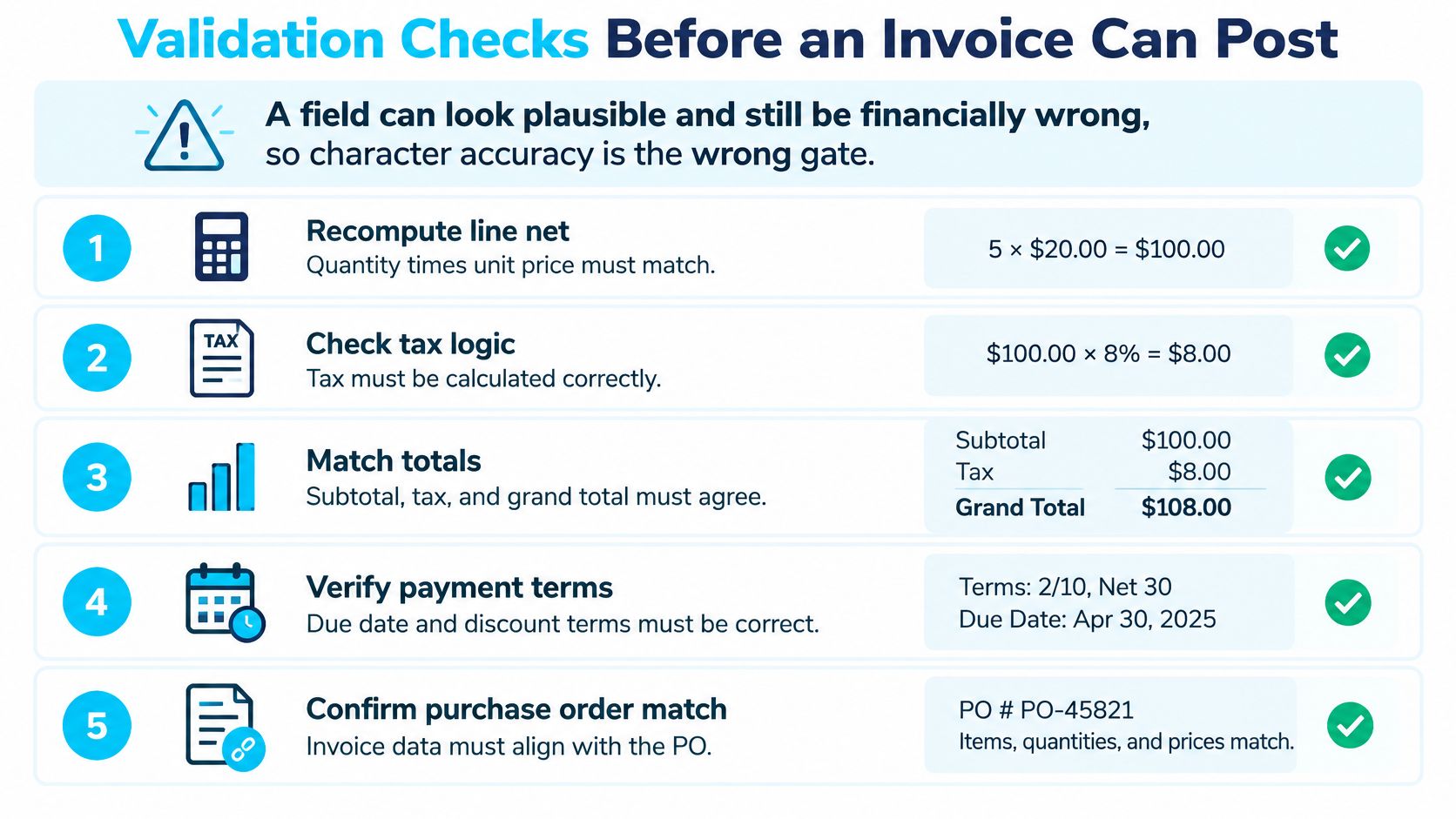
Give financially important fields stricter gates
A benchmark of 102 digitally born and scanned invoices found identifiers at about 90% accuracy, while tax amount, net amount, and currency-format fields were near 60% for one layout-extraction approach; another extractor reached approximately 94% overall accuracy in the same evaluation setup.
The implementation lesson is field-specific. A recognizable supplier logo doesn't compensate for an incorrect currency or tax amount. Review rules should reflect the consequences of an error, not how visually prominent the field is.
Recompute line net amounts from quantity and unit price, applying the documented discount and rounding rules. Then reconcile the line totals with the header. Verify payment terms against the applicable agreement, including how the due date and any early-payment discount are determined.
Make every release explainable
Configure tolerances only where the business already permits them. Don't introduce an unexplained rounding allowance merely to increase the share of invoices that pass automatically.
Assign a named owner to each exception category. A receiving discrepancy belongs with someone who can confirm delivery; an unusual tax treatment belongs with someone authorized to assess it. Store the reason code, original value, corrected value, reviewer, and release decision.
A reviewer should be able to distinguish an extraction correction from an approved commercial variance. Those are different decisions and should leave different evidence.
A record that passes the configured controls is ready for routing. A record that fails remains an exception, not an ERP posting awaiting later cleanup.
How Approved Data Reaches the ERP
An emailed PDF isn't the same thing as a structured e-invoice. A study of approximately 1,500 Swedish companies found that 42% of firms issued e-invoices in 2016, yet only 12% of all invoices sent were electronic.
That historical gap explains why finance teams need a mixed-input architecture. Measure invoice volume by channel, not just how many suppliers say they support electronic invoicing.
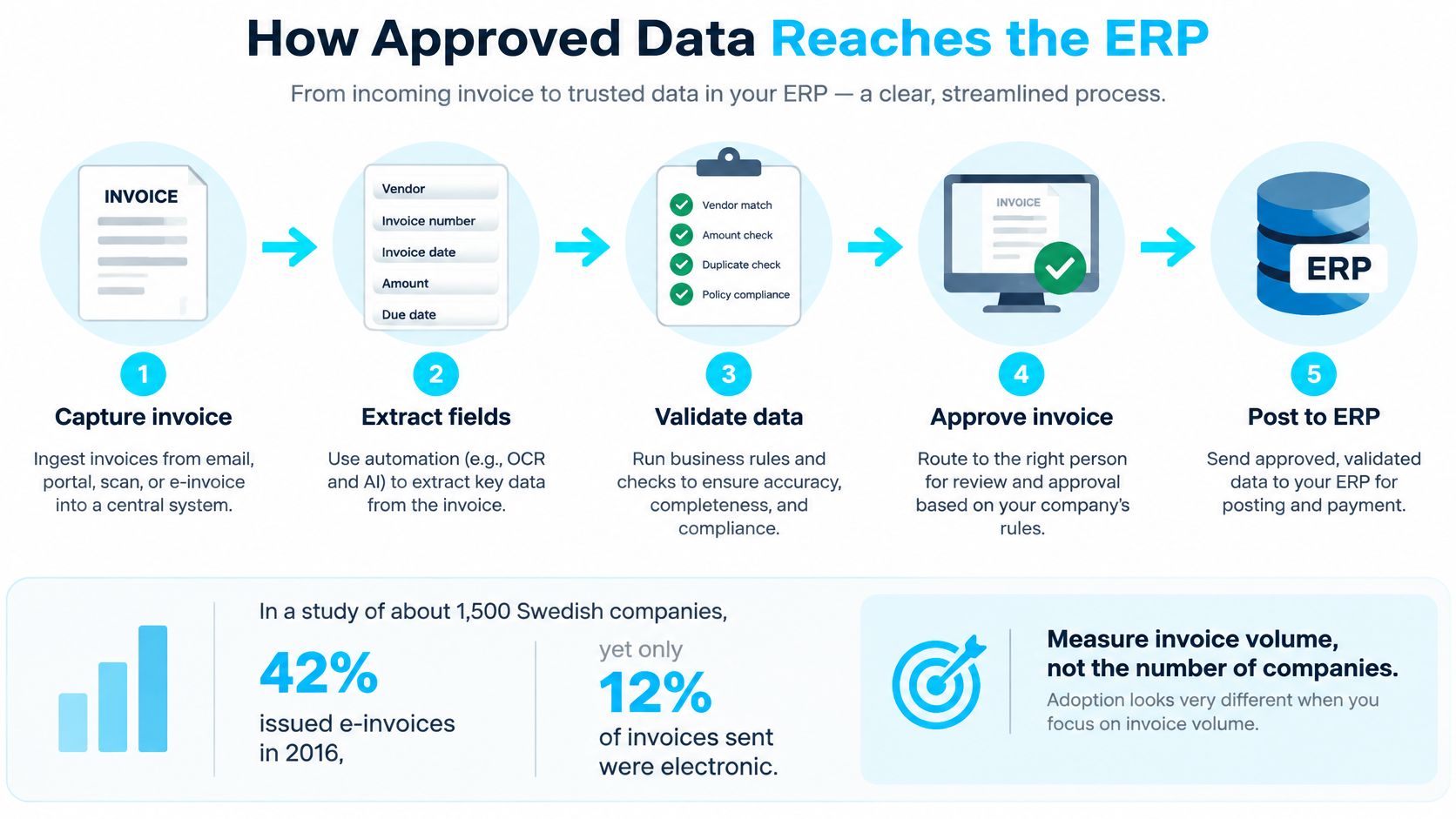
Keep different inputs on appropriate paths
Which path each invoice input takes
| Input | Processing path | Main risk |
|---|---|---|
| Native structured e-invoice | Direct integration into ERP | Mapping and tax validation still required |
| Scanned PDF or paper | OCR, layout extraction, validation | Field errors in totals, tax, and tables |
| Phone photo | OCR with review queue | Skew, shadow, and low confidence |
| Multi-page invoice | Page-level extraction, then total check | Total sits on a later page |
| Credit note or statement | Classify before extraction | Posted as a standard invoice |
Connect capture to the existing approval process
- Split the inbox. Send native structured invoices through direct integration. Route image-based documents through OCR; text-bearing PDFs may support direct text extraction.
- Classify the document. Identify invoices, credit notes, statements, and supporting attachments before applying extraction rules.
- Extract and preserve context. Keep field values, confidence, page references, and source documents together.
- Run validation. Send failures to a named queue instead of substituting a guessed value.
- Route for approval. Use the organization's amount, cost-center, project, and receipt requirements to identify the approver.
- Post accepted records. Transfer approved headers and lines through the ERP integration, and capture the accounting system's response.
- Store the evidence. Retain the image, extracted values, approval, and exception history for the applicable retention period.
Suppose a plant's high-volume supplier emails PDFs. Those documents still need classification, extraction, validation, approval, and posting. If the supplier later sends native structured invoices, the character-recognition step disappears, but the business controls remain.
Orchestration connects these actions and tracks whether each completed successfully. The design considerations in purchase-order approval integration are relevant because an extracted invoice must fit the approval process people already use.
Plan explicitly for rejected ERP submissions and retries so the same accepted record isn't posted twice. Modernize supplier by supplier rather than assuming every project partner can provide standardized electronic data immediately.
What Changed for a Parts Manufacturer
A 150-employee industrial parts manufacturer had Ryshe automate its contract and purchase-order workflows with AI. The project took three months, cut processing time by 82%, reduced the error rate to 1.8%, saved 20 hours per week, and captured $95K in early-payment discounts.
Those are contract-and-PO automation outcomes, not an invoice OCR benchmark. Their relevance is the mechanism: extraction became useful because agreement checks, human exception handling, and ERP integration surrounded it.
Real documents shaped the implementation
We trained the models on the client's actual documents, including varied formats, handwritten notes, and legacy material. The workflow extracted terms, pricing, and conditions, checked prices against agreements, and flagged exceptions for human review.
An SAP connector allowed accepted purchase orders to populate without manual re-entry. Staff no longer had to carry the same information from a document into the purchasing system after the extraction had already succeeded.
The manufacturer's contract-intelligence case illustrates an important distinction between reading information and completing work. The operational result depended on what happened after extraction.
“We went from drowning in paperwork to having a system that tells us exactly what needs attention. The ROI was obvious within the first month.”
That VP of Operations' description identifies the change in attention. People handled the records that needed judgment instead of treating every page as an equally manual task.
Translate the mechanism, not the percentage
For an AEC firm, the comparable question might be whether extracted terms reach the correct project approver. For an aerospace manufacturer, it might be whether a purchasing discrepancy retains enough evidence for review.
Evaluate the benefits in operational terms:
- Time recovered: Work people no longer spend reading, rekeying, and transferring accepted information.
- Commercial value: Discounts captured and agreement discrepancies resolved before commitments move forward.
- Control retained: Exceptions that remain visible to people authorized to decide them.
The manufacturer's results belong to its document set, workflows, and ERP environment. Another plant should assess its own volume, exception rate, and master-data quality before expecting the same improvement.
Fraud and E-Invoicing Rules Beyond OCR
Invoice fraud affected 24% of organizations in 2024, up from 14% in 2023, according to the 2025 AFP Payments Fraud and Control Survey highlights. Faster extraction doesn't establish that a payment instruction is legitimate.
OCR can faithfully read a changed bank account, supplier name, or amount. It cannot independently prove that the supplier authorized the change. A convincing PDF could contain accurate goods, prices, and tax while its payment block is forged.
Separate document recognition from payment authorization
Keep supplier identity and payment changes outside automatic acceptance based solely on extraction confidence. Use controls that establish who requested a change and who authorized it:
- Vendor-master verification: Check proposed changes against the controlled supplier record.
- Segregation of duties: Separate the ability to change payment details from the authority to approve payment.
- Recorded approval: Preserve the decision and supporting evidence.
- Out-of-band confirmation: Confirm new bank details through an established contact channel, not the contact information supplied in the change request.
Reading a bank account correctly is not permission to pay it.
An exception reviewer correcting a misread account number is performing a different task from someone approving a new destination for funds. Design permissions and records around that distinction.
Choose the ingestion path without dropping compliance
Cross-border invoicing adds requirements beyond extracting the visible page. Establish the rules for each relevant jurisdiction with the finance and compliance owners, including required formats, tax checks, reporting, and retention.
Keep OCR available for legacy PDFs and scans that won't arrive as structured data. Prefer native e-invoice feeds where the applicable rules or supplier capabilities support them. Don't assume that a readable PDF satisfies a requirement for structured submission.
Connect either path to procurement records, identity controls, tax validation, retention, and reporting. Define where invoice data can be stored and who may access it, including any service involved in extraction.
Before rollout, write separate acceptance lists: documents eligible for straight-through processing, and changes that always require a person. High extraction confidence must never override the second list.
Choose Review Rules Before You Buy a Tool
Write down the operating decisions before comparing engines:
- Input volume: Which invoices still arrive as paper, PDFs, or photographs?
- Critical fields: Which values must be correct before approval or payment?
- Review thresholds: What uncertainty or failed rule forces human verification?
- Exception ownership: Who resolves PO, tax, receipt, and vendor-master issues?
- Supplier migration: Which suppliers can move to structured e-invoices?
If those answers are missing, a new model may only accelerate the same unresolved work. Choose a pilot sample that includes difficult tables, incomplete documents, and the supplier formats AP staff already struggle with.
Design against your own documents
In weeks 1–2 of our Document Intelligence work, we audit document types, volumes, current processing workflows, and pain points. In weeks 3–5, we configure extraction for the client's document types, validate accuracy against the client's test set, and integrate with existing systems and workflows.
Ryshe Forge provides ongoing document and operations automation for contracts, POs, invoices, and submittals, including intake, routing, approval, and compliance workflows. It uses reserved monthly delivery capacity rather than treating production automation as a one-off script.
Whether you implement internally or with a delivery partner, measure exceptions by cause. Expand only when the pilot demonstrates that validation, approval evidence, and failed-record handling are already part of the production path.
Ryshe designs invoice-processing workflows that connect extraction to validation, exception routing, approval, and existing business systems. Visit Ryshe to scope an assessment around your actual documents, ERP requirements, and exception workload before choosing an OCR tool.