Maintenance Data Orchestration on Azure: Guide
Unify CMMS, ERP and sensor data on Azure; build batch or event pipelines, enforce governance, and prep data for predictive maintenance.

In this article
- 2. Connect Sources and Model Maintenance Data
- Map CMMS, ERP, Production, and OT Sources
- Define Maintenance Entities and Asset IDs
- Preserve History, Timestamps, and Units
- 3. Build Batch and Event-Driven Pipelines
- Ingest CMMS and ERP Changes
- Process Telemetry and Maintenance Events
- Choose Batch, Micro-Batch, or Event Processing
- Control CMMS Write-Back
- Scalable Data Pipeline Architecture on Azure | Best Practices for Real-Time Analytics
- 4. Set Security, Governance, and Recovery Controls
- Secure Access, Networks, and Secrets
- Assign Data Owners and Track Lineage
- Test Recovery and Integration Failures
- 5. Monitor Pipelines and Prepare for Predictive Maintenance
- Monitor Pipeline Health, Data Quality, and Cost
- Prepare Data for Predictive Maintenance
- Conclusion: Deliver in Phases and Verify Results
- FAQs
- How do I resolve conflicting asset records across systems?
- How can I prevent duplicate work orders after API timeouts?
- How do I know my data is ready for predictive maintenance?
- Frequently asked questions
- How do I resolve conflicting asset records across systems?
- How can I prevent duplicate work orders after API timeouts?
- How do I know my data is ready for predictive maintenance?
Originally published October 25, 2026.
I start maintenance data orchestration on Azure with shared asset IDs, clear data owners, and a deadline for each decision - not a service list. If your team needs updates every 5 minutes, use that target to choose the pipeline cadence.
In this guide, I cover how to:
- Connect CMMS, ERP, production, and sensor data while keeping raw records and change history.
- Choose batch or event processing, check data quality, and handle retries without duplicate records.
- Require approval for CMMS write-back and keep analytics separate from machine controls.
- Set access rules, track lineage, test recovery, and monitor delays and costs.
- Check sensor data for 4 weeks before modeling, then build predictive maintenance features using only data available at prediction time.
My rule: verify the data flow before expanding automation.
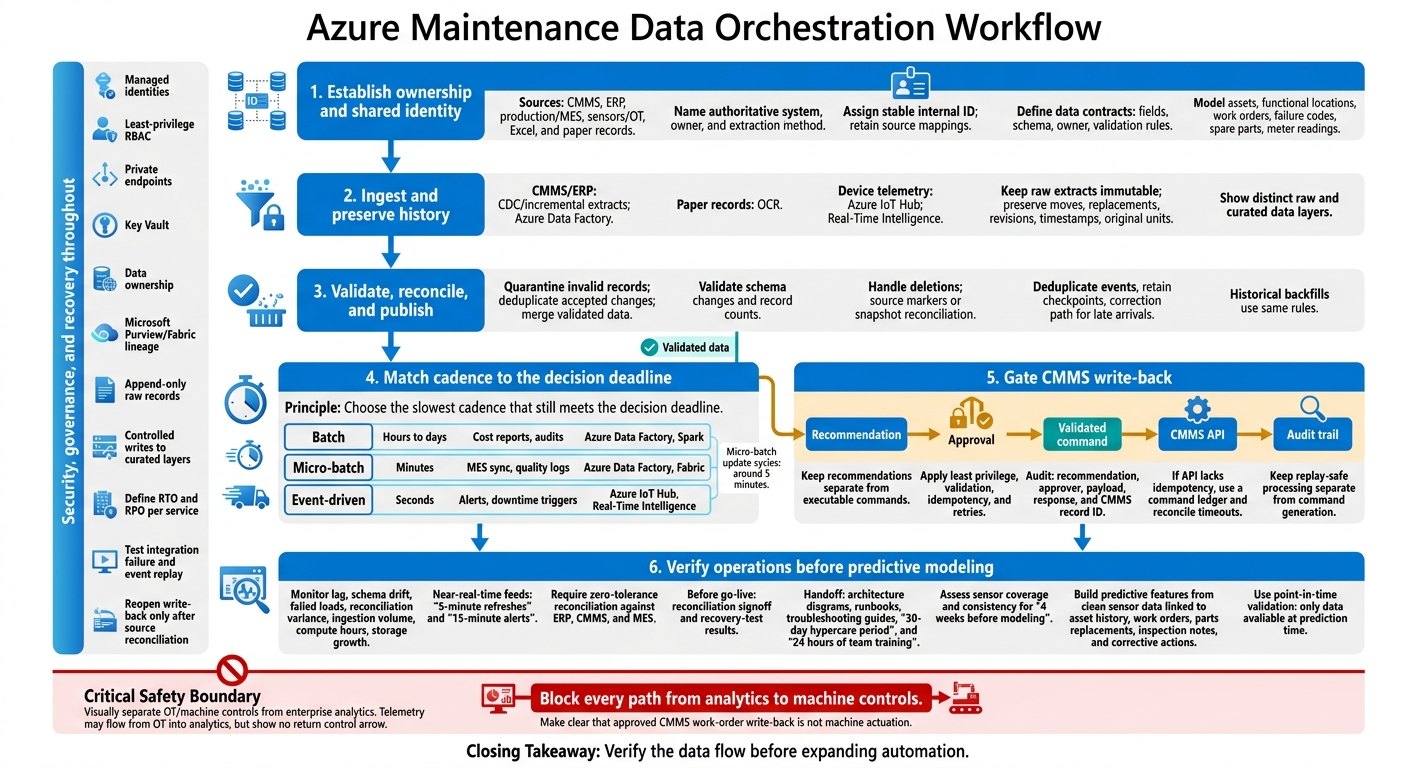
Azure Maintenance Data Orchestration Workflow
2. Connect Sources and Model Maintenance Data
Map CMMS, ERP, Production, and OT Sources
Build a source register that names the authoritative system for each maintenance field, not just each record [1]. The aim goes beyond bringing data together: you need to trace maintenance writes, asset changes, and production events.
Inventory CMMS, ERP, Excel, and paper records, then bring them into one canonical model [3]. Record each source’s owner and extraction method, and map its fields to shared names before building pipelines. Use Azure Data Factory for API integrations, CDC for source-system changes, and OCR for scanned paper records [1]. This map sets out what each pipeline must ingest, normalize, and reconcile.
Define Maintenance Entities and Asset IDs
Give each physical asset a stable internal ID. Keep time-stamped mappings between source asset IDs and that internal ID to prevent duplicate assets and incorrect joins across CMMS, ERP, and OT feeds [1].
Define a data contract for each entity that includes required fields, schema version, accountable owner, and validation rules.
| Entity | Authoritative source | Key/relationships | Update pattern | Validation rule |
|---|---|---|---|---|
| Assets | CMMS/EAM asset register | Source asset ID mapped to stable internal ID | Changes with history | No duplicate source-to-internal mappings |
| Functional locations | CMMS/EAM | Location code linked to assets | Effective-dated changes | Location code is valid and active |
| Work orders | CMMS/EAM | Work-order ID linked to asset | Revisions and status changes | Work-order ID and status are valid |
| Failure codes | CMMS/EAM | Code value; referenced by work orders | Reference updates | Code exists in the reference list |
| Spare parts | CMMS/EAM or ERP | Part number | Reference updates | Part number exists in the reference list |
| Meter readings | Historian or OT feed | Meter ID linked to asset | Append; keep corrections as new records | Timestamp and unit are valid |
Preserve History, Timestamps, and Units
Preserve asset moves, component replacements, work-order revisions, timestamps, time zones, and original units. Keep raw historical data alongside cleaned, standardized versions so you can check the original context during analysis [1].
Format reports for en-US, but store dates, numbers, currency, and units unchanged. These models feed the batch and event-driven flows in the next section.
3. Build Batch and Event-Driven Pipelines
Ingest CMMS and ERP Changes
Bring in CMMS and ERP changes through CDC or incremental extracts. Link each change to the stable asset ID and history rules defined earlier.
Keep raw extracts immutable. Quarantine invalid records, deduplicate accepted changes, and merge them into validated maintenance datasets. Handle deletions through source deletion markers or full-snapshot reconciliation. Validate schema changes and record counts before publishing. Apply these same rules to event streams from OT and machine sensors.
Process Telemetry and Maintenance Events
Use Azure IoT Hub for device ingestion and Real-Time Intelligence for event-driven processing. Match telemetry to maintenance records using the same asset and work-order keys, then generate condition alerts and downtime triggers.
Deduplicate events by ID, retain checkpoints, and send late arrivals through a correction path. Keep analytics separate from machine control. That boundary helps determine whether the workload belongs in batch, micro-batch, or event processing.
Choose Batch, Micro-Batch, or Event Processing
Choose the slowest cadence that still meets the decision deadline. Micro-batch processing can support near-real-time visibility, with update cycles around 5 minutes [1].
| Approach | Latency | Typical workload | Azure tooling |
|---|---|---|---|
| Batch | Hours to days | Cost reports, audits | Azure Data Factory, Spark |
| Micro-batch | Minutes | MES sync, quality logs | Azure Data Factory, Fabric |
| Event-driven | Seconds | Alerts, downtime triggers | Azure IoT Hub, Real-Time Intelligence |
Run historical backfills through the same validation and merge rules as live data, but maintain separate checkpoints. Keep replay-safe processing separate from command generation. This lets you reconcile corrected analytics before issuing any maintenance request.
Control CMMS Write-Back
Write-back should connect each recommendation to a confirmed CMMS record. Keep recommendations separate from executable commands. Send approved commands through CMMS APIs using least privilege, validation, idempotency, retries, and audit trails.
Log the recommendation, approver, payload, response, and CMMS record ID in the audit trail. If an API lacks idempotency, maintain a command ledger and reconcile timeouts before creating another work order. Secure these flows before expanding access or automating approvals.
Scalable Data Pipeline Architecture on Azure | Best Practices for Real-Time Analytics
4. Set Security, Governance, and Recovery Controls
Once controlled write-back is in place, secure access, track lineage, and set recovery controls around the same maintenance data flow.
Secure Access, Networks, and Secrets
Use managed identities for Azure resources and apply least-privilege RBAC across ingestion, transformation, reporting, and CMMS write-back. Require approval before write-back, and log the requester, approver, executor, and CMMS record ID.
Use private endpoints and separate OT from enterprise IT and analytics. Block every path from analytics to machine controls. Store secrets in Key Vault - not in code.
Assign Data Owners and Track Lineage
Keep a data dictionary for assets, work orders, meter readings, and failure codes so teams can resolve conflicting definitions. Assign clear ownership across CMMS, ERP, and MES.
Use Microsoft Purview and Fabric to track lineage, maintain audit trails, and control changes. Keep raw records append-only, and allow writes only to curated layers [1].
Test Recovery and Integration Failures
Define recovery time objectives (RTO) and recovery point objectives (RPO) for each service. Test failed integrations and event replay in a staging setup that mirrors production. Run recovery drills during planned maintenance windows, and reopen write-back only after source reconciliation.
Standardize the response and logged details for common integration failures:
| Failure Scenario | HTTP Status Code | Logged Details |
|---|---|---|
| Missing/malformed inputs | 400 Bad Request | Correlation ID, validation error |
| Invalid signature | 403 Forbidden | Reason code, source IP, timestamp |
| Stale timestamp | 403 Forbidden | Server time, payload timestamp |
| Duplicate delivery | 200 OK | Event ID, idempotency key match |
| Key Vault access failure | 500 Internal Server Error | Internal error code; never exposed to sender |
Keep credentials and sensitive payloads out of logs. Feed these error codes and correlation IDs into the monitoring rules in the next section.
5. Monitor Pipelines and Prepare for Predictive Maintenance
Monitor Pipeline Health, Data Quality, and Cost
With security and recovery controls in place, treat the pipeline as a production system. Use Azure Monitor and service metrics and logs to track lag, schema drift, failed loads, and reconciliation variance. Monitor ingestion volume, compute hours, and storage growth to keep costs in check.
For near-real-time feeds, set 5-minute refreshes and 15-minute alerts [1]. Add automated checks and require zero-tolerance reconciliation against ERP, CMMS, and MES [1].
Before go-live, require reconciliation signoff and recovery-test results. Deliver architecture diagrams, runbooks, and troubleshooting guides, followed by a 30-day hypercare period and 24 hours of team training [1]. Once the pipeline is stable, use the same governed data to build maintenance features.
Prepare Data for Predictive Maintenance
Assess sensor coverage and consistency for four weeks before modeling [2]. Build features using clean, high-frequency sensor data linked to asset history, work orders, parts replacements, inspection notes, and corrective actions [1].
Use point-in-time validation, and exclude any data that wasn’t available at scoring time [1].
Conclusion: Deliver in Phases and Verify Results
Assign clear owners for CMMS data, telemetry, the Azure platform, and predictive maintenance approvals. Expand only after reconciliation, recovery testing, documentation, and ownership handoff pass review.
FAQs
How do I resolve conflicting asset records across systems?
Start by creating a single source of truth for asset data from your ERP, CMMS, and SCADA systems. Use consistent data models and standard asset definitions to resolve mismatches caused by different naming conventions or metrics.
Catalog each system, its data formats, how often it updates, and its integration points. Standardize the data your maintenance workflows depend on first. Then automate alerts for missing values, duplicate records, and other data quality issues.
How can I prevent duplicate work orders after API timeouts?
Use idempotent requests: Include a client-generated identifier or idempotency key with each work order request. Keep the same key for retries. Before processing a retry, check the key in your maintenance management system to see whether the order already exists.
Configure Azure Data Factory pipelines with error handling and automated retries that check the target system’s status before resubmitting a request. Reconcile source systems with your data lake to find and resolve any remaining discrepancies.
How do I know my data is ready for predictive maintenance?
Your data is ready when sensor/SCADA, maintenance/CMMS, and operations data reliably connect in one governed model with consistent definitions.
That means you need enough sensor coverage and historical data to learn failure patterns. You also need automated data-quality checks and monitoring that flag late, missing, or invalid data, plus data lineage to trace and reconcile numbers that don’t match across systems.
If you can’t verify these requirements, your data isn’t ready for predictive maintenance.
Frequently asked questions
How do I resolve conflicting asset records across systems?
Start by creating a single source of truth for asset data from your ERP, CMMS, and SCADA systems. Use consistent data models and standard asset definitions to resolve mismatches caused by different naming conventions or metrics. Catalog each system, its data formats, how often it updates, and its integration points. Standardize the data your maintenance workflows depend on first. Then automate alerts for missing values, duplicate records, and other data quality issues.
How can I prevent duplicate work orders after API timeouts?
Use idempotent requests: Include a client-generated identifier or idempotency key with each work order request. Keep the same key for retries. Before processing a retry, check the key in your maintenance management system to see whether the order already exists. Configure Azure Data Factory pipelines with error handling and automated retries that check the target system’s status before resubmitting a request. Reconcile source systems with your data lake to find and resolve any remaining discrepancies.
How do I know my data is ready for predictive maintenance?
Your data is ready when sensor/SCADA, maintenance/CMMS, and operations data reliably connect in one governed model with consistent definitions. That means you need enough sensor coverage and historical data to learn failure patterns. You also need automated data-quality checks and monitoring that flag late, missing, or invalid data, plus data lineage to trace and reconcile numbers that don’t match across systems. If you can’t verify these requirements, your data isn’t ready for predictive maintenance.