Mean Reciprocal Rank for Azure AI Search
Measure MRR@10 for Azure AI Search: define relevance, build judged queries, compare retrieval setups, and track production metrics.
In this article
- How to Calculate MRR
- MRR Formula and Rank Positions
- A 4-Query MRR@10 Example
- Build a Reliable Evaluation Set
- Define Relevance With Domain Experts
- Record Context, Access Scope, and Labels
- Evaluate Azure AI Search Configurations
- Compare Text, Vector, Hybrid, and Semantic Ranking
- Record Scores and Test Controlled Changes
- Use MRR in Production Reviews
- Review Segments and Support Metrics
- Set a Review and Release Process
- How Ryshe Supports Evaluation Delivery
- Summary: Measure First-Relevant Result Position
- FAQs
- What MRR@10 score should my team target?
- How many queries do I need for reliable MRR testing?
- How should I evaluate MRR for personalized recommendations?
- Frequently asked questions
- What MRR@10 score should my team target?
- How many queries do I need for reliable MRR testing?
- How should I evaluate MRR for personalized recommendations?
Originally published October 26, 2026.
I use Mean Reciprocal Rank (MRR) to check how early Azure AI Search returns the first relevant result. Rank 1 scores 1; rank 10 scores 0.1. For MRR@10, no relevant result in the top 10 means a score of 0.
Here’s how I make that score useful:
- Define relevance: Use actual queries, expert labels, and the right user permissions.
- Compare search setups: Test text, graph vs. vector retrieval, hybrid, and semantic ranking against the same query set.
- Score what users see: Measure final ranks after filtering and reranking, not search scores.
- Check the trade-offs: Review recall, latency, cost, and critical-query failures before release.
For RAG, I treat MRR as a measure of retrieval quality - not proof that the generated answer is correct.
How to Calculate MRR
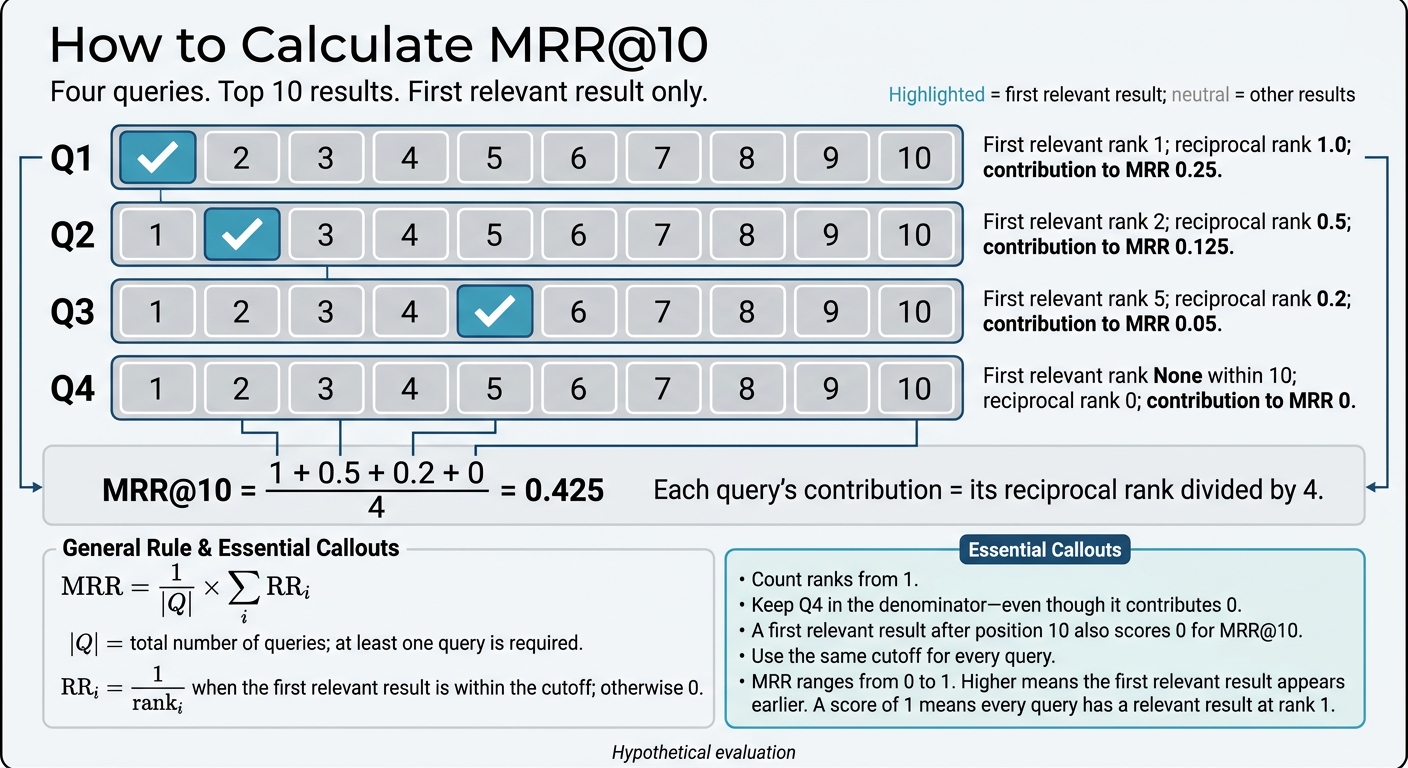
How to Calculate MRR@10
MRR Formula and Rank Positions
Calculate MRR with this formula:
$$ MRR = \frac{1}{|Q|}\sum_{i=1}^{|Q|} RR_i $$
Here, $|Q|$ is the total number of queries, and you need at least one query. For each query, $RR_i = 1/rank_i$ if the first relevant result falls within the scored range. Otherwise, $RR_i = 0$.
Start counting ranks at 1. A first relevant result at rank 1, 2, or 5 gives a reciprocal rank of 1, 0.5, or 0.2, respectively.
In Azure AI Search and Elasticsearch recommendation workflows, score the position of the first relevant item in each ranked list.
MRR ranges from 0 to 1. Higher scores mean relevant results appear earlier. A score of 1 means every query has a relevant result at rank 1.
MRR@k scores only the top k results. If the first relevant result appears after k, that query scores 0. Use the same cutoff for every query so comparisons stay fair.
A 4-Query MRR@10 Example
This hypothetical Azure AI Search evaluation checks the top 10 results for each of four queries. Each query’s contribution is its reciprocal rank divided by 4.
Query ID First relevant rank Reciprocal rank Contribution to MRR Q1 1 1.0 0.25 Q2 2 0.5 0.125 Q3 5 0.2 0.05 Q4 None within 10 0 0 MRR@10 = (1 + 0.5 + 0.2 + 0) / 4 = 0.425
Keep Q4 in the denominator even though it contributes 0. A first relevant result after position 10 would also count as 0.
Next, build a relevance set you can trust to produce reliable MRR results.
Build a Reliable Evaluation Set
MRR depends on the first relevant result, so build evaluation cases from real queries and production documents, not demo files. Cover common tasks and known failure modes. Use expert labels, stable item IDs, and saved ranked results. Preserve the corpus and configuration versions, too.
Use a fixed evaluation depth of 10 or 20 for every case. Keep tuning, held-out testing, and production-monitoring sets separate. Never tune on held-out results. A stable judged set lets you compare Azure AI Search runs using the same queries.
Define Relevance With Domain Experts
Have domain experts write relevance rules before they judge results. These rules should address document revisions and acceptable substitutes.
For aerospace, judge regulated requirements, controlled documents, and compliance records.
Specify whether substitutes count as relevant and whether a linked document is required. For recommendations, define each case by its user, task context, and ranked results. Then judge whether each result helps complete the task to identify the first relevant result.
Record Context, Access Scope, and Labels
Record the user, task context, and access scope for each case. Match access conditions to production permissions in regulated AEC, manufacturing, and aerospace workflows. Also record whether data leaves the environment or is used to train external models - either can block compliance [3].
Log labeling disagreements and have an expert resolve them before locking the evaluation set and comparing search configurations under the same conditions.
Evaluate Azure AI Search Configurations
Compare configurations using a fixed evaluation set so each one runs against the same queries.
MRR measures how early the first relevant result appears in the final Azure AI Search output. RRF merges ranked lists; MRR scores the resulting order. Calculate MRR@10 on the final results your app displays after filtering and reranking, since both steps can change rank and visibility [4].
The aim: get the first relevant result closer to the top.
Compare Text, Vector, Hybrid, and Semantic Ranking
Test whether each configuration moves the first relevant result earlier for the same query set.
| Retrieval configuration | Ranking stage | Expected effect on first relevant result | Runtime constraints |
|---|---|---|---|
| BM25 full-text search | Initial retrieval | Best for exact matches, technical codes, and specific part numbers. | Lowest latency; minimal resource overhead. |
| Vector (HNSW) | Initial retrieval | Best for conceptual queries and matching meaning without exact keywords. | Requires memory for HNSW graphs; latency scales with vector dimensions. |
| Hybrid (RRF) | Merging stage | Combines text and vector signals to find both exact terms and semantic intent. | Runs two queries in parallel; RRF merging adds minimal overhead. |
| Semantic ranking | Re-ranking stage | May move the most relevant result to rank 1. | Adds latency and per-query cost; reranks only the top 50 results. |
Record Scores and Test Controlled Changes
Log @search.score and @search.rerankerScore for diagnostics, but calculate MRR using only the first relevant rank. Record result IDs, rank positions, and configuration versions so you can reproduce MRR comparisons across Azure AI Search runs.
After logging the baseline, change one variable at a time, such as chunking strategy, vector weighting, or candidate depth. Keep the query set and relevance labels fixed.
Candidate depth determines how many results reach reranking. MRR@10 still scores only the final top 10, so any gain must justify the added latency and cost.
Use MRR in Production Reviews
After baseline testing, check production data to see whether ranking gains hold up on real queries. Keep using the same judged queries in production reviews so MRR stays comparable over time.
Review Segments and Support Metrics
Report MRR@10, query volume, and zero-result rate by task, access scope, and workflow. Check MRR alongside recall, latency, and cost when assessing changes to query rewrites, vector weighting, reranking, or filtering.
| Metric | What it measures | When to use it |
|---|---|---|
| MRR@k | The position of the first relevant result, averaged across queries. | When success depends on where the first relevant item appears. |
| Recall@k | The fraction of relevant documents retrieved in the top k results. | When broad coverage matters. |
| Latency | The time it takes to return search results. | To check workflow response-time requirements. |
| Zero-result rate | The percentage of queries that return no results. | To investigate retrieval gaps. |
Zero-result rate helps separate ranking problems from index gaps or taxonomy issues. Together, these metrics help you judge whether a change improves quality or just moves results around.
Set a Review and Release Process
Have domain experts review production queries before each release test. After release, keep a review phase in place to collect feedback and monitor error handling [1]. Set regression thresholds in advance, including critical-query failures that block release even when average MRR improves.
This review loop is easier to maintain when validation is part of delivery.
How Ryshe Supports Evaluation Delivery
Ryshe supports AEC, manufacturing, and aerospace teams with senior-led AI delivery, automation, governance, observability, and production validation. Validation uses the organization’s actual documents, including scanned markups and handwritten notes [1][2].
Summary: Measure First-Relevant Result Position
Define relevance and record final ranks, counting misses as zero. Keep the cutoff fixed, then check segments and regressions before release. MRR tells you where the first relevant result appears - not whether the system fully solves the task.
FAQs
What MRR@10 score should my team target?
There’s no universal MRR@10 benchmark. Your target should reflect your domain’s requirements and the search precision your team needs for daily work.
Test samples that reflect your actual enterprise data, then compare MRR@10 against your baseline search performance. Look for measurable gains that move relevant documents closer to the top of the results. Start by refining one high-value domain before expanding, and keep results grounded in your source documentation.
How many queries do I need for reliable MRR testing?
There’s no fixed query count for reliable Mean Reciprocal Rank (MRR) testing. How many you need depends on your document collection and how your project retrieves information.
For production evaluation in AEC, manufacturing, and aerospace, use a statistically significant sample of actual production data, not curated demo sets. Include enough queries to cover the range of document formats, inconsistencies, and edge cases. That way, your metrics reflect performance under actual production conditions.
How should I evaluate MRR for personalized recommendations?
Calculate each user’s score by dividing 1 by the rank of their first relevant item. Then average those scores:
MRR = (1/|Q|) × Σ(1/rank_i)
Here, |Q| is the number of users evaluated. Focus on top-k results, since higher placement affects trust and usefulness.
In AEC, manufacturing, and aerospace, track MRR in production to check whether critical technical data and project-specific documents appear early in the results as project needs change.
Frequently asked questions
What MRR@10 score should my team target?
There’s no universal MRR@10 benchmark. Your target should reflect your domain’s requirements and the search precision your team needs for daily work. Test samples that reflect your actual enterprise data, then compare MRR@10 against your baseline search performance. Look for measurable gains that move relevant documents closer to the top of the results. Start by refining one high-value domain before expanding, and keep results grounded in your source documentation.
How many queries do I need for reliable MRR testing?
There’s no fixed query count for reliable Mean Reciprocal Rank (MRR) testing. How many you need depends on your document collection and how your project retrieves information. For production evaluation in AEC, manufacturing, and aerospace, use a statistically significant sample of actual production data, not curated demo sets. Include enough queries to cover the range of document formats, inconsistencies, and edge cases. That way, your metrics reflect performance under actual production conditions.
How should I evaluate MRR for personalized recommendations?
Calculate each user’s score by dividing 1 by the rank of their first relevant item. Then average those scores: MRR = (1/|Q|) × Σ(1/rank_i) Here, |Q| is the number of users evaluated. Focus on top-k results, since higher placement affects trust and usefulness. In AEC, manufacturing, and aerospace, track MRR in production to check whether critical technical data and project-specific documents appear early in the results as project needs change.