Invoice Processing Automation: How It Works in 2026
Invoice processing automation explained: data capture, validation, approvals, ERP integration, fraud controls and the metrics that prove results.
Best-in-class accounts payable teams process an invoice for $2.78. The average sits at $9.40. That $6.62 gap, roughly 70% below the average benchmark, is about $662,000 a year for a firm handling 100,000 invoices, before implementation and operating costs, according to an accounts-payable benchmark. Older surveys in the same review put manual invoices near $30, with about $53.50 added when someone corrects an error on a paper invoice.
That gap is not a scanning story. Invoice processing automation is software that moves an invoice from receipt to payment with the fewest manual touches while approvals and the audit trail stay intact. The dollars show up only when capture, validation, purchase-order matching, approvals, ERP posting, and exception handling run as one controlled flow. A fast scan that still waits on a missing receipt, a bad cost code, or a held payment does not get you to best-in-class economics.
Invoice Processing Automation at a Glance
Read the path as a diagnostic, not a product tour. Each stage has a job, and each stage fails for a different reason. Fix the stage that is breaking before you buy another capture tool.
| Stage | What Automation Does | Where It Usually Breaks |
|---|---|---|
| Capture | Reads PDFs, scans and emailed invoices into structured fields | Poor scan quality and unfamiliar layouts |
| Validation | Checks totals, tax, currency, supplier details and duplicates | Inconsistent supplier master data |
| PO and receipt matching | Compares the invoice with the purchase order and goods receipt | Missing PO numbers and late receiving records |
| Approval | Routes invoices to approvers by value, cost centre or project | Approval rules that do not match current policy |
| ERP posting | Writes the coded invoice to the ledger | Mismatched codes and failed integration jobs |
| Payment | Schedules payment and captures early-payment discounts | Payments held by unresolved exceptions |
Hybrid is still the normal state
Ask an AP team how automated its invoice flow really is and the honest answer is usually "partly." Surveys of AP teams consistently show that most organizations still run invoice processing as a hybrid of automated and manual steps. Human review, exception queues, and manual approval remain ordinary work, not a sign the project failed.
Early tools grew as separate pieces: a scanner here, an image store there, a routing inbox somewhere else. Teams digitized paper and still rekeyed, chased approvers, and posted by hand. The opportunity now is joining those pieces so a clean invoice can travel from receipt to payment without a clerk touching every field.
Look back at the table. Three of the six stages, matching, posting, and payment, are control stages where money either moves or stops. Capture accuracy matters, but queue design, exception ownership, and the ledger write-back decide whether automation pays. Treat those as the design work, not as cleanup after go-live.
Practical rule: If capture is already above 90% field accuracy and cycle time is still long, stop tuning OCR. The break is almost always matching, master data, or the post back to the ledger.
Duplicate handling, routing delays, and exception correction cost more than keystrokes. For a deeper look at how enterprise teams stitch those handoffs together, the invoice workflow guidance for enterprise teams from Doczen is a useful companion to the stage map above.
Walk the row that matches your pain. A queue full of unknown suppliers is a validation problem. Invoices that match on paper and never hit the ledger are a posting problem. Payments that miss discount windows are usually exceptions that nobody owns.
How Data Capture and Validation Work
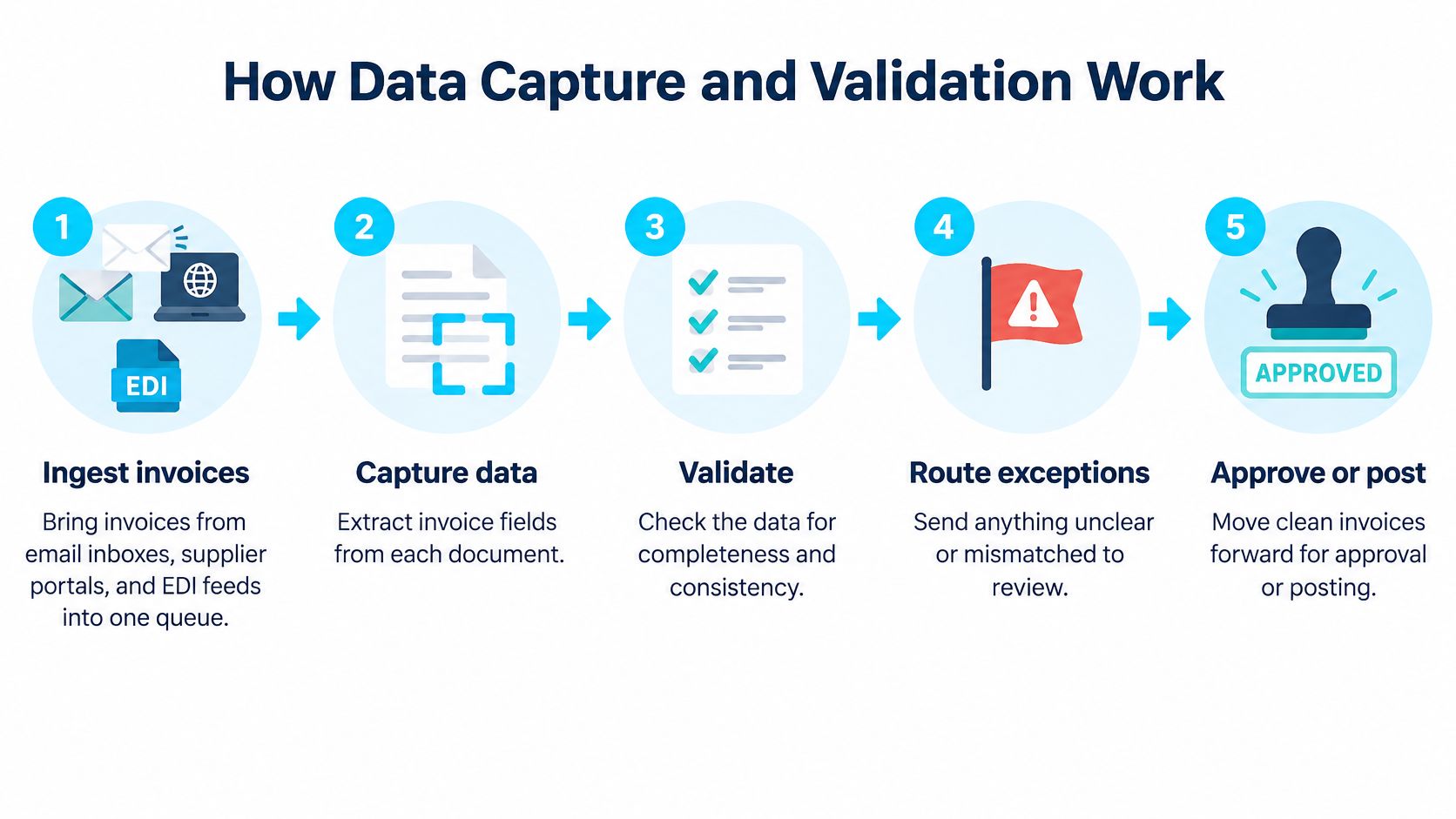
Treat capture as a chain of decisions, not one OCR click. A model that reads a clean PDF can still post the wrong tax if nobody scores the field or checks the arithmetic.
- Ingest into one queue. Pull invoices from shared mailboxes, supplier portals, and EDI feeds. Paper scans join the same queue, with the image kept beside the record.
- Classify before you extract. A PO invoice, a credit note, and a statement are not the same document. Misclassification sends the wrong rules downstream.
- Extract header and lines. Header fields are supplier, invoice number, date, currency, and total. Lines carry quantity, unit price, tax, and cost code.
- Score every field. Attach a confidence score at field level, not one score for the whole page.
- Validate with rules. Run arithmetic checks, tax-rate checks, currency checks, duplicate detection on invoice number plus supplier plus amount, and a supplier-master lookup.
- Route what the model does not trust. A reviewer sees the source image next to the extracted value and corrects only the weak fields.
Why one accuracy number lies
A 2025 benchmark summarized from Fraunhofer IAIS and Lamarr Institute research, covered by Parseur's model comparison, tested eight multimodal models. The strongest reported model hit 96.50% on clean, digitally generated invoices, 92.71% on scanned invoices, and 87.46% on scanned receipts. The drop tracks visual noise and image quality. OCR-only setups also stumble on odd layouts, unusual fonts, and poor scans.
| Document Type | Strongest Reported Accuracy | What It Means in Practice |
|---|---|---|
| Clean, digitally generated invoices | 96.50% | Extraction can run with light spot checks |
| Scanned invoices | 92.71% | Confidence thresholds and routine reviews are needed |
| Scanned receipts | 87.46% | Route low-confidence fields to a reviewer before posting |
Keep the source image, extracted values, field-level confidence, model version, and every correction. That audit trail is what an auditor asks for when a total was changed. Segment accuracy by document class, supplier, language, scan quality, and field type. Totals, tax, currency, purchase-order number, and line quantities can be wrong while the average still looks fine. Those are the fields that move money.
If you are choosing an engine, compare how each one behaves on your worst scans, not a demo PDF. A practical walk-through of invoice OCR trade-offs helps when layout variety, not headline accuracy, is the main constraint. Set the threshold so a low-confidence tax line never posts on its own.
Matching, Approvals and Exception Handling
Better capture does not finish the job. A 2025 AP benchmark named invoice exceptions as the leading operational challenge, and another industry survey, both in the Institute of Finance and Management AP trends report, put manual data entry at 37%, high processing costs at 36%, and coding errors at 28% among major pain points. Higher extraction accuracy still fails when supplier master data, PO discipline, receiving records, and approval policy disagree.
Three-way matching compares the invoice with the purchase order and the goods receipt. Inside tolerance, the invoice moves on. Outside tolerance, it becomes an exception with a reason code, not a vague "needs review" flag. If your team is still sorting what a PO-backed bill commits you to, what a purchase order invoice means is a clear primer before you set tolerances.
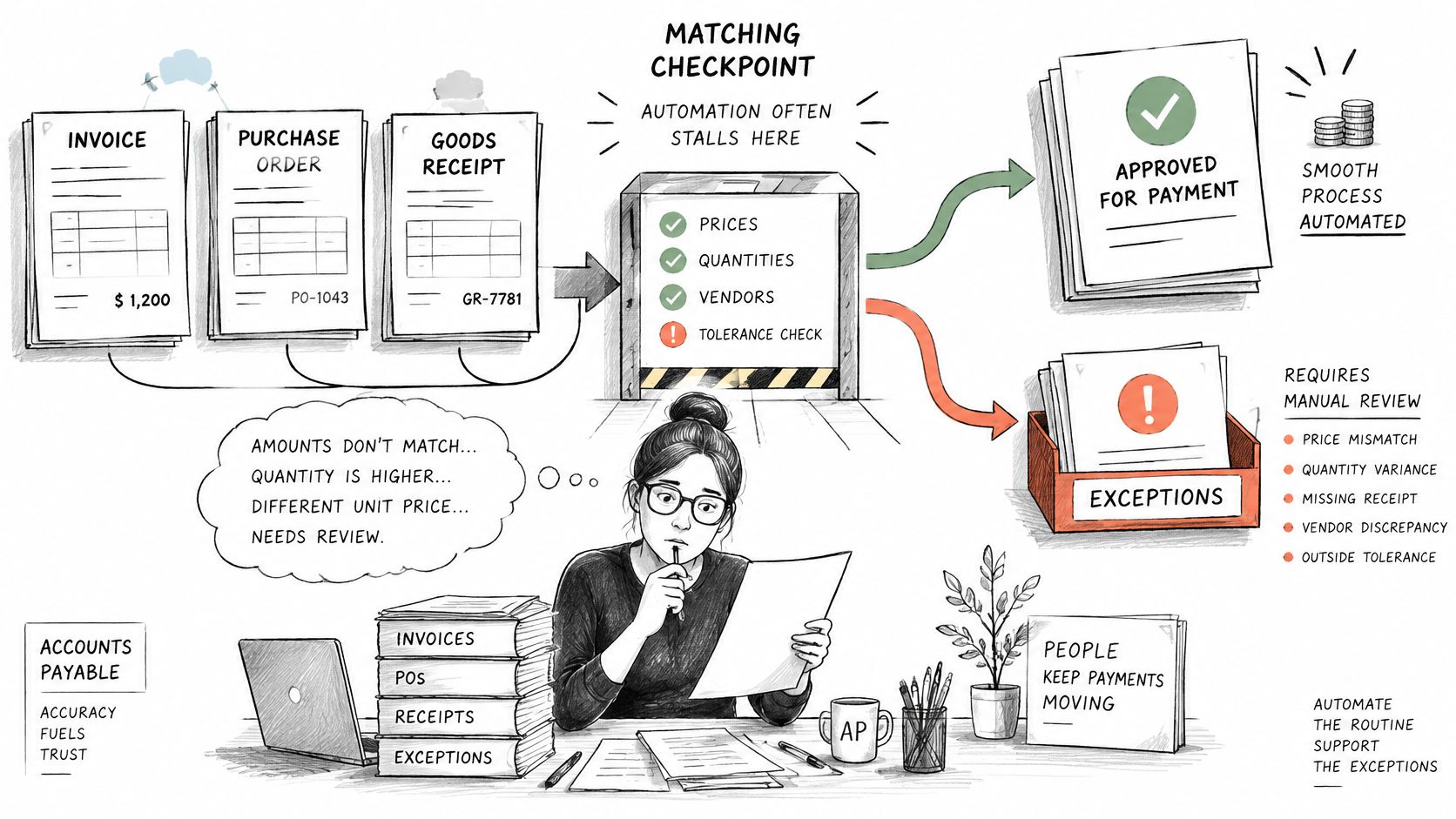
Approval routing should follow value, cost centre, project, or contract, with a delegate when the named approver is out. Rules that still reflect last year's org chart are a silent queue. Measure capture, matching, approval, and ERP posting separately. They fail independently.
The invoices software will not sign
The open question after go-live is what happens to the 15 to 20% of invoices automation cannot confidently approve, and how much staff time that slice still consumes. That is where the queue needs owners, reason codes, a service-level target, and an escalation path. Track resolution time and the share cleared without rekeying.
| Exception | Typical Root Cause | Fix Upstream |
|---|---|---|
| Missing PO number | Suppliers are not told to quote POs | Make PO numbers a condition in supplier terms and intake rules |
| Price above tolerance | Pricing changed after the PO was issued | Set tolerance bands by category and update PO prices |
| Quantity mismatch with receipt | Partial deliveries were not recorded | Require receipt posting before invoice matching runs |
| Tax mismatch | Incorrect tax codes in the supplier master | Audit tax fields in supplier records each quarter |
| Duplicate invoice | The same invoice was resent or re-keyed | Check invoice number, supplier and amount at intake |
| Unknown supplier or cost code | Supplier or project codes are out of date | Sync supplier and project codes from the ERP on a fixed schedule |
Construction, engineering, manufacturing, and aerospace add partial deliveries, project phases, change orders, retainage, subcontractor packs, and several cost codes on one bill. A header match will not settle those. Keep human judgment on ambiguous cases. Give each recurring exception a named owner who can change the PO rule, the receipt habit, or the master record, instead of routing the same defect faster.
Connecting Invoice Automation to Your ERP
Posting is its own failure point. A perfectly read invoice that never lands in the ledger is still open, still unpayable, and still invisible to cash forecasting. Connectors often matter more than the OCR engine, because clean extraction does not produce touchless processing without accurate master data and a reliable write-back.
Work the integrations in this order.
Pull purchasing facts first. The automation platform should read purchase orders and goods receipts from the ERP before it tries to match. Matching against a stale copy creates false exceptions, so the read has to stay current rather than rely on a periodic export.
Sync the supplier master next. Vendor name, bank details, tax ID, and payment terms have to agree in both systems. If AP "fixes" a supplier only inside the workflow tool, the next invoice breaks again.
Validate codes before the post. Project, cost-code, and general-ledger accounts should be checked against the ERP chart, not typed freehand. A code that does not exist should stop the invoice, not create a suspense entry nobody owns.
Write the approved invoice back with the coding, the approval reference, and a payment reference the ERP can reconcile. Failed posts need a retry and a visible error the same day, not a silent queue.
Intake counts as an integration too. Invoices often land in a shared mailbox, so the Microsoft 365 or Outlook connection has to create the same record the ERP will later post. On job-cost work, the project system, Procore being the usual one in construction, has to see that same invoice, or project managers approve a document finance never received.
Questions to take into the design meeting
- Write-back scope: Which fields are written to the ERP, and which stay only in the workflow tool?
- Failed posts: How are failed jobs retried, and who is alerted the same day?
- Master ownership: Who owns the supplier master, and which system wins on a conflict?
- Code sync: How often do project and cost codes refresh?
- Audit log: Where is the log of extracts, edits, approvals, and posts kept?
Treat those five answers as design inputs, not as cleanup after go-live; this guide to building a data integration strategy covers the broader sequencing. Then prove the path before you retire the old one: post a representative sample of each invoice type, including a credit note, a partial receipt, and a non-PO bill. Header-only success from one cooperative supplier does not clear the bar for go-live.
Fraud Controls That Keep Humans in the Loop
Fewer human touches is a weak target when the risk is a changed bank account. A 2025 survey of 225 mid-market finance and accounting leaders, reported by CFO.com, found that only 4% had fully automated AP from invoice to payment with no manual touchpoints. 38% took at least five days to process an invoice, and four in ten reported invoice fraud or overpayment in the prior year. Manual invoice review was still the most common fraud control, used by 52%, and 50% required at least two approvers.
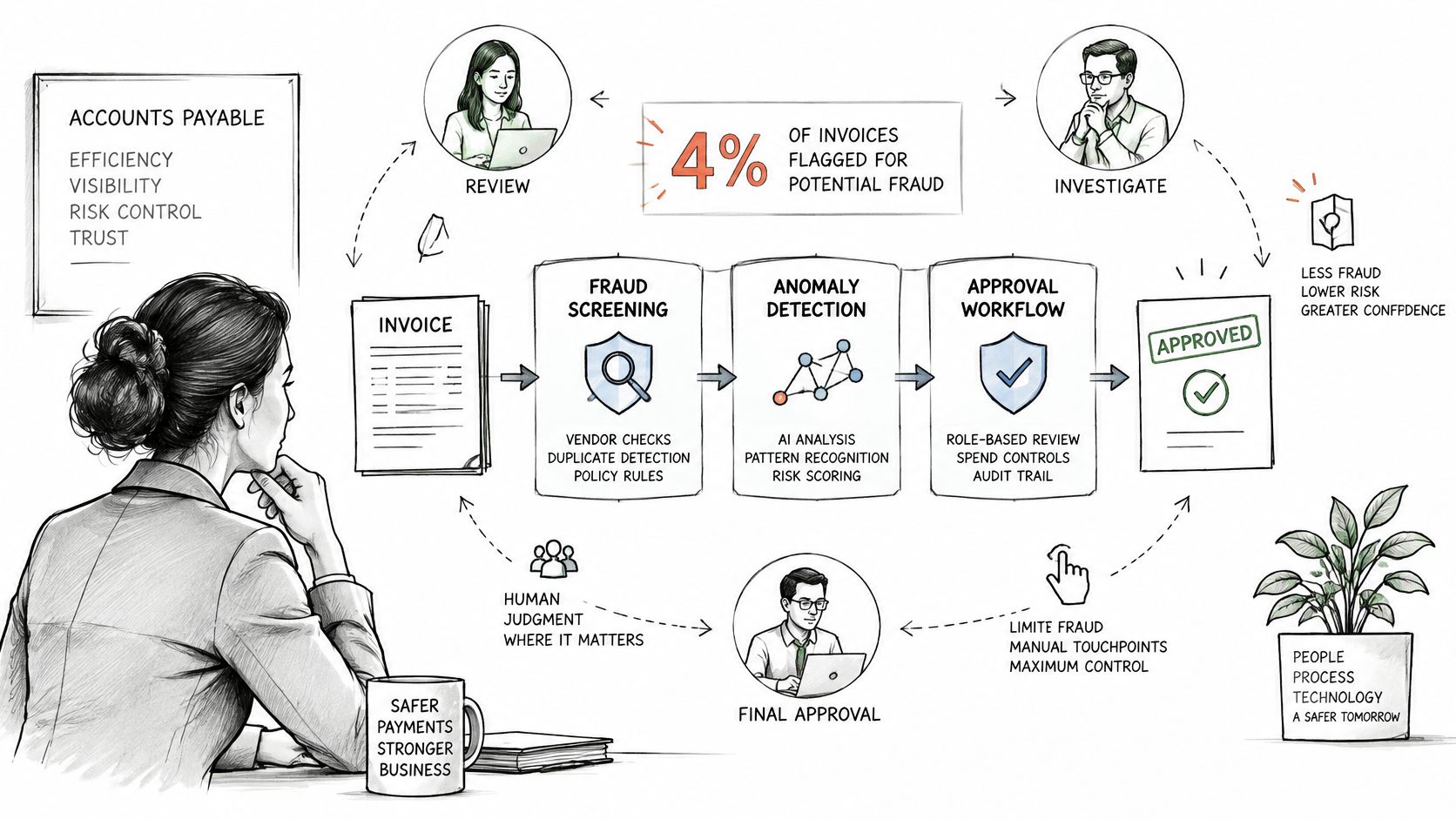
Design risk-tiered controls instead of stripping reviewers out.
- Low risk: A known supplier, matched to PO and receipt, inside tolerance, with unchanged bank details, can move straight through to payment scheduling.
- Medium risk: A price variance, a new PO, or an unusual quantity gets a second check by someone who did not create the order.
- High risk: Changed bank details, a first-time supplier, a duplicate pattern, an unusual payee, or a large amount needs independent verification. Call back a known contact, not the number on the invoice, and keep separation of duties between master-data changes and payment release.
A model that recommends payment because the invoice "looks like" past approvals can wave through a new fraud pattern. Bank-detail changes and duplicates have to be checked outside that recommendation. Business-email-compromise attempts and related-party bills belong in the high-risk tier even when the OCR confidence is perfect.
For organizations paying across borders, the same workflow has to respect tax, currency, jurisdiction, sanctions screening, and data-retention rules. Log every override and every supplier-master change. After go-live, judge the control by prevented duplicate payments, false-positive rate, override frequency, payment holds, and verified fraud attempts. Cycle time alone will not tell you the control still works.
Metrics That Prove Automation Works
A fast process that lets duplicate payments rise is not a success. Read the set together, or you will optimize one number and damage another.
| Metric | How to Calculate It | Healthy Direction |
|---|---|---|
| Cost per invoice | Total AP processing cost divided by invoices processed | Lower |
| Cycle time | Days from invoice receipt to payment scheduling | Lower |
| First-pass match rate | Invoices matched without intervention divided by invoices received | Higher |
| Exception rate by cause | Exceptions grouped by reason code divided by invoices received | Lower, tracked for each cause |
| Touchless rate | Invoices posted and paid with no AP touch divided by total invoices | Higher, read with control results |
| Duplicate payments prevented | Duplicate invoices blocked before payment, reported monthly | Higher, with false-positive rate tracked |
What the benchmark is actually measuring
A 2025 Ardent Partners benchmark, summarized in research on finance back-office automation returns, reported average invoice-processing cost of $9.84 and an 8.2-day cycle time, versus $2.65 and 2.9 days for best-in-class organizations. Ardent defines straight-through processing as receipt, approval, and payment scheduling without AP intervention. An earlier Ardent benchmark found best-in-class organizations at a 67.2% touchless rate, 3.2 times that of peers. Leading teams get there with structured purchasing, integrated ERP data, automated matching, and exception-focused human review, not with a scanner.
Record cost per invoice, cycle time, and exception rate before the project, using the same definitions you will use later. Otherwise the before-and-after comparison is a story, not a measurement.
How the numbers pull on each other
First-pass match rate tells you whether tolerances and PO data fit real invoices. Exception rate by cause points at the supplier, the buyer, or the master record. A monthly review of that split matters, because a rising exception count usually means purchasing or supplier discipline slipped, not that the software regressed. Prioritize rules that kill repeat causes: missing PO numbers, price variances, tax mismatches, duplicates, and supplier-master inconsistencies.
Read touchless rate next to duplicates prevented and the false-positive rate on fraud holds. A high touchless rate with climbing overrides is a control failure wearing a productivity badge. In construction, manufacturing, and aerospace, add project, work-order, contract, or cost-code validation to the match rate, or header-only automation will look healthier than the job cost is.
After three to six months, a healthy pattern is falling cost and cycle time, a rising first-pass match rate, and a stable or falling exception count. If touchless rises while exceptions by cause stay flat, you automated the easy invoices and left the expensive ones alone.
Confirm Your Readiness Before You Automate
Automate the stage your data can support. Score four checks as ready, partial, or missing before you sequence the build.
- Volume and document types: Count invoices by channel and by class, including credits, statements, and non-PO bills.
- PO discipline: Measure the share of invoices that carry a valid PO. A low share means matching rules will mostly create exceptions.
- Supplier-master quality: Check duplicates, missing tax IDs, and bank details with no verification date.
- ERP integration points: Confirm write-back fields, retry behavior, master ownership, code sync, and the audit log.
In the first two weeks of document intelligence work, we audit document types, volumes, current processing workflows, and pain points. In process discovery, we map the manual steps, name automation candidates, and rank them by impact and feasibility. The handover should be a ranked list of top exception causes, the stages to automate first, and the metrics baseline you will not change mid-project.
Results follow the data the process starts with. A clean PO record and a trusted supplier master are preconditions. On a manufacturing contract and PO automation project, processing time fell by 82%, the error rate fell to 1.8%, and the team captured $95K in discounts, because pricing checks and exception flags sat on agreements the ERP could already see. Use a data readiness checklist so those preconditions are scored, not assumed.
Pull three months of invoice data, count exceptions by cause, and bring that list to the readiness conversation. That list decides whether you start with capture, with PO discipline, or with the post to the ledger.
Ryshe designs invoice processing automation for architecture, engineering, construction, manufacturing, and aerospace teams, including capture, validation, exception routing, and ERP posting that keeps human review on the invoices software should not approve alone. We run that work as a scoped build or as ongoing delivery with a named senior team, so the exception causes you ranked get fixed. If you want that path mapped against your own invoice file, visit Ryshe.