Document Intelligence API Guide: Capabilities and Responses
Technical reference to the document intelligence API: capabilities, response fields, intake rules, accuracy metrics, exception handling and integration.
The usual buying advice for a document intelligence API is to sort vendors by a headline OCR percentage and pick the winner. That advice fails as soon as the files look like real project work. A strong character score on a clean demo PDF does not tell you whether an invoice total sits on the right line, whether a shaky clause will stop for review, or who owns the record after the model changes.
Treat the API as governed infrastructure. It has to classify the file, return fields with evidence, hold uncertain values, and leave an audit trail your ERP and your reviewers can both trust. Extraction quality still matters. It is not the contract you should sign against.
Document Intelligence API Capabilities at a Glance
Match the endpoint to the document before you compare vendors. Early engines returned plain text. Current services identify text, layout, tables, named fields, and document type in scans and in born-digital files. Most production systems use two or three of the rows below, not one.
| Capability | Returns | Typical input | Check before relying on it |
|---|---|---|---|
| Text recognition (OCR) | Lines, words and character positions | Image-only scans and photographed pages | Image quality and noise |
| Layout analysis | Pages, paragraphs, reading order and selection marks | Multi-column specifications and submittals | Reading order on complex pages |
| Table extraction | Rows, columns, cell text and spans | Schedules, bills of quantities and invoice line items | Tables that continue across pages |
| Prebuilt field extraction | Named fields such as invoice total, due date and vendor name | Invoices, receipts and purchase orders | Field coverage for your own layouts |
| Custom model extraction | Fields you define from labeled samples | Contracts, compliance forms and internal SOPs | Quality and volume of labeled samples |
| Classification | Document type with a confidence score | Mixed intake folders | Similar types that differ only on a few pages |
| Semantic search and question answering | Ranked passages with source references | Project archives and knowledge bases | Retrieval errors caused by OCR mistakes |
Text recognition is the right call for photographed site records and image-only scans. A 2021 peer-reviewed benchmark built 18,568 document instances and 51,304 processing requests, and found that server-based systems beat the open-source Tesseract engine especially when noise degraded the scans. Error rates rose with noise for every engine tested. Do not buy on a clean-page demo.
Layout analysis matters on multi-column specifications, where a wrong reading order glues the left column to the right. Table extraction is what you want for schedules and invoice lines, and it breaks when a table continues on the next page without a repeated header. Prebuilt field extraction covers invoices and purchase orders until a vendor layout omits a field your process requires. Custom models fit contracts and internal SOPs, and they only hold up when the labeled samples match the formats you receive, including handwritten notes.
Classification splits a mixed intake folder, then hands each type to the right extractor. It struggles when two types differ on only a few pages. Semantic search is for project archives, and a bad OCR pass will rank the wrong passage with a confident citation. A practical stack classifies, extracts fields, then searches the normalized result. For a wider look at how those stages fit an IDP program, the Ares intelligent document processing write-up is a useful companion. The rest of this guide covers the call, the response, and how you prove the result.
Routing Documents by Content Layer and Scan Quality
A file that opens, and even one that passes PDF/A validation, is not proof that text or tables can be extracted.
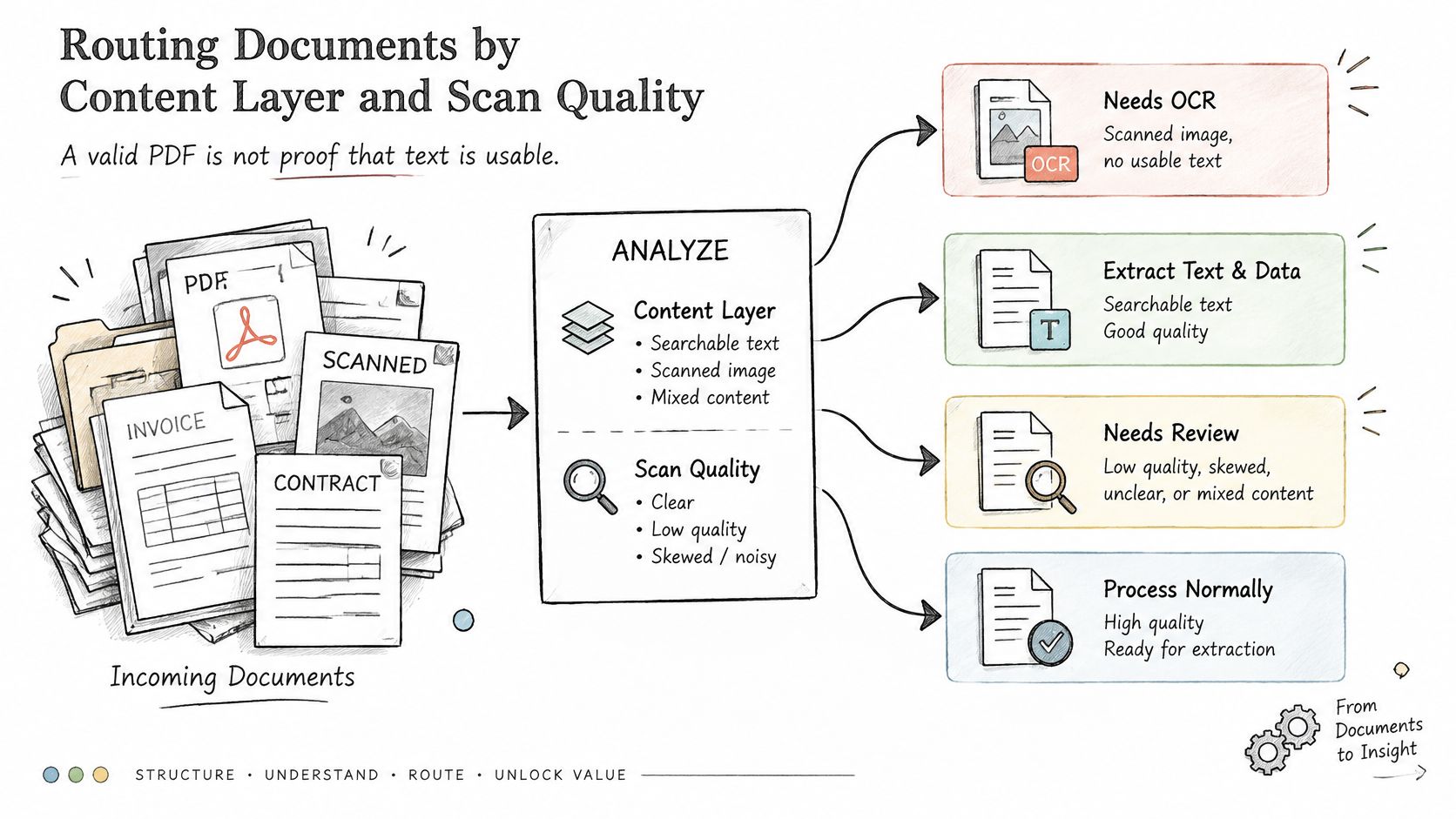
ISO 19005-1 defines PDF/A-1 as a constrained use of PDF 1.4 for long-term preservation of documents that contain character, raster, and vector data. PDF/A-1b mainly preserves visual appearance and may hold scanned images with no represented text, while still allowing invisible OCR text. PDF/A-1a adds logical structure and semantic properties. Successful validation only says the file meets a preservation profile.
Route by what is actually in the file
- Born-digital pages with a text layer go straight to text and table extraction. Still run a layout check. Embedded fonts and multi-column specs can yield selectable text in the wrong order.
- Image-only scans go to OCR only after a quality check on resolution, skew, and noise. Blurry or skewed pages go to review. Forcing extraction on them creates confident wrong fields.
- Mixed files are split by page. Only the image pages receive OCR. Running OCR across a text layer wastes time and can replace good text with worse text.
- Fillable forms use the form-field values first. Flag any empty required field instead of guessing from nearby labels.
- Handwritten notes and legacy formats need a custom model trained on real project documents, not on blank templates, with review turned on. Template training misses the stamps, markups, and odd layouts that show up on live jobs.
- Malformed, encrypted, or unreadable files are quarantined with a reason code. Do not retry them until someone supplies a readable copy.
- Multilingual or non-Latin pages stay in the pipeline only when the chosen model supports that script. Unsupported pages go to review.
Practical rule: Keep the original PDF and the rendered page images for every accepted file. Any later value has to be rechecked against that evidence, not against a downstream copy.
Score page classification on its own service level. Low-confidence or structurally ambiguous pages go to a person. They do not trigger an approval, a posting, or a search index update.
How a Single Document Request Moves Through the API
One document should be traceable from the bytes you send to the record you store. Synchronous calls suit a single page when the caller can wait. Multi-page PDFs should use an asynchronous operation so a timeout does not look like a failed analysis.
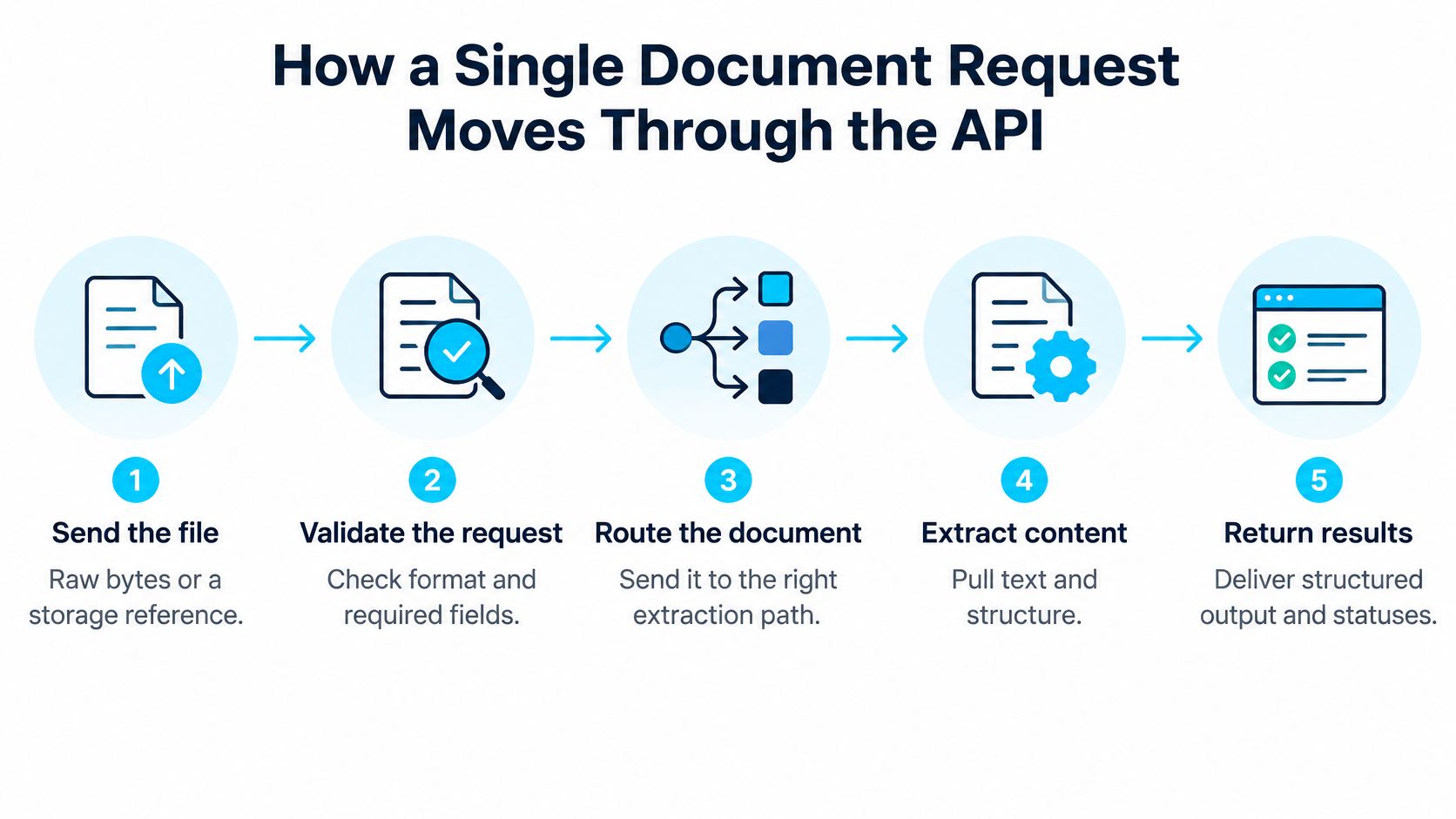
- Send the file as raw bytes or as a storage reference, plus the processor or model identifier. The same PDF returns different fields under a prebuilt invoice model than under a custom contract model. Log which model you asked for.
- Read the immediate response. A sync endpoint returns the analysis. An async endpoint returns an operation identifier. Store that identifier before you do anything else. It is the key for status, retries, and idempotent writes.
- Poll until the status is terminal, meaning succeeded, failed, or partially succeeded. Stop at a ceiling you set, such as a maximum wait and a maximum number of polls. Indefinite polling hides stuck jobs.
- Read the analysis as pages, lines, words, tables, paragraphs, and fields. Each item carries its own page reference. Do not flatten the payload into a single bag of strings before you have checked those references.
- Check document status and each field's confidence before a value leaves the pipeline. A succeeded document can still hold a field you should not post.
- Write normalized fields to the destination and keep a pointer to the original file. Contract workflows need that pointer when a clause drives an obligation. A worked pattern is in this contract clause extraction pipeline.
- Handle failures by category. Unsupported formats, page limits, and file-size limits need a corrected file and a new submission. Throttling needs retries with exponential backoff and jitter. A blind retry of a rejected file only repeats the rejection.
| Status or error | Meaning | Required action |
|---|---|---|
| succeeded | Analysis complete with pages, fields and confidence | Proceed to field checks and validation |
| partiallySucceeded | Some pages or fields did not process | Route affected pages to review |
| failed | No usable result was produced | Read the error category before any retry |
| Unsupported format, page limit or file size exceeded | Input rejected by the service | Correct the file and resubmit |
A healthy completed response names the operation, the model, every page that was read, the fields you asked for, a confidence on each field, and a page location for each value. If any of those are missing, the call is not done, even when the HTTP status says success.
Response Fields Every Extracted Value Needs
A flat key-value pair is not a production result. Each value needs durable provenance so a reviewer, an auditor, or a later model run can see where it came from.
The W3C Web Annotation Data Model links one or more bodies to one or more targets and supports selectors for a precise segment. Map the body to the extracted value and the target to the page region. That pattern is what lets someone jump from an invoice total, a contract clause, or a submittal attribute to the evidence in one step.
Three jobs every field has to do
Identify the source. documentId ties the value to the file you ingested. page tells a reviewer which page to open. Without both, a correction cannot be audited.
Locate and prove the value. boundingPolygon is the region to highlight. charSpan points at the characters in the text stream when the engine provides one. If the polygon does not contain the characters you stored, the value is not grounded.
Govern trust. confidence drives routing. validationStatus records passed, failed, or needs-review. extractionMethod separates prebuilt, custom, and manual values. modelVersion and schemaVersion stop a silent model swap from rewriting last quarter's approvals.
| Field | Purpose | Example value |
|---|---|---|
| documentId | Ties the result to the original file | file-7c91e4 |
| page | Locates the value for reviewers | 3 |
| boundingPolygon | Highlights the exact region on the page | eight coordinates in page units |
| charSpan | Points to the characters in the text stream | offset 1840, length 12 |
| confidence | Drives threshold routing | 0.64 |
| validationStatus | Records passed, failed or needs-review | needs-review |
| extractionMethod | Separates prebuilt, custom and manual values | custom-model |
| modelVersion | Ties the result to the model that produced it | custom-contracts-2025.03 |
| schemaVersion | Keeps downstream parsers stable | submittal-v2 |
The storage contract
Store an immutable source reference beside versioned results. Keep the original file hash, parser or model version, schema version, timestamps, and reviewer decisions. Downstream routing should read normalized fields. Compliance screens should read evidence links and confidence, not a second copy of the business payload.
JSON-LD helps when results move between systems, because the annotation model is a shared shape rather than one vendor's response. Run this test on any API you evaluate. Can a reviewer open an invoice total or a contract clause and land on the evidence in a single step? If the answer is no, the response is not ready for an approval workflow.
Measuring Accuracy Beyond Generic OCR Scores
Returned text is not a business result. An ACL Industry benchmark evaluated 570 documents covering 3,402 pages across education, government and nongovernmental organizations, technology, healthcare, and finance. Under identical retrieval-augmented-generation settings, answer accuracy swung with OCR quality. On a historical-book task the range ran from 8.63% to 83.45%. On an ultra-long-document task it ran from 9% to 74%. On a cross-page-table task it ran from 25.74% to 74.59%.
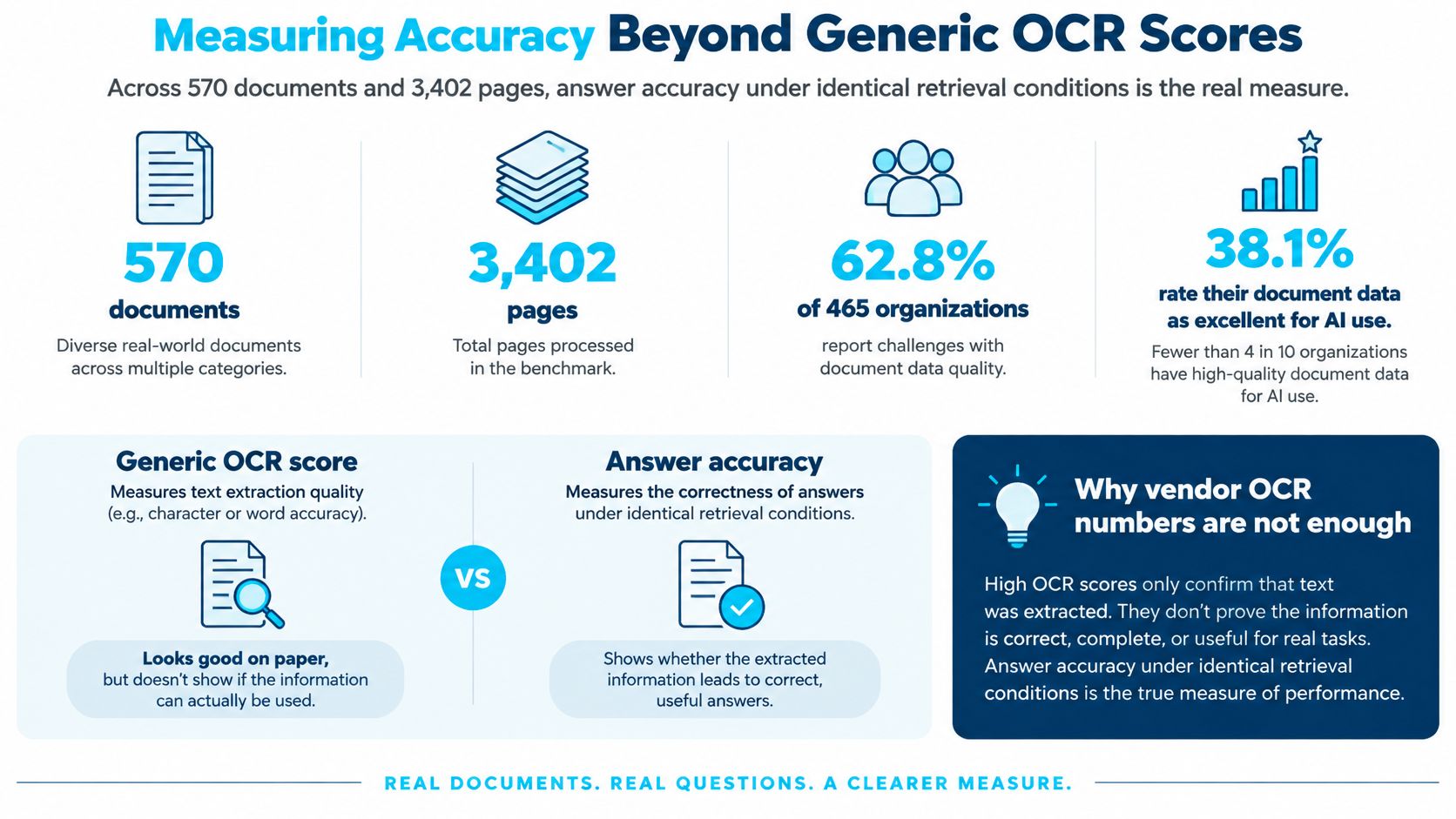
Layout, reading order, table reconstruction, and bad scans change what a later search or agent can answer. A generic OCR percentage hides that spread. The same trap shows up in invoice work, which is why field checks belong in the test design described in this invoice processing OCR note, not only a character score.
Metrics to set on your own files
Build the test set from your mix, then record every metric by document type. A clean invoice score will hide failures on degraded contracts if you average them together.
- OCR character or word accuracy: Share of characters or words that match the labeled text.
- Page classification accuracy: Share of pages assigned the right content layer and document type.
- Field-level precision and recall: Precision is the share of returned fields that are correct. Recall is the share of true fields you returned.
- Table-cell accuracy: Correct cell text, including cells that span rows or continue on the next page.
- Evidence-localization accuracy: The returned region contains the value, not a nearby lookalike.
- Straight-through processing rate: Share of documents posted with no human touch.
- Exception rate and exception aging: How often items wait, and how long they wait.
- False approvals: Values or routes accepted that a reviewer would have rejected.
- Downstream reconciliation mismatches: Posted records that fail a later match to purchase orders, specs, or the ledger.
- Approval-cycle time: Clock time from intake to an accepted decision, not time inside the model call.
Set the target for each metric before the pilot starts, and agree it with the business owner. A target chosen after you see the scores is a story, not a gate.
Teams that need a fuller evaluation design than a single benchmark number can use this AI evaluation guide for ML teams. It is the right frame for thresholds you will defend in a design review.
Exception Handling, Confidence Thresholds and Review Queues
The API you want is the one that flags uncertainty, not the one with the prettiest average score. Ambiguous, damaged, incomplete, and odd layouts are normal intake, not edge cases.
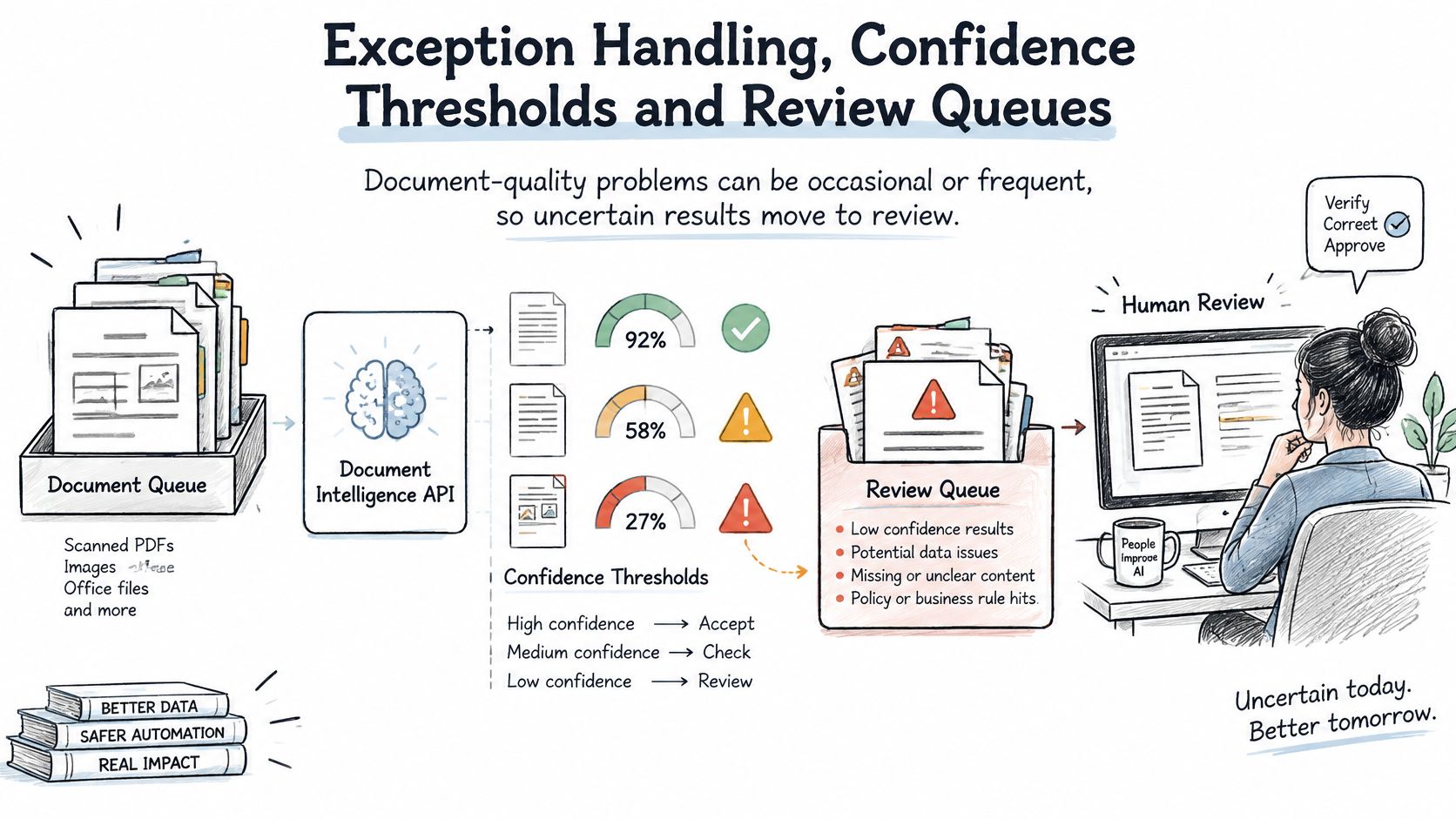
An Apryse global survey of 465 organizations in 2025 found that 62.8% experience document-quality problems occasionally or frequently, while only 38.1% rated their document data as excellent for AI use. 82.8% planned to invest in document automation within the following year. Spending more on extraction without a review path just moves bad data faster.
Controls, in the order you should set them
Thresholds differ by field. A missing invoice total should stop at a higher bar than a vendor address you can confirm from the master file. One global cutoff either floods the queue or lets bad totals through.
The queue shows evidence. Anything under the threshold opens with the page image and the candidate value side by side. Reviewers should not retype from a spreadsheet that has lost the page.
Escalation follows value, type, or age. A high-value change order ages out of the general queue faster than a routine transmittal. Write the rule down so it does not live in one person's inbox.
Corrections feed the next model or rule update. Capture the old value, the new value, and the reason. Schedule the retrain or the rule change. Unscheduled "we'll fold it in sometime" never happens.
Schema versions and audit trails stay with the correction. Record who changed which value and when. A corrected total has to stay interpretable after the schema gains a field.
Decision accuracy is not extraction accuracy
An invoice total can be read correctly and still be routed wrongly because supplier identity, tax treatment, purchase-order match, or approval authority is unresolved. Measure the decision, not only the string.
Watch straight-through rate, false approvals, rework, exception aging, and reconciliation mismatches by document type. If aging climbs or false approvals appear for one type, tighten that type's threshold or its escalation rule. Loosening the threshold to make the queue look smaller is how bad postings get into the ledger.
Integration, Governance and Data Ownership Choices
Fit and ownership decide more production outcomes than model rank. A standalone endpoint that cannot post into the system of record is a demo. Independent OECD research on AI adoption in firms found that 47% of surveyed firms cited inadequate interoperability between equipment as an obstacle to the data integration AI needs. Integration programs usually stall on ordinary gaps: no maintained connector, identity that does not map across tenants, or two stores that can both overwrite the same total. Ask those questions before model rankings.
What to settle before the first production call
Confirm connectors for ERP, CRM, ECM, and Microsoft 365, plus the identity model and tenant isolation. Confirm retention, deletion guarantees, regional processing, and data residency. Name the system of record for extracted values. If both the API store and the ERP can change a total, an auditor will not know which value to trust.
| Pattern | Best when | Trade-off | Design requirement |
|---|---|---|---|
| Webhook callbacks | High volume and downstream systems must react quickly | Receiver must be reachable and handle duplicates | Idempotent handler keyed by operation identifier |
| Polling | Batch jobs, restricted networks or low volume | Added latency and wasted status calls | Backoff schedule and a maximum wait time |
| Cloud-hosted processing | Fast start and managed scaling | Data residency and platform dependence | Region selection and portable export format |
| In-house or private deployment | Strict control of data and model changes | Operations staff and upgrade effort | Model version control and change approval |
Reliability mechanics that keep books clean
Make webhook handlers idempotent on the operation identifier so a duplicate delivery does not create a second invoice. Retry only transient failures. Add fields in a new schema version so current consumers keep working. Keep a portable export so a platform change does not trap the corpus.
A document question-answering layer such as GPT-6 Astra document question answering can sit on extracted text and surface citations, while the harder decision stays underneath: who may change extraction rules, corrections, extracted data, logs, prompts, and model versions. Write that ownership down before production. Cloud convenience against in-house control is a real trade. For regulated engineering and aerospace work, named control beats another feature matrix. Put privacy controls in the same design, alongside these privacy by design practices, rather than bolting them on after go-live.
Run a Pilot on Your Own Documents Before You Commit
I would not sign a platform decision on a vendor sample set. Pull a test set that covers every document type, quality band, and content layer you route today, and include the messy files on purpose. A set of 50 to 100 files is enough to expose layout gaps without turning the pilot into a second project.
Agree acceptance criteria with the business owner before the first run. Use field-level precision and recall, evidence checks, straight-through rate, and an exception-aging limit, each by document type. A type passes only when every required field meets its target and aging stays inside the limit you wrote down.
Run that set through the same request flow, response contract, retries, and provenance store you plan to ship. A demo console hides idempotency bugs and missing polygons. In the same week, get written answers on residency, retention, deletion, export, and who owns corrections.
A document type that misses one required field does not get a partial pass. Partial passes are how pilots become production with known holes.
Ryshe builds its Document Intelligence solutions on Azure AI Document Intelligence and SharePoint Premium, which are included in licenses most enterprise clients already pay for. You can book a 30-minute call to see the accelerator run on your own documents at ryshe.com. If you are not ready to book, write the pilot criteria this week and name the owner who can say no.
Ryshe designs document intelligence for architecture, engineering, construction, manufacturing, and aerospace teams that need extraction, review queues, and system integration their own staff can run. If you want the accelerator exercised on your contracts, invoices, or submittals, visit Ryshe and book the 30-minute working session. Bring a handful of difficult files. The session is useful only if those files look like the ones your reviewers already struggle with.