What Is Document Automation? a Practical Guide for 2026
What is document automation? Learn how software captures, extracts, routes and approves business documents, with stages, examples and limits.
Document automation is software that creates, captures, extracts, validates, routes, approves, stores and distributes business documents with minimal manual intervention.
You might have an invoice open beside a purchase order, an approval email buried in your inbox, and a spreadsheet waiting for the same information. The tedious part isn't reading the invoice. It's checking which record is authoritative, finding the right approver, and making sure someone catches a mismatch before payment.
Useful automation handles those connections. It also makes responsibility clear when a document is incomplete, outdated, or wrong.
Document Automation in Plain Language
Think of a mail room. A clerk opens envelopes, reads addresses, sorts the contents into trays, and carries each item to the right desk. A document automation system performs a similar chain of work, except it can also check the contents and update the business record.
Say a supplier emails an invoice. Instead of asking an accounts payable employee to download it, rename it, copy its details, and chase approval, software captures the file and identifies the relevant information. It checks that information against purchasing records, sends discrepancies for review, and passes approved results to accounting.
The important distinction is between moving a file and completing useful work. Saving an invoice in a searchable folder helps people find it. Connecting its contents to an approved accounting entry changes how the business operates.
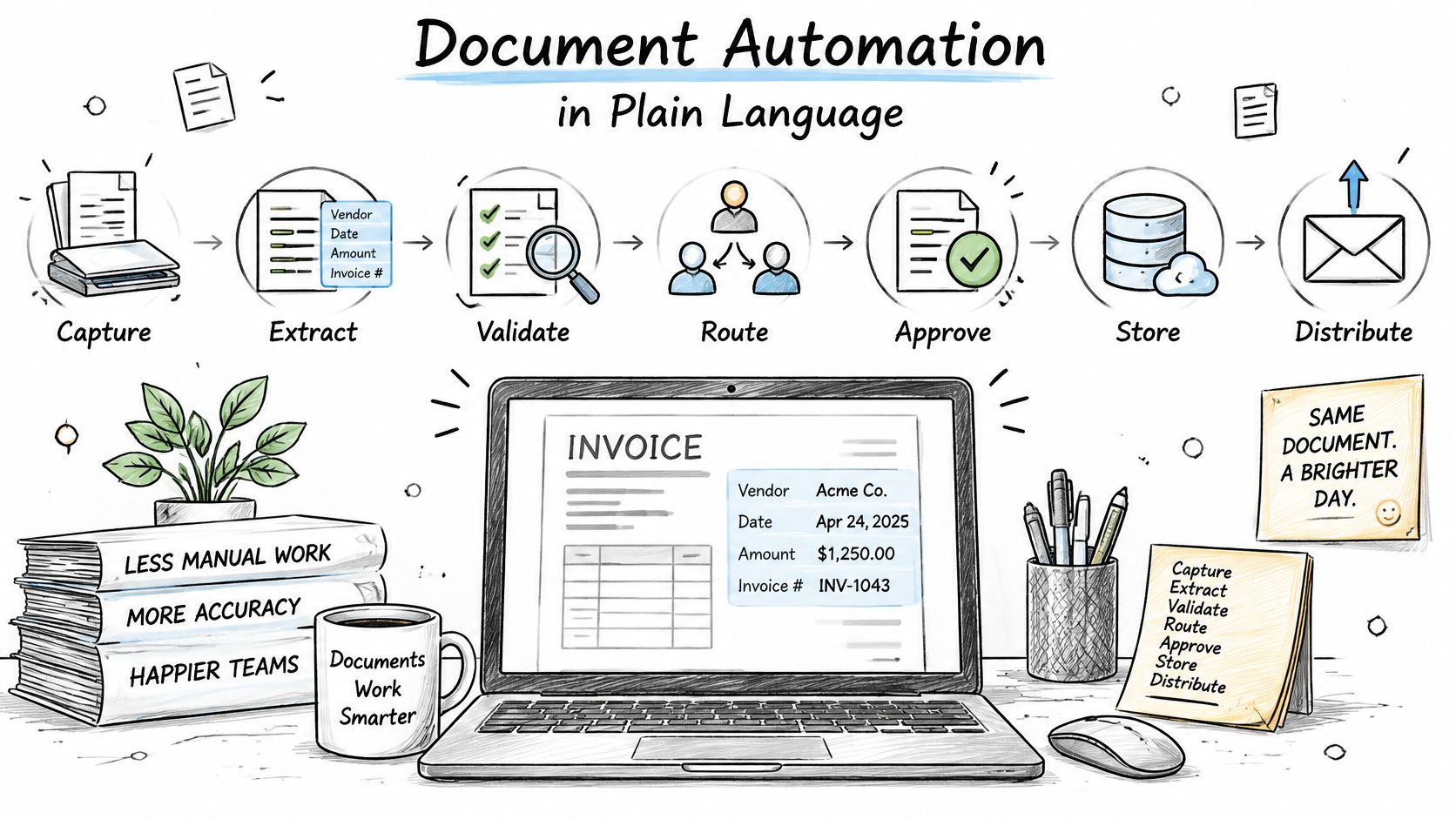
From document assembly to operational data
Early document assembly combined predefined text with customer information to generate individual letters or agreements. Workflow tools added routing, while optical character recognition, usually shortened to OCR, made scanned text readable by software.
As PandaDoc's automated document processing guide describes, cloud OCR services emerged in the late 2000s and early 2010s, making recognition available without maintaining all the infrastructure on-site. Modern intelligent document processing adds classification and extraction capabilities for documents with varied layouts.
That history explains why different tools can all be described as document automation. A template tool creates a contract; an intake pipeline reads an incoming contract; an approval workflow sends it to legal. They serve different parts of the same document lifecycle.
A document becomes operational data when its contents can trigger a controlled action, rather than simply sit in a folder.
So, when someone asks what is document automation, the practical answer isn't just software that reads PDFs. It's a connected process that turns business paperwork into usable records and accountable decisions.
The Seven Stages a Document Passes Through
Automation is a chain of connected stages, not one tool. The table follows a supplier invoice from arrival to its final business record, showing where each component does its work.
The seven stages of a document automation pipeline
| Stage | What the software does | Supplier invoice example |
|---|---|---|
| Capture | Acquires the file from email, scanner or portal | PDF invoice arrives in the accounts inbox |
| Recognize | Converts images to text with OCR or reads native text | Scanned invoice becomes machine-readable text |
| Classify | Identifies the document type | Labelled as an invoice, not a contract |
| Extract | Pulls named fields from the document | Invoice number, date, total and PO reference captured |
| Validate | Checks values against rules and confidence scores | Total matches the PO within tolerance; a blurred date is flagged |
| Route and approve | Sends the item to the right person or queue | Routed to the approver for that cost centre |
| Store and distribute | Writes results to ERP, CRM or file storage | Approved record posted to accounting; original archived |
Capture establishes the input and its origin. Keep the original attachment and sender information together so a reviewer can trace the record back to what arrived.
Recognition makes the content readable. An OCR engine handles scanned images; a native-text parser reads text already present in a digital file. Layout and field detection help associate labels with the right values, rather than treating the page as an undifferentiated string.
Classification identifies the document type. An invoice and a purchase order may contain similar supplier names and amounts, but they shouldn't trigger the same action.
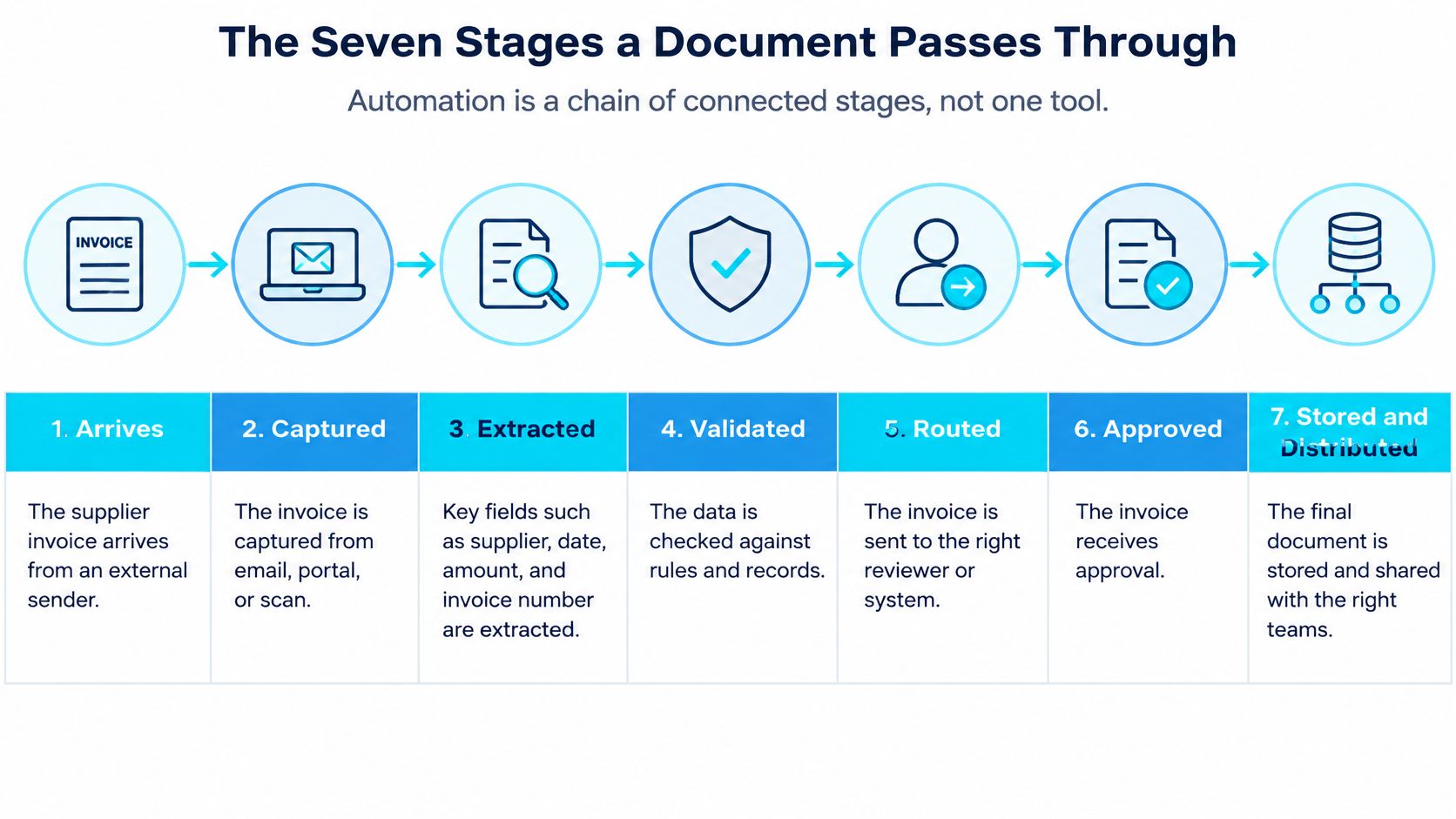
Turning readable text into a controlled transaction
Extraction uses an extraction model to populate named fields. Keep that field list specific to the task: an invoice workflow needs payment-related information, not every fact on the page. A contract clause extraction pipeline illustrates a different extraction task, where the target is relevant contractual language rather than invoice totals.
Validation applies a rules engine and field-level confidence checks. A clearly read amount can still be incorrect for the purchase order, so recognition confidence and business validity need separate checks.
Routing and approval use a workflow orchestrator to assign the item to an authorized reviewer. Storage and distribution then use application programming interfaces, or robotic process automation when appropriate, to write results into the receiving ERP, CRM, or document-management system.
The document-processing benchmark paper emphasizes evaluating the complete document-to-structured-data pipeline because upstream recognition errors affect downstream extraction. A misread digit shouldn't become an approved total.
Expect three outputs: a structured record, an audit trail, and an exception queue. That queue isn't a failure of the design. It's where the workflow places documents it cannot safely clear.
Measured Gains From Automating Documents
The opportunity comes from repetitive handling, not just typing speed. FileCenter's business process document automation guide cites an estimate that knowledge workers spend about 50% of their time preparing and editing documents, alongside a survey in which 73% of IT decision-makers observed manual-task automation saving employees 10% to 50% of time previously lost.
Those figures describe a broad opportunity, not a forecast for an individual department. A more useful implementation question is whether the complete workflow reduces handling time while preserving the checks that matter.
In a study published in the International Journal of Artificial Intelligence, researchers tested OCR, automated classification, language-model summarization and classification, and robotic process automation on 105 authentic administrative documents, reporting the following results.
Measured results from a 105-document study
| Measure | Result |
|---|---|
| OCR accuracy | 89.00% |
| Accuracy across three major document classes | 95.24% |
| Accuracy across fifteen subcategories | 82.86% |
| Average handling time before automation | About 4.5 minutes per document |
| Average handling time after automation | 0.38 minutes per document |
| Reduction in handling time | 91.57% |
Read the measures separately
The OCR result describes text recognition, not whether every payment field was correct. The broad classification result measures document-type identification, while the subcategory result shows that finer distinctions were harder. The handling-time comparison captures the combined effect of reading, interpreting, and writing results back into the document system.
That's why classification accuracy isn't a substitute for field accuracy. A system can correctly label a file as a contract while extracting the wrong renewal date. Likewise, faster handling isn't enough if reviewers must later repair incorrectly posted transactions.
Measurement rule: Count the work left behind, including corrections, exception review, and failed updates, before calling the saved time a business benefit.
Build the financial case around your own baseline and realized capacity recovery. The AEC document intelligence ROI guide provides a relevant framework for connecting document-handling improvements to project operations.
Where Document Automation Works Across Industries
Different documents support different decisions. These examples separate reported project results from useful operational outputs where no numerical outcome is established.
Reported outcomes by document type
| Document type | Automated action | Reported outcome |
|---|---|---|
| Invoices and purchase orders | Extract totals, match to PO, route exceptions | Manufacturing contract and PO project cut processing time by 82%, reduced error rate to 1.8%, and captured $95K in discounts |
| Submittals, RFIs and project documents | Classify by project phase, extract deadlines, flag items near due date | AEC project saved 15 hours per project manager each week; 74% faster retrieval at 92% extraction accuracy over four months |
| Engineering specifications | Tag spec sections and responsible parties | Searchable records linked to specification sections and responsible parties; no separate measured outcome reported |
| Contracts and agreements | Extract key terms, pricing and conditions | Structured terms available for review; no separate measured outcome reported |
| Compliance documents | Route for review and record approvals | Traceable review status; no separate measured outcome reported |
| Insurance certificates | Check expiry dates and coverage fields | Exceptions identified for review; no separate measured outcome reported |
Manufacturing and procurement
In manufacturing, invoice and purchase order workflows connect document contents to purchasing commitments. Say a supplier invoices a different quantity from the approved order. The useful action isn't merely extracting both quantities, it's preventing an unmatched item from proceeding without review.
Our manufacturing contract and PO project produced the procurement results shown in the table. Those are results from an individual project, not an expected return for every manufacturer.
Architecture, engineering and construction
AEC teams need to locate the right document within the right project context. A submittal deadline means little without its project, phase, responsible party, and review status. Our AEC document intelligence work classified documents and extracted dates, specification sections, responsible parties, and deadlines.
The AEC RFI and submittal automation guide explores this workflow more specifically. Deadline alerts and an RFI response tracker support action, while metadata makes relevant documents easier to retrieve.
For engineering specifications, tagging should help a reviewer distinguish a useful precedent from a requirement governing the current project. Findable doesn't automatically mean applicable.
Contracts need another kind of interpretation. In our contract-processing work, we trained models to extract terms, pricing, and conditions from varied formats, including handwritten notes and legacy documents.
Compliance documents and insurance certificates require explicit review rules. An extracted expiry date can trigger follow-up, but a designated reviewer must decide whether the document meets the organization's requirements. Match the document type, decision risk, and workload to your operation before expecting comparable results.
Limits and Misconceptions Before You Automate
Document automation is a data-quality and governance problem before it is an AI problem.
A capable model can't reliably choose the governing drawing if nobody has established which revision is current. Nor should it decide whether a handwritten annotation overrides an approved specification.
The Apryse global survey announcement reports that 76.6% of organizations say documents contain 25% to 75% of their data, yet only 38.1% rate that data as excellent for AI use. That gap makes document preparation and control part of the automation project, not housekeeping to postpone until later.
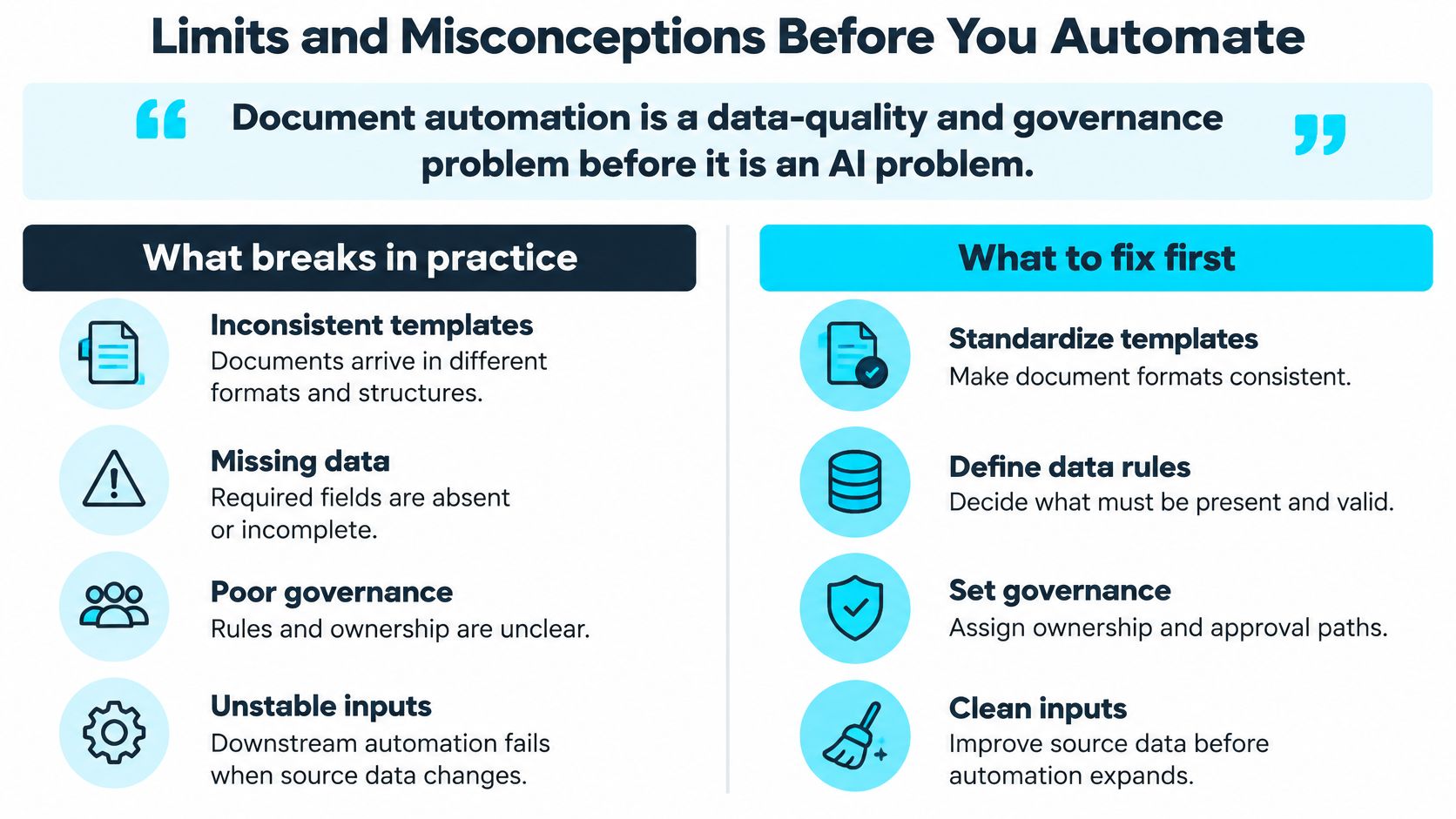
Automated doesn't mean unattended
Consider an invoice with changed bank details. Even if the text is perfectly legible, the workflow shouldn't treat successful extraction as authorization to change payment instructions.
Straight-through processing means an item proceeds without human intervention after meeting defined conditions. Human-in-the-loop automation pauses for an authorized person when judgment or risk warrants it. Use the former for bounded, low-risk actions and the latter for consequential exceptions.
Role-based access and segregation of duties matter here. The person correcting a supplier field shouldn't automatically gain permission to approve the resulting payment.
A stronger model doesn't repair an unmanaged collection
Missing metadata, conflicting versions, and inconsistent templates create uncertainty about meaning, not merely readability. A superseded drawing may be sharp, complete, and easy to extract, yet still be the wrong basis for action.
Establish document ownership, revision status, retention rules, and provenance. Preserve the source document alongside corrections so reviewers can distinguish what arrived from what someone later accepted.
OCR isn't business understanding
A handwritten delivery note may contain a readable number without making clear whether it represents ordered, delivered, or rejected units. Testing clean forms alone won't tell you whether the workflow handles that ambiguity.
Use representative scans, annotations, rotated pages, and unfamiliar layouts in acceptance testing. Require the system to flag missing information rather than fill it with a plausible guess.
Before authorizing a workflow, answer these questions:
- Version conflict: What happens when a superseded document arrives?
- Decision ownership: Who accepts responsibility for correcting a wrong extraction?
- Early detection: Which control catches the error before it affects payment, safety, or a customer commitment?
Pick One Document Workflow to Automate First
Choose one document workflow, not the whole department.
Start with discovery: map the manual process, audit document types and volumes, and rank candidates by impact and feasibility. That's how we approach process discovery at Ryshe, with the initial document audit covering current workflows and pain points.
Check security, system access, and delivery skills before committing. The AIIM and Deep Analysis survey announcement identifies data security as the leading implementation concern and integration challenges as the next most prominent concern.
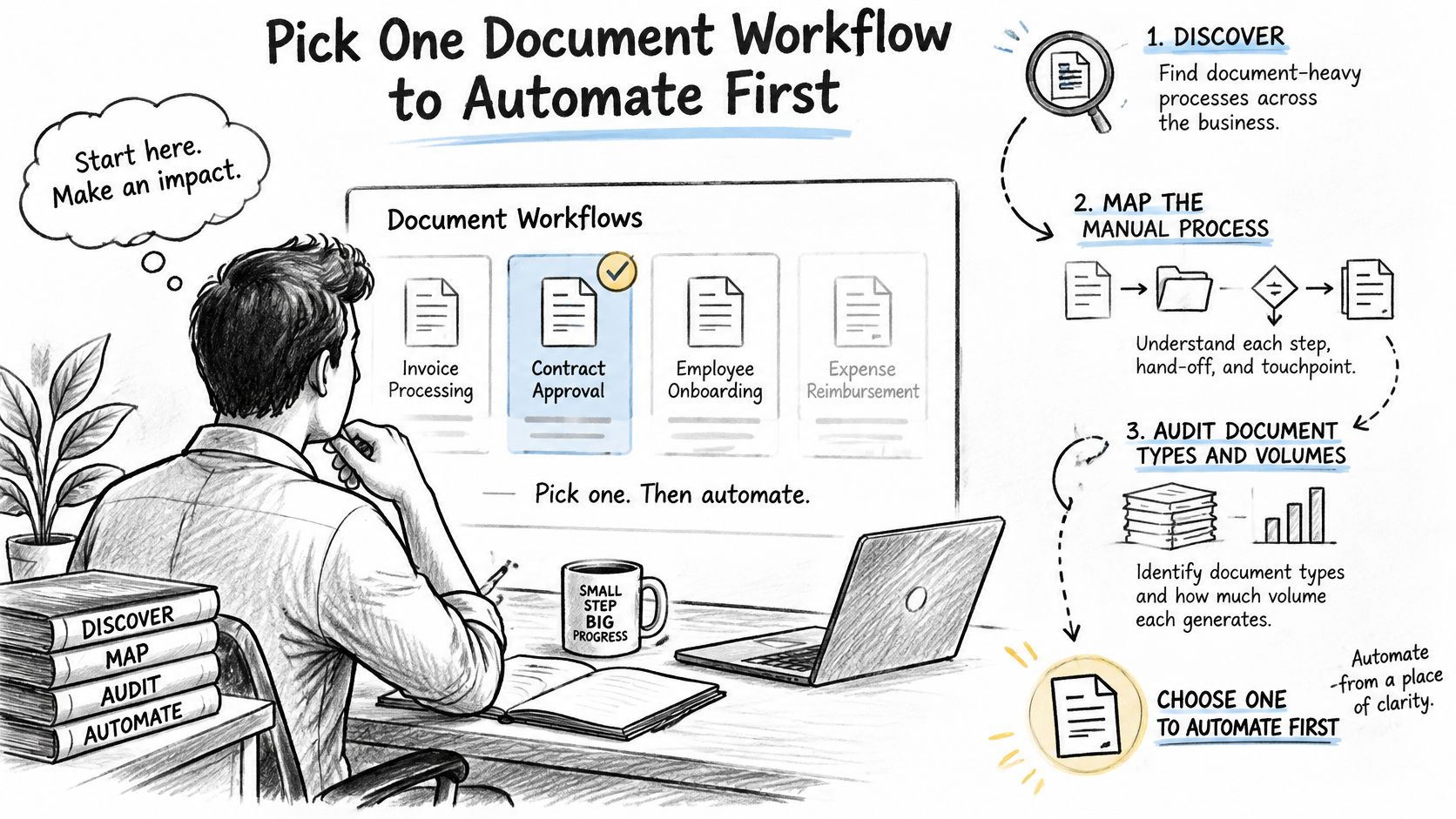
Build a pilot with explicit acceptance criteria
- Choose a bounded candidate. Start with high-volume documents that have clear rules, such as invoices tied to purchase orders. Repetition makes improvements easier to measure.
- Record the baseline. Measure handling time, errors, rework, and current exception ownership. Include approval delays, not just data-entry time.
- Set field-level targets. Check dates, quantities, totals, and approval authority separately. A blended score can hide a critical weakness.
- Assign exception owners. Name the person or role responsible for each exception type, with an escalation route when they can't resolve it.
- Connect the decision system. Write accepted results into the ERP, CRM, or Microsoft 365 workflow where employees act. Keep evidence of acceptance and correction, with a recovery path for incorrect updates.
- Pilot on real documents. Compare outputs with reviewed examples, including difficult cases. Expand only after accuracy and exception handling meet the written targets.
Put a review date on the calendar before the pilot starts. Compare cycle time, exception rate, rework, and realized ROI against the baseline, then decide whether to expand, revise the rules, or stop.
Ryshe helps teams connect document extraction, validation, and approval workflows to their existing operational systems. Visit Ryshe to book a 30-minute call and see the Document Intelligence accelerator run on your own documents, using a real workflow to discuss what can proceed automatically and what needs accountable review.